






iPhone 16 Plus Repair Services
Get fast, reliable, and professional iPhone 16 Plus repair services at The Fix — your trusted destination for expert device care.
Common Repairs We Handle Daily


Imagine this: you're out for the day, relying on your iPhone 16 Plus's famously long-lasting battery to navigate, capture memories, and stay connected. But suddenly, you glance down and see the battery percentage plummeting, a wave of anxiety washing over you. Or perhaps you're trying to capture a perfect family photo, and the camera just won't focus, turning a precious moment into a blurry frustration. When your reliable device starts acting up, it feels less like a technical problem and more like a personal one.
This guide is for you. We understand that feeling of disconnection and stress when your phone fails. It’s why we’ve written this transparent, honest resource—not just as technicians, but as people who know how vital these devices are to our daily lives. We'll walk you through the common issues, offer clear advice, and demystify the entire iPhone 16 Plus repair process, so you can feel confident and in control.
Getting to Know Your iPhone 16 Plus
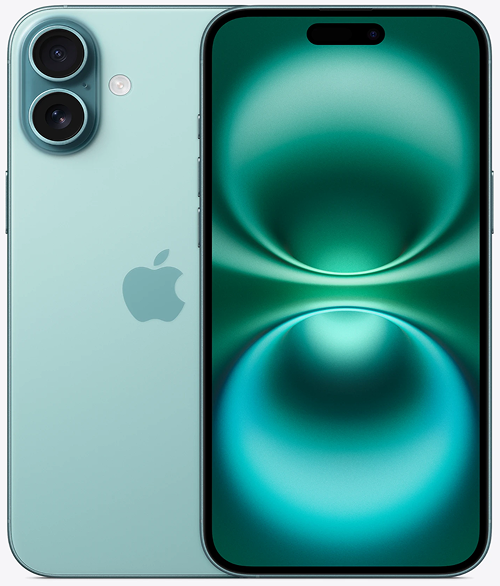
Released in the fall of 2024, the iPhone 16 Plus quickly became the go-to choice for users who prioritized screen real estate and battery endurance above all else. As the "marathon runner" of its lineup, it was aimed at content lovers, social media power users, and anyone who simply wanted a phone that could go the distance without constantly needing a charger. Praised for its expansive Super Retina XDR display and the efficient yet powerful A18 chip, its most celebrated feature was its truly all-day-and-then-some battery life, setting a new standard for a non-Pro Apple device.
The Universal Challenges of Modern Electronic Devices
Before we dive into the specific feelings of a faulty iPhone 16 Plus, it helps to understand that many problems are simply part of the nature of modern technology.
- Screen & Display Fragility: The beautiful, immersive screen on your iPhone 16 Plus is a masterpiece of engineering, protected by Ceramic Shield technology. While incredibly tough, it's still glass. The frustration of seeing a crack after a seemingly minor drop is a universal experience, often happening when the impact force is concentrated on a single, vulnerable point like a corner.
- Battery Degradation: Think of your phone's battery like the charge in a portable power bank—every time you use it and recharge it, its maximum potential is slightly diminished. This is a slow, chemical process. The anxiety you feel when your two-year-old phone doesn't hold a charge like it used to is a real and inevitable consequence of this battery aging.
- Port and Connection Wear: The USB-C port is your phone's lifeline to power and data, but it's also a point of physical stress. The frustration of a phone that won't charge can often be traced back to the simple, mechanical wear and tear from daily use or the gradual buildup of unseen debris from a pocket or purse.
- Software Complexity: iOS is designed to be seamless, but it's an incredibly complex ecosystem. A small bug in an app or an iOS update can cause conflicts that lead to frustrating problems like crashes or slowdowns, making you feel like your phone has a major hardware problem when it might be a simple software glitch.
So, knowing these are universal truths, how do they specifically show up and make you feel on your iPhone 16 Plus?
An In-Depth Look at Common iPhone 16 Plus Problems
Here are the issues that cause the most stress for iPhone 16 Plus users, based on our experience and widespread reports.
1. The Battery Drains Faster Than Expected
- Symptoms: The most common feeling is "battery anxiety." You bought the Plus model specifically for its endurance, but you find yourself checking the battery percentage constantly, and it's not living up to its promise. The phone might also feel warm even when you’re not using it heavily.
- Potential Causes: Often, this isn't a faulty battery but a software issue. A newly installed app with inefficient code, a background process stuck in a loop after an iOS update, or even poor cellular reception can force the phone's modem to work overtime, draining the battery. Over time, of course, the battery's chemical age will also be a factor.
- In-Depth Fixes to Try:
- Check for a Culprit: Go to Settings > Battery. Wait a moment for the list to populate, then scroll down to see which apps have used the most power in the last 24 hours. If an app you rarely use is at the top, you may have found your power-drainer.
- Perform a Hard Reset: A simple reboot can sometimes solve the problem. Press and quickly release the volume up button, then the volume down button, then press and hold the side button until you see the Apple logo. This ends all current processes without deleting data.
- Update Everything: Make sure both your iOS and all your apps are updated to the latest versions, as these updates often contain important bug fixes for power consumption.
- A common worry our technicians often hear is, "Do I need a new battery already?" One key detail from our experience is that a single rogue app can make a brand-new battery perform like an old one. Before considering a hardware fix, isolating the software issue is crucial. If the problem persists after these steps, it’s a clear sign that you might need a professional iPhone 16 Plus repair to assess the battery's health.
2. The Screen Flickers or Becomes Unresponsive
- Symptoms: You're in the middle of reading an article or watching a video, and the screen's brightness starts to pulse or flicker. In other cases, a section of the screen, or the entire display, stops responding to your touch, leaving you feeling locked out of your own device.
- Potential Causes: A flicker can be a software issue, often related to a bug in the display driver or a conflict with an app's display settings. An unresponsive screen, however, often points to a hardware problem. It could be that the digitizer (the touch-sensing layer of the screen) is failing, or that the internal cable connecting the display to the main logic board has become slightly dislodged after a drop.
- In-Depth Fixes to Try:
- Adjust Display Settings: Try turning Auto-Brightness off and on again under Settings > Accessibility > Display & Text Size.
- Hard Reset: Just as with the battery issue, a hard reset can resolve a temporary software glitch that is causing the display driver to malfunction.
- Remove Screen Protector/Case: In rare cases, a poorly fitted screen protector or case can interfere with the screen's touch sensors.
- One key detail our experts have noted is the difference between a software and hardware issue. If the screen is unresponsive but you can still hear notifications or feel vibrations, it's a strong indicator that the phone's "brain" is working fine, but the display itself is disconnected or failing. This almost always requires a professional iPhone 16 Plus repair.
3. The Camera Struggles to Focus
- Symptoms: You're trying to capture a special moment, but the camera refuses to focus on your subject, hunting back and forth endlessly. The resulting photos are soft and blurry. This often affects the main camera and can be especially frustrating when trying to take portraits or close-ups.
- Potential Causes: The iPhone 16 Plus's camera module contains a sophisticated optical image stabilization (OIS) system with tiny motors that move the lens. A minor drop or even a sharp jolt can damage these delicate mechanisms, preventing the camera from focusing correctly. It can also be a software bug within the Camera app itself.
- In-Depth Fixes to Try:
- Clean the Lens: A smudge or piece of debris on the camera lens is the most common and easiest fix. Wipe it gently with a microfiber cloth.
- Tap to Focus: Make sure you are tapping on the screen to tell the camera which subject you want to be in focus.
- Test in Another App: Try using the camera in Instagram, Snapchat, or another third-party app. If it focuses correctly there, the issue is likely a bug in Apple's native Camera app and may be resolved with a software update.
- A common misconception our technicians often address is that if the camera glass isn't cracked, the camera must be fine. In reality, the internal focusing and stabilization mechanisms are the most fragile parts. We see many devices with pristine external glass but a damaged internal OIS motor from an impact, a situation that requires a full camera module replacement.
4. The Phone is Overheating
- Symptoms: Your iPhone 16 Plus feels uncomfortably warm in your hand, especially during charging or while using an intensive app. You might even get a temperature warning on the screen that temporarily disables the device.
- Potential Causes: Heat is a byproduct of processing. A software loop, a graphically demanding game, or using GPS navigation in a hot car can cause the A18 chip to work overtime, generating significant heat. While the phone is designed to dissipate this, continuous high temperatures can be a sign of an underlying software issue.
- In-Depth Fixes to Try:
- Close Demanding Apps: If you know a certain game or app is causing the heat, close it and let the phone cool down.
- Charge in the Open: Avoid charging your phone under blankets or in direct sunlight. Remove the case if it feels particularly warm during a charge cycle.
- Update Software: As with battery issues, ensuring your iOS and apps are up to date is the best way to resolve heat-generating software bugs.
- One key detail our experts have noted from experience is the direct link between chronic overheating and long-term battery damage. Heat is the number one enemy of lithium-ion batteries. An unresolved software issue causing your phone to run hot constantly can prematurely age your battery, turning a temporary software problem into a permanent need for a new battery.
Our iPhone 16 Plus repair Process: What to Expect at The Fix
We know that the thought of a repair can bring on feelings of uncertainty. Our process is designed to replace that anxiety with confidence and clarity.
- The Free, No-Pressure Diagnosis: It all starts with a conversation. You tell us how your phone is making you feel—the frustrations, the worries. Our technicians then run a thorough diagnostic to find the root cause, and this service is always free.
- Clear Options and Upfront Pricing: We explain the problem in simple, understandable terms. We’ll outline your repair options and provide a clear, upfront quote with no surprises, allowing you to make an informed decision without any pressure.
- The Expert Repair: If you decide to proceed, our skilled technicians will treat your device with care, using high-quality parts and professional tools to ensure a reliable and lasting solution.
- Post-Repair Testing: We don't just fix the problem; we verify the solution. Your iPhone 16 Plus is tested thoroughly after the repair to ensure everything is working perfectly, so you can leave feeling the relief of having your reliable device back.
A Proactive Guide to Keeping Your iPhone 16 Plus in Peak Condition
The best way to avoid the stress of a broken phone is to take a few proactive steps. Think of it as preserving the peace of mind you felt when you first got your device. A good case and a quality screen protector are the simplest ways to guard against the heart-stopping moment of an accidental drop. To keep that amazing battery life strong, try to avoid the extremes of heat and cold, and use the "Optimized Battery Charging" feature. Keeping your software updated is like a regular check-up, ensuring your phone has the latest fixes to run smoothly and efficiently, hopefully avoiding the need for an iPhone 16 Plus repair down the line.
Conclusion
Your iPhone 16 Plus is designed to be a seamless part of your life, and it’s deeply frustrating when it isn't. While many of these issues can feel overwhelming, most have a clear explanation and a reliable solution. The most important thing is to know that you have options and that a problem doesn't mean the end for your device.
If you’ve tried these steps and are still feeling stuck, or if you simply want the reassurance of an expert opinion, we are here to help. The friendly technicians at The Fix are ready to provide a clear, transparent, and effective iPhone 16 Plus repair to restore your connection to the world and bring you peace of mind.


Trusted repair solution for mobile phones, tablets, gaming consoles, and computer systems. We provide fast, reliable, and affordable repair services to get your devices back in perfect working condition.
The Fix is an independent repair service provider and is not affiliated with, sponsored by, or endorsed by Apple Inc., Samsung Electronics, Google LLC, or any other device manufacturer. We use high-quality compatible replacement parts unless explicitly stated. All trademarks are property of their respective owners.


© Copyright The Fix Solutions All rights reserved 2026.
Design by Deepcoder