






iPhone 16 Repair Services
Get fast, reliable, and professional iPhone 16 repair services at The Fix — your trusted destination for expert device care.
Common Repairs We Handle Daily


The Definitive Guide to iPhone 16 repair: Common Problems & Solutions
There are few things more dissonant than when a piece of precision-engineered technology like the iPhone 16 fails to execute a command. You might be leveraging the powerful A18 Bionic chip, only to feel the device become unusually warm, or perhaps the ProMotion display, known for its fluid responsiveness, exhibits a frustrating stutter. When the seamless integration of hardware and software is interrupted by a technical fault, it's more than an inconvenience; it's a puzzle that needs solving.
This guide is for the user who wants to understand the "why" behind the problem. It’s a transparent, analytical resource from lead technicians who diagnose these complex systems daily. Our mission is to demystify the entire iPhone 16 repair process, exploring the root causes of common issues and detailing the component-level solutions available to you.
Getting to Know Your iPhone 16
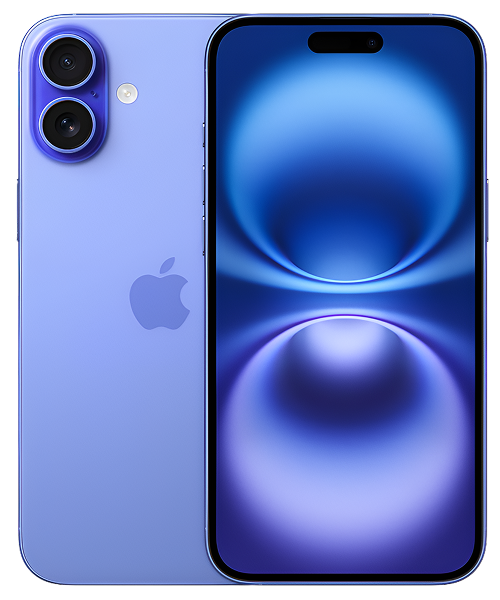
Released in the fall of 2024, the iPhone 16 solidified its position as the new standard-bearer in Apple's flagship lineup. It was engineered for the user who demands high performance and cutting-edge features, inheriting technology previously reserved for the Pro models. The device was widely celebrated for bringing the fluid ProMotion display to the standard model for the first time, enhancing every interaction. This was paired with the new, more efficient A18 Bionic chip and the introduction of the innovative "Capture" button, making it a formidable tool for both content consumption and creation.
The Universal Challenges of Modern Electronic Devices
Before we analyze iPhone 16-specific faults, an expert diagnosis requires acknowledging the foundational principles of modern mobile hardware.
- Screen & Display Fragility: The iPhone 16’s Super Retina XDR display with ProMotion is an advanced component, but its front is still protected by Ceramic Shield. This material integrates nano-ceramic crystals into the glass matrix, providing exceptional resistance to scratches and direct-impact fractures. However, its very hardness creates a degree of rigidity. Torsional (twisting) force or an impact concentrated on a corner can create a stress point that overcomes the material's structural integrity, resulting in a crack.
- Battery Degradation: The lithium-ion battery is a consumable chemical component. Its operational principle involves the transfer of ions between a graphite anode and a metal-oxide cathode through an electrolyte. Each full charge cycle causes microscopic, irreversible degradation of these materials, reducing the battery's maximum capacity. Heat acts as a catalyst, accelerating this chemical decay and forcing the Battery Management System (BMS) to work harder to provide stable voltage, which can lead to performance throttling.
- Port and Connection Wear: The USB-C port is a complex electromechanical component with multiple data and power delivery lanes. While robust, it is a point of physical wear. Beyond the mechanical stress of daily use, debris can become compacted inside, potentially shorting pins or blocking the Power Delivery (PD) controller chip from negotiating a proper charging speed.
- Software Complexity: iOS is a highly optimized operating system that interfaces directly with hardware drivers. However, a conflict between a third-party app and a core system process, or a corrupted file within the NAND storage, can lead to a "kernel panic." This is a low-level software crash that can cause symptoms like random restarts, which are often mistaken for a critical hardware failure.
So, knowing these are universal truths, how do they specifically manifest on your iPhone 16?
An In-Depth Look at Common iPhone 16 Problems
The following are the most frequent technical issues requiring an iPhone 16 repair, based on component-level analysis and widespread user data.
1. iPhone 16 Battery Drain Issues
- Symptoms: You observe a precipitous drop in battery percentage even during light use. The device no longer reliably lasts a full day, and you may notice performance throttling (UI lag, slower app launch times) when the battery is below a certain percentage.
- Potential Causes: From a technical standpoint, rapid drain is often a software issue preventing the A18 Bionic chip from entering its low-power "sleep" states. A rogue app, a stuck background process, or even the 5G modem constantly searching for a signal in a low-coverage area can keep the system's power management IC (PMIC) in a high-draw state. While less common on a new device, a faulty battery with high internal resistance is also a potential hardware cause.
- In-Depth Fixes to Try:
- Isolate Software Processes: Go to Settings > Battery and analyze the per-app usage. An app with high background activity is a primary suspect. Disable its background refresh.
- Hard Reset the System: A hard reset (press/release volume up, press/release volume down, press/hold side button) forces a full reboot of the system and can terminate a stuck process that a simple restart might not.
- Update iOS and Apps: Ensure you are running the latest software, as Apple often releases patches that optimize the power management instructions for the A18 chip.
- A common misconception our technicians often address is that battery health percentage is the only indicator of a battery's condition. Professional diagnostic tools can measure the battery's internal resistance and actual cycle count. A battery can have 95% health but high internal resistance, causing it to fail under load—a detail that only a deeper analysis can reveal.
2. iPhone 16 Overheating
- Symptoms: The device becomes uncomfortably warm, particularly on the right side of the frame where the logic board is located. This is most noticeable during fast charging, playing graphically-intensive games, or using AR applications. The screen may dim automatically, and charging may pause.
- Potential Causes: The iPhone 16 uses a passive thermal management system, relying on graphite sheets to spread heat and the aluminum/titanium frame to act as a heatsink. Overheating occurs when the A18 chip's high-performance cores are engaged for prolonged periods, generating more heat than the system can dissipate. This is almost always caused by inefficient software code that fails to properly utilize the chip's low-power efficiency cores. A hardware fault, such as a small short on a logic board power rail, is a much rarer but more serious cause.
- In-Depth Fixes to Try:
- Identify the Thermal Source: Use the battery menu to identify if a specific app is correlated with the overheating.
- Charge with Care: Remove the case while fast-charging to allow for better heat dissipation. Avoid using the phone for intensive tasks while it is charging.
- Reset Settings: Settings > General > Transfer or Reset iPhone > Reset > Reset All Settings can sometimes resolve software conflicts that cause thermal runaway, without deleting your data.
- One key detail our experts have noted is the importance of distinguishing between "warm" and "hot." A phone getting warm during heavy use is normal thermal dissipation. If it becomes too hot to comfortably hold, it's a sign that the thermal throttling system is being pushed to its limit. If a full software restore doesn't fix this, a professional iPhone 16 repair diagnostic is needed to rule out a logic board short.
3. iPhone 16 Camera Problems
- Symptoms: The camera app launches to a black screen, freezes, or crashes. The autofocus system, driven by a Voice Coil Motor (VCM), fails to lock onto a subject, resulting in blurry photos. You may also observe a "jitter" or vibration from the sensor-shift Optical Image Stabilization (OIS) mechanism.
- Potential Causes: The camera module is a delicate electromechanical system. A minor drop can de-align the lens elements or damage the microscopic motors that drive the OIS and autofocus. From a software perspective, a glitch in the Image Signal Processor (ISP) firmware within the A18 chip can prevent the system from properly initializing the camera module upon launch.
- In-Depth Fixes to Try:
- Force-Quit the App: A simple app relaunch can often resolve a temporary software glitch.
- Switch Cameras: Try switching between the front and rear cameras, and between different lenses (if applicable), to see if the problem is isolated to a specific module.
- Test in a Third-Party App: If the camera works in an app like Instagram but not the native Camera app, the issue is almost certainly software-based.
- A common misconception is that a camera issue is always a simple module swap. On modern iPhones, some components are cryptographically "paired" to the logic board for security. While a camera replacement is a common iPhone 16 repair, if the issue persists it may indicate a fault on the logic board's camera power rails or data lines, a far more complex repair.
4. iPhone 16 Charging Issues
- Symptoms: The device charges intermittently, requires the cable to be held at an angle, or doesn't charge at all. You may receive persistent "Liquid Detected" warnings even when the device is dry. Data transfer via the USB-C port is unreliable or fails completely.
- Potential Causes: Compacted debris within the USB-C port is the leading cause. The second most common cause is damage to the charging logic IC on the main board (historically known as the Tristar/Hydra chip), often due to power surges from uncertified or damaged chargers. Liquid intrusion, even minor, can also cause corrosion on the port's pins.
- In-Depth Fixes to Try:
- Inspect and Clean: Power the device off. Use a non-metallic, anti-static tool and a bright light to gently clean out any visible debris from the port.
- Isolate Accessories: Methodically test with a different, known-good USB-C cable and a different, reputable power adapter to rule out accessory failure.
- Hard Reset: A hard reset can sometimes resolve a software glitch within the charging management system.
- One key detail our experts have noted is that the charging process is an active negotiation. When you plug in your phone, the Power Delivery IC communicates with the charger to determine the correct voltage and current. If this chip is damaged, the phone may not charge at all, even with a perfectly functional port and battery. This is why a professional diagnostic is key to avoiding an unnecessary port replacement.
Our iPhone 16 repair Process: What to Expect at The Fix
We believe a technical problem deserves a technical, transparent solution. Our process is designed to give you a clear understanding of the fault and the solution.
- The Free, No-Pressure Diagnosis: Our process begins with component-level testing. We use diagnostic software to check for kernel panics, multimeters to test power rails on the logic board, and microscopes to inspect ports and connectors. This allows us to find the precise point of failure.
- Clear Options and Upfront Pricing: We present you with a detailed diagnostic report in plain English. We explain the difference between a simple component swap and a more complex board-level repair, providing a clear, itemized quote for each viable option.
- The Expert Repair: Our certified technicians perform repairs in a static-safe environment using precision tools. We use high-quality, performance-tested parts for a durable and reliable repair.
- Post-Repair Testing: After the repair, your iPhone 16 undergoes a full suite of tests. We verify charging speeds, camera focus, thermal performance under load, and more to ensure the device is returned to you in peak operational condition.
A Proactive Guide to Keeping Your iPhone 16 in Peak Condition
The longevity of a complex device like the iPhone 16 can be extended by mitigating the primary causes of failure. Using a quality case with shock-absorbing corners is the best defense against physical damage to the screen and internal camera mechanics. To preserve the battery's chemical health, avoid exposing the phone to extreme temperatures (like leaving it on a car dashboard) and utilize the "Optimized Battery Charging" feature. Finally, regular software updates are crucial; they are not just for new features, but for essential patches that optimize how iOS manages the A18 chip's power and thermal output, which can help you avoid the need for a premature iPhone 16 repair.
Conclusion
Your iPhone 16 is a powerful piece of technology, and encountering a problem can be a frustrating experience. However, every issue has a logical, technical cause, and therefore, a logical solution. While many software-related glitches can be resolved with careful troubleshooting, hardware failures require a precise, expert approach.
If you’ve performed the initial diagnostics and the issue persists, or you simply want a definitive analysis of your device's health, we are here to provide clarity. For any iPhone 16 repair, from a simple screen replacement to a complex logic board issue, the expert technicians at The Fix are ready to provide a transparent and effective solution to restore your device to its full functionality.


Trusted repair solution for mobile phones, tablets, gaming consoles, and computer systems. We provide fast, reliable, and affordable repair services to get your devices back in perfect working condition.
The Fix is an independent repair service provider and is not affiliated with, sponsored by, or endorsed by Apple Inc., Samsung Electronics, Google LLC, or any other device manufacturer. We use high-quality compatible replacement parts unless explicitly stated. All trademarks are property of their respective owners.


© Copyright The Fix Solutions All rights reserved 2026.
Design by Deepcoder