






iPhone 15 Pro Repair Services
Get fast, reliable, and professional iPhone 15 Pro repair services at The Fix — your trusted destination for expert device care.
Common Repairs We Handle Daily


iPhone 15 Pro repair: Professional Fix vs. DIY Risks - An Honest Comparison
You’re staring at your beautiful, yet frustratingly broken, iPhone 15 Pro. A quick search online brings up a dozen YouTube videos and slick-looking toolkits, all promising an easy, cheap, Do-It-Yourself fix. It looks simple enough, right? A few screws, a suction cup, and you’re back in business, saving a bunch of money in the process. It’s a tempting thought.
But as a technician who has seen the aftermath of countless DIY repairs gone wrong, I can tell you that the reality is often much more complicated. So, before you add that toolkit to your cart, let’s have an honest conversation. This guide is a head-to-head comparison, breaking down the real risks, hidden costs, and potential pitfalls of a DIY approach versus the safety and reliability of a professional iPhone 15 Pro repair.
Getting to Know Your iPhone 15 Pro
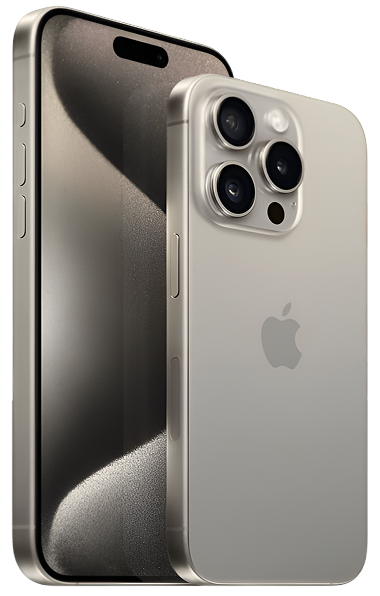
When you invested in the iPhone 15 Pro, which launched in the fall of 2023, you bought a piece of precision engineering. Aimed at professionals, creators, and tech enthusiasts, it’s a device where every component is designed for peak performance. From its lightweight and durable titanium frame to the A17 Pro chip and the incredibly advanced camera system, it’s a complex, tightly integrated machine. Understanding this complexity is the first step in appreciating the risks of opening it up yourself.
The Universal Challenges of Modern Electronic Devices
So, what makes working on these devices so tricky? Let's compare the DIY perspective to the professional one.
- Screen & Display Fragility: DIY View: "It's just a piece of glass, I can swap it out." Pro Reality: The screen is a laminated assembly of the OLED panel, the touch digitizer, and the Ceramic Shield glass. They are bonded together. A DIY attempt risks damaging the delicate ribbon cables that control display and touch, turning a screen issue into a logic board issue.
- Battery Degradation: DIY View: "I'll just pop the old battery out and put a new one in." Pro Reality: The battery is held in with strong adhesive pull-tabs that can easily tear. Prying a battery out with a metal tool is incredibly dangerous and can cause a fire. We use special solvents and techniques to remove it safely.
- Port and Connection Wear: DIY View: "My port is clogged, I'll just stick a paperclip in there." Pro Reality: A metal paperclip can easily short out the electrical pins inside the USB-C port, causing permanent damage to the charging circuit on the main logic board.
- Software Complexity: DIY View: "It's a software bug, I'll just reset it." Pro Reality: Sometimes a software issue can be a symptom of a failing hardware component (like the NAND storage). A professional diagnostic can tell the difference, saving you from a pointless and frustrating software reset loop.
Now, let's apply this Pro vs. DIY comparison to the most common iPhone 15 Pro issues.
An In-Depth Look at Common iPhone 15 Pro Problems
Here’s an honest breakdown of what you're up against for each common problem.
1. Common iPhone 15 Pro problems: The Cracked Screen
- Symptoms: You have a cracked screen, which is not only an eyesore but can also have unresponsive touch spots and be a hazard with sharp glass.
- Potential Causes: An accidental drop. It happens to everyone.
- The DIY Approach: You buy a screen replacement kit online. You spend hours following a video, carefully removing tiny pentalobe and tri-point screws. You struggle with the adhesive, heat the phone up just right, and pry the screen off without tearing the fragile Face ID and sensor cables. You swap the parts and reassemble.
- The Risks of DIY:
- Stripped Screws: These are incredibly small and easy to damage.
- Torn Cables: Tearing the Face ID cable is a common mistake that permanently disables Face ID. This cannot be fixed, even by professionals.
- Lost Water Resistance: You will break the phone's factory water-resistance seal, and DIY kits don't come with the proper tools or seals to replace it.
- Poor Quality Parts: The cheap screen you bought online has poor color accuracy, a lower refresh rate than your ProMotion display, and drains your battery faster.
- A common misconception our technicians often address is that all replacement screens are the same. The truth is, the quality varies wildly. A professional repair service uses high-grade parts that are tested for color accuracy, touch response, and power efficiency, ensuring your "Pro" phone still feels like a Pro phone. A professional iPhone 15 Pro repair uses high-quality parts and careful testing on the components you rely on most.
2. iPhone 15 Pro battery drain issues
- Symptoms: Your phone just can't make it through the day. It's frustrating and makes your high-end device feel unreliable.
- Potential Causes: After a couple of years, this is normal chemical aging. But it can be accelerated by heat or software issues.
- The DIY Approach: You buy a replacement battery and the toolkit. The biggest challenge is removing the old battery. The pull-tabs tear. You're tempted to use a metal tool to pry it out.
- The Risks of DIY:
- Fire Hazard: This is not an exaggeration. Puncturing a lithium-ion battery with a metal tool can cause it to short-circuit and erupt in a dangerous chemical fire. We've seen it happen.
- Inaccurate Battery Health: Many third-party batteries don't communicate properly with iOS, meaning your phone may not show the correct battery health or may display a persistent "non-genuine part" warning.
- One key detail our experts have noted is the value of a proper diagnostic. Is your battery draining because it's old, or because a component on your logic board is shorting out and constantly drawing power? A DIY battery replacement won't fix the second problem. A professional service will test for that first, saving you from wasting money on a battery you might not even need.
3. iPhone 15 Pro camera not working
- Symptoms: Your advanced camera system, one of the main reasons you bought the Pro model, is now just a black screen. Or maybe it won't focus, making your photos blurry.
- Potential Causes: A drop can damage the delicate image stabilization motors. It can also just be a software glitch.
- The DIY Approach: This is an extremely delicate repair. You'll need to disassemble most of the phone's internals just to get to the camera module, which is connected by tiny, fragile press-fit connectors.
- The Risks of DIY:
- Dust Contamination: Your home is not a clean room. A single speck of dust that gets on the sensor during your DIY repair will show up in every photo you take from then on.
- Component Mismatch: On newer iPhones, some components are serialized and paired to the logic board. A DIY camera swap can sometimes result in lost features or error messages.
- A common misconception our technicians often debunk is that a camera fix is easy because the part is small. The truth is, its location and sensitivity make it a high-risk repair. When you compare the small savings of a DIY attempt to the high risk of damaging other components in the process, a professional iPhone 15 Pro repair is clearly the more logical choice.
4. iPhone 15 Pro overheating
- Symptoms: Your phone gets uncomfortably hot, throttles its performance, and becomes sluggish.
- Potential Causes: 95% of the time, this is a software issue. But in rare cases, it can be a hardware short circuit on the logic board.
- The DIY Approach: There isn't really a DIY hardware fix for this. You can try a software restore, but if the problem is a hardware short, you're stuck.
- The Risks of DIY: The main risk here is misdiagnosis. You might assume it's a software problem, spend a whole weekend wiping and restoring your phone, only to find the issue persists because it was hardware all along.
- One key detail our experts have noted is the value of professional diagnostic tools. We can use thermal cameras to see exactly which chip on the logic board is overheating. This allows for a precise micro-soldering repair that a DIY approach could never achieve. It’s the difference between guessing and knowing.
Our iPhone 15 Pro repair Process: The Risk-Free Alternative
So, what does the professional process look like? It’s designed to be the complete opposite of a stressful, risky DIY weekend.
- The Free, No-Pressure Diagnosis: We use our expertise and tools to tell you exactly what’s wrong, for free. You get a clear answer without spending a dime or an hour of your time.
- Clear Options and Upfront Pricing: We’ll give you a quote and explain the benefits of a professional repair versus the risks of DIY, so you can make an informed choice.
- The Expert Repair: Our technicians do this all day, every day. We have the right tools, the high-quality parts, and the experience to do the job quickly and safely. We even replace the water-resistance seals.
- Post-Repair Testing: We test everything to make sure your device is working perfectly before we hand it back.
A Proactive Guide to Keeping Your iPhone 15 Pro in Peak Condition
The best way to win the Pro vs. DIY debate is to never have to make the choice at all. A quality case and screen protector are your best investments. They are the proactive choice that can save you from having to even consider a risky repair down the line. Practicing good battery hygiene and keeping your software updated will also help you avoid many common issues.
Conclusion
When you look at it side-by-side, the choice becomes clear. While a DIY repair might seem cheaper on the surface, the hidden costs—the risk of causing more damage, the lower quality parts, the loss of features like Face ID or water resistance, and your own valuable time—can add up quickly.
Your iPhone 15 Pro is a premium device, and it deserves a professional, reliable solution. If you’re facing an issue, we’re here to help, starting with a free diagnosis. Contact The Fix today for a transparent and professional iPhone 15 Pro repair that protects your device and your peace of mind.


Trusted repair solution for mobile phones, tablets, gaming consoles, and computer systems. We provide fast, reliable, and affordable repair services to get your devices back in perfect working condition.
The Fix is an independent repair service provider and is not affiliated with, sponsored by, or endorsed by Apple Inc., Samsung Electronics, Google LLC, or any other device manufacturer. We use high-quality compatible replacement parts unless explicitly stated. All trademarks are property of their respective owners.


© Copyright The Fix Solutions All rights reserved 2026.
Design by Deepcoder