






iPhone 14 Pro Max Repair Services
Get fast, reliable, and professional iPhone 14 Pro Max repair services at The Fix — your trusted destination for expert device care.
Common Repairs We Handle Daily


Extend Your iPhone 14 Pro Max's Life: Why This Device is Still Worth Keeping
Remember when you first got your iPhone 14 Pro Max? That feeling of unboxing something genuinely impressive—the massive 6.7-inch display, the Always-On screen showing your Lock Screen even when the phone was "off," that new Dynamic Island that made notifications actually cool. It felt like the future, and honestly, it still holds up incredibly well today.
But now it's 2025, and maybe your battery doesn't last quite as long as it used to. Or perhaps there's a crack in the corner of that beautiful screen. Maybe the camera's acting a bit finicky, or the charging port's being temperamental. And you're wondering: is it time to upgrade, or can I keep this thing going?
Here's the truth: your iPhone 14 Pro Max is still a powerhouse device with years of solid life left in it. The A16 Bionic chip inside is fast enough for everything you throw at it, the camera system is still excellent, and with the right care and occasional iPhone 14 Pro Max repair, there's no reason you can't keep using it well into 2027 or beyond. Let's talk about how to make that happen—and why it's worth it.
Let's Talk About Your iPhone 14 Pro Max for a Second
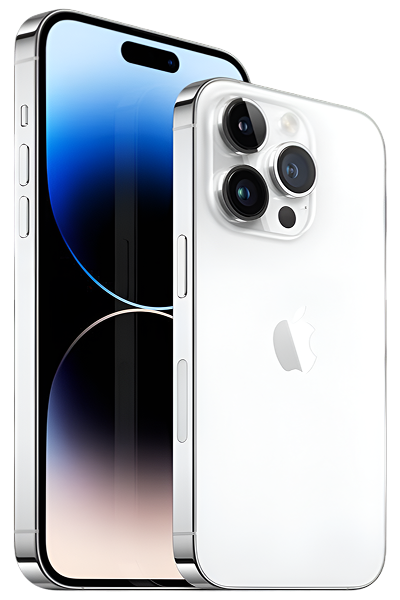
The iPhone 14 Pro Max launched in September 2022, and it marked a pretty significant moment in iPhone evolution. This was the year Apple ditched the notch for the Dynamic Island, brought Always-On display to iPhones for the first time, and bumped the main camera to a massive 48MP sensor. That Pro Max battery life? Legendary. People were getting two full days out of a single charge.
It's also built like a tank. The Ceramic Shield front, surgical-grade stainless steel frame, and textured matte glass back make this one of the most premium-feeling iPhones Apple's ever made. A lot of people bought this specific model because they wanted the absolute best iPhone available—the biggest screen, longest battery life, and most advanced camera system.
Now, two-plus years later, it's still incredibly capable. The A16 Bionic chip that powers it is the same chip that's in the iPhone 15 standard models, which means it's got plenty of performance headroom. iOS 18 runs great on it, and Apple's still going to be supporting it with updates for at least another three to four years. If your only issues are normal wear and tear—battery aging, minor damage, maybe some software quirks—keeping this device running makes way more sense than upgrading.
How to Keep Your iPhone 14 Pro Max Running Great (Let's Start Here)
Here's the thing about device longevity: an ounce of prevention really is worth a pound of cure. Before we dive into fixing problems, let's talk about how to avoid them in the first place. These aren't complicated tips—just smart habits that'll keep your iPhone 14 Pro Max in great shape for years.
Protect that beautiful screen and camera. Yeah, cases and screen protectors add bulk. But let's be real—a good case can be the difference between a phone that lasts five years and one that needs an expensive screen replacement after six months. Look for cases with raised edges around both the screen and that massive camera bump. Those are the two most vulnerable areas when you inevitably drop your phone (and you will—everyone does). Quality screen protectors are cheap insurance against scratches and cracks.
Baby that battery—it'll thank you later. Your iPhone 14 Pro Max's battery is going to degrade over time no matter what you do, but you can definitely slow it down. Here's what actually works: avoid extreme temperatures (don't leave it in hot cars or freezing cold rooms), use "Optimized Battery Charging" (Settings > Battery > Battery Health & Charging), and don't stress about partial charging throughout the day—that's actually better than full 0-100% cycles. Fast charging is fine occasionally, but slower overnight charging is gentler on battery chemistry.
Keep that Lightning port clean. Your iPhone 14 Pro Max still uses Lightning (not USB-C like the newer models), and that port is a magnet for pocket lint. Once a month, power off your phone and gently inspect the port with a flashlight. See lint or debris? Carefully remove it with a wooden toothpick. This simple habit prevents 90% of charging problems we see.
Update your software religiously. iOS updates aren't just about new emoji and features—they're packed with bug fixes, security patches, and performance optimizations specifically designed to keep older devices running smoothly. Your iPhone 14 Pro Max will keep getting updates for years, so take advantage of them. Enable automatic updates if you can stand the occasional overnight installation.
Don't ignore small problems. That tiny crack? It can spread. That weird charging issue that only happens sometimes? It can get worse. Those occasional random restarts? They might be early warning signs. Addressing small issues early is almost always easier and less expensive than waiting until they become major problems.
Give it a proper cleaning now and then. We're not talking about going crazy with cleaners here. Just a slightly damp microfiber cloth on the screen and body once a week keeps oils and grime from building up. For the stainless steel frame, a gentle wipe removes fingerprints and keeps it looking sharp. Don't use alcohol or harsh chemicals on the oleophobic coating (the oil-resistant layer on your screen)—just water is fine.
Why Modern Phones Face These Challenges (Yours Isn't Special—In a Good Way)
Look, every smartphone deals with certain issues as it ages. It's not that your iPhone 14 Pro Max is poorly made—quite the opposite, actually. These are just realities of how materials and technology work over time.
Screens are tough but not indestructible. Your Ceramic Shield display is genuinely impressive technology. It's tougher than most competitors' screens, with better drop protection and scratch resistance. But here's the thing: it's still glass. And glass, no matter how advanced, can break if it hits the ground at the wrong angle with enough force. Corner impacts are the worst—all that energy concentrates into one tiny point. It's not a design flaw, it's just physics. The good news? Even cracked screens are repairable, and your phone's data stays perfectly safe.
Batteries are consumable components. Think of your battery like the tires on a car—they're designed to last a long time, but they're not meant to last forever. Every time you charge your iPhone 14 Pro Max, tiny chemical changes happen inside that battery. After about 500 full charge cycles (that's roughly two years for most people), you'll notice it doesn't hold charge quite like it used to. That's completely normal chemistry at work, not a defect. The upside? Battery replacement gives your phone a complete second wind.
Ports and buttons get worn. Your Lightning port has been plugged and unplugged hundreds, maybe thousands of times. The volume and power buttons have been pressed countless times. Mechanical components experience wear—that's just how physical things work. Plus, your phone lives in pockets and bags where dust, lint, and debris constantly find their way into openings. Sometimes what looks like a broken charging port is just a port that needs cleaning.
Software can get quirky. iOS is incredibly sophisticated software managing dozens of processes simultaneously. Sometimes apps have bugs. Sometimes iOS updates introduce temporary issues that get fixed in the next update. Sometimes files get corrupted. The good news is that software problems are often fixable without replacing any hardware—you just need to know what to try.
Common iPhone 14 Pro Max Problems (And How to Think About Them)
Let's walk through the issues people commonly face with their iPhone 14 Pro Max. We're organizing these by what we see most often, so you can quickly find what matches your situation.
The Battery Blues: When Your All-Day Champion Starts Struggling
What you're noticing: Remember when your iPhone 14 Pro Max could easily last a full day—sometimes even stretching into a second day? Now you're reaching for a charger by mid-afternoon. Your battery percentage seems to drop faster than it should, especially when you're not even using the phone much.
Why it's happening: Here's the deal—battery drain after two years is totally normal. Your battery's been through hundreds of charge cycles, and the chemistry inside just can't hold as much energy as it used to. But before you assume it's purely hardware aging, consider this: iOS updates sometimes introduce bugs that cause excessive battery drain. Apps can go rogue and run constantly in the background. Poor cellular signal forces your modem to work overtime, draining power quickly.
You can check your actual battery health by going to Settings > Battery > Battery Health & Charging. If "Maximum Capacity" shows 80% or below, your battery's genuinely worn out. But if it's still above 85% and you're experiencing terrible battery life, it's probably software-related.
Let's try some fixes:
- Hunt down power-draining apps. Go to Settings > Battery and look at the usage list over the last 10 days. If an app you barely use is consuming a huge percentage of your battery, that's your culprit. Either delete it or disable Background App Refresh for that app (Settings > General > Background App Refresh).
- Do a proper restart. Press Volume Up, then Volume Down, then hold the Side button until you see the Apple logo. This kills any stuck processes that might be draining battery in the background.
- Check for iOS updates. Sometimes Apple releases updates specifically to fix battery drain issues introduced in previous updates. Keep your software current.
- Try Low Power Mode for a day. Enable it in Settings > Battery and see if battery life improves dramatically. If it does, you've confirmed it's a software issue, not hardware.
Did You Know?
The "80% rule" for battery health isn't arbitrary—it's based on the capacity where most users start noticing meaningful differences in daily use. Your iPhone 14 Pro Max's Battery Management System is constantly monitoring the battery and will actually throttle performance if the battery can't deliver peak power. So even though your phone still works at 75% battery health, you're not getting the full performance you paid for. Battery replacement essentially gives you a brand new phone experience for a fraction of the cost of upgrading.
Here's what we've learned from the repair bench:
We often see iPhone 14 Pro Max devices where owners are convinced they need a battery replacement, but after some investigation, it turns out one app with a coding bug was responsible for the entire problem. Before assuming hardware failure, spend 15 minutes investigating your battery usage stats. You might save yourself a repair visit entirely.
The Screen Saga: Cracks, Dead Zones, and Touch Troubles
What you're noticing: Maybe there's a crack—small or large—on that gorgeous 6.7-inch display. Or perhaps the screen works fine but there's one area that doesn't respond to touch as well. Or you're seeing weird flickering, especially at low brightness. Or maybe everything looks fine, but touch sensitivity just feels... off.
Why it's happening: Screen issues on the iPhone 14 Pro Max usually fall into one of three categories: visible physical damage (cracks you can see), internal damage you can't see (digitizer failure, loose display cables), or software glitches affecting the display driver.
Cracks happen from drops—that's pretty obvious. But sometimes you'll get internal damage without any visible cracks. The digitizer (the touch-sensing layer) can fail, or the ribbon cable connecting the display to the motherboard can work loose. The Always-On display feature on your 14 Pro Max can sometimes contribute to image retention or "burn-in" effects if you've had static elements on screen for thousands of hours.
Let's try some fixes:
- If there's no visible damage: Remove your screen protector and case temporarily. Some poorly-fitted protectors or super-tight cases can interfere with the edges of the screen.
- Clean the screen properly. Oils, moisture, and grime affect capacitive touch more than you'd think. Use a slightly damp microfiber cloth (just water, not cleaning chemicals).
- Force restart. The usual: Volume Up, Volume Down, hold Side button. This fixes more screen glitches than you'd expect.
- Check True Tone and brightness. Sometimes disabling and re-enabling True Tone (Settings > Display & Brightness) resolves flickering issues. Also, try manually adjusting brightness to see if the issue is related to auto-brightness behavior.
Here's what we've learned from the repair bench:
Here's something interesting about the iPhone 14 Pro Max's Always-On display: it's actually incredibly well-designed to prevent burn-in. The display slightly shifts content pixel-by-pixel and adjusts brightness to prevent static elements from causing permanent damage. But if you've used the same wallpaper with bright static elements for two years straight, you might notice very faint image retention. This isn't true burn-in (permanent damage) but rather temporary persistence that often fades with varied content usage.
The Camera Conundrum: Focus Problems and Image Quality
What you're noticing: Your iPhone 14 Pro Max's camera system—which takes absolutely stunning photos when it's working right—is acting up. Maybe it won't focus properly, hunting back and forth endlessly. Or photos are coming out blurry even though you're holding still. Or maybe one of the three cameras (wide, ultra-wide, or telephoto) isn't working at all.
Why it's happening: The camera system on your 14 Pro Max is sophisticated: optical image stabilization, sensor-shift technology, autofocus motors, and complex computational photography all working together. When you drop your phone—even from what seems like a minor height—those tiny internal motors and mechanisms can get knocked out of alignment. The external camera glass might look perfect, but internally, something's wrong.
Software issues can also cause camera problems. iOS bugs, conflicts between the Camera app and third-party apps, or corrupted camera settings can all make your camera act weird.
Let's try some fixes:
- Clean those lenses. The iPhone 14 Pro Max has three rear camera lenses and they're magnets for fingerprints. A clean microfiber cloth works wonders. This sounds too simple to matter, but smudges genuinely affect autofocus.
- Force-close the Camera app. Swipe up from the bottom and hold to see all running apps, then swipe up on the Camera app to fully close it. Reopen it fresh.
- Test in third-party apps. Try Instagram, Snapchat, or another camera app. If the camera works fine there but not in Apple's Camera app, it's a software bug that'll likely be fixed in an update.
- Reset camera settings. Go to Settings > Camera and toggle some settings off and on—like Lens Correction or Smart HDR. Sometimes a setting gets stuck in a weird state.
Here's what we've learned from the repair bench:
A common misconception: "My camera glass isn't cracked, so the camera must be fine." Not true. The most delicate components—the autofocus motors and image stabilization mechanisms—are inside the camera module. We regularly see iPhone 14 Pro Max devices with perfect-looking camera glass but completely broken autofocus from drops. If your camera worked perfectly before a specific drop (even one that seemed minor), internal damage is likely.
The Charging Challenge: Port Problems and Power Issues
What you're noticing: Your iPhone 14 Pro Max isn't charging reliably. You have to position the Lightning cable just right to get it to charge. Or it charges super slowly even with your fast charger. Or you're getting "Liquid Detected" warnings even though the phone's completely dry. Sometimes it just won't charge at all.
Why it's happening: The Lightning port is a precision component with multiple pins that handle both power and data. After two years of daily use, debris accumulation is incredibly common—pocket lint gets compacted deep inside the port by repeated cable insertions. This prevents proper electrical contact between the cable and the pins.
If you've been near water or used your phone in humid environments, even minor moisture can cause corrosion on those pins. This creates poor connections that prevent fast charging or cause intermittent charging. The "Liquid Detected" sensor can be triggered by corrosion residue even after any actual water is long gone.
True hardware failure—bent pins, damaged internal components—can happen but is less common than simple debris or corrosion issues.
Let's try some fixes:
- Inspect the port carefully. Power off your phone first. Use a bright flashlight and look deep inside the Lightning port. See any lint, dust, or debris? That's probably your entire problem.
- Clean gently and patiently. Use a wooden toothpick (never metal!) and carefully, slowly work out any visible debris. Compacted lint takes time and patience—don't rush it. Compressed air can help too, but don't blast it too close or too long.
- Try different cables and chargers. Test with multiple Lightning cables (ideally Apple's official cables) and different power adapters. Bad cables are surprisingly common and can mimic port problems.
- Test the charging speed. Plug into your 20W or higher fast charger. The iPhone 14 Pro Max should reach about 50% in roughly 30 minutes. If it's charging but very slowly, that indicates either port contamination or charging circuit issues.
Here's what we've learned from the repair bench:
We estimate that about 70% of "my charging port is broken" complaints are resolved with thorough professional cleaning—no parts replacement needed. The other 30% need actual port replacement. But here's the critical distinction: aggressive DIY cleaning attempts with metal tools can convert a cleaning issue into real hardware damage. If gentle wooden-toothpick cleaning doesn't work, it's time for professional help rather than more aggressive home attempts.
The Overheating Episode: When Your Phone Gets Too Warm
What you're noticing: Your iPhone 14 Pro Max gets uncomfortably warm, especially during charging, intensive apps, or even just sitting in your pocket. Sometimes it gets hot enough that iOS displays a temperature warning and temporarily disables features like the camera flash.
Why it's happening: The A16 Bionic chip is powerful, and power generates heat—that's normal physics. But if your phone's getting hot during light tasks, something's wrong. Usually, it's software-related: an app stuck in a loop, background processes running constantly, or iOS bugs that prevent the processor from scaling down to low-power modes.
Fast charging while using intensive apps generates heat from both the battery (charging) and processor (working) simultaneously. Using your phone in direct sunlight adds external heat on top of internal heat generation. And yes, a thick case can trap heat that would otherwise dissipate.
Let's try some fixes:
- Identify what's generating heat. Check Settings > Battery to see which apps are consuming the most power (high power = high heat). If something unexpected tops that list, investigate further.
- Give your phone breathing room. Remove the case while charging. Don't charge under blankets or in direct sunlight. Let heat dissipate naturally.
- Use Low Power Mode temporarily. This forces the processor to be more conservative, generating less heat. If overheating stops in Low Power Mode, you've confirmed it's a processor/software issue.
- Reset all settings. Settings > General > Transfer or Reset iPhone > Reset > Reset All Settings. This doesn't delete data but returns system settings to defaults, which can fix software conflicts causing overheating.
Here's what we've learned from the repair bench:
There's an important distinction between "warm" and "hot." Your iPhone 14 Pro Max getting warm during demanding tasks is totally normal—that stainless steel frame and glass back are designed to pull heat away from internal components and dissipate it. But if it's too hot to hold comfortably, or if you're getting temperature warnings during light use, that's abnormal. If a full software wipe doesn't fix persistent overheating, there might be a hardware issue that needs professional diagnosis.
Understanding Device Longevity: Why Your iPhone 14 Pro Max is Built to Last
Let's talk about something important: planned obsolescence, and why your iPhone 14 Pro Max doesn't suffer from it.
There's this persistent myth that Apple intentionally makes older iPhones slow or obsolete to force upgrades. But here's the reality: your iPhone 14 Pro Max is genuinely built for longevity. The A16 Bionic chip inside is still incredibly powerful—it's the same processor powering the regular iPhone 15 models. iOS 18 runs beautifully on it. Apple's still providing full feature updates, not just security patches.
Compare that to many Android devices that stop receiving major updates after two years. Your iPhone 14 Pro Max will likely receive iOS updates through at least iOS 21 or 22—that's 2027 or 2028. The hardware is absolutely capable of lasting that long, and Apple's software support will be there.
The environmental impact of keeping your device: Every time someone buys a new smartphone, there's an environmental cost. Manufacturing a new iPhone generates significant carbon emissions, requires rare earth mineral mining, uses substantial water and energy, and eventually creates electronic waste when that device is replaced.
By keeping your iPhone 14 Pro Max running through repairs and maintenance, you're making a genuinely meaningful environmental choice. Extending your device's life from three years to five years doesn't just save you money—it reduces your personal electronic footprint significantly.
The financial reality: Think about it this way: you paid a premium for your iPhone 14 Pro Max when it was new. That investment included top-tier hardware, build quality, and years of software support. Getting repairs to extend its useful life means you're maximizing your return on that investment.
Even substantial repairs cost a fraction of what you'd pay for a new flagship device. And you keep everything—your data, your settings, your apps, your familiarity with the device. There's no setup hassle, no learning curve, no adjustment period. You just get your reliable daily driver back.
What to Expect When You Bring Your iPhone 14 Pro Max In
We understand that handing over your phone—which contains basically your entire digital life—can feel a bit stressful. Let's walk through exactly what happens at The Fix, so you know what to expect.
Free diagnostic assessment. You bring in your iPhone 14 Pro Max and describe what's going on. We run a comprehensive diagnostic to identify the exact problem—not just the symptoms, but the root cause. We test battery health, check charging circuits, inspect ports under magnification, test all cameras and sensors, and verify software integrity. This diagnostic is always free, with zero obligation to proceed with any repair.
Honest, clear explanation. Once we know what's wrong, we'll explain it to you in plain language. No confusing technical jargon, no pressure tactics, no upselling unnecessary services. We'll tell you what needs fixing, give you options, and honestly assess whether repair makes sense for your specific situation. If we think you'd be better served by a different solution, we'll tell you that too.
Quality repair work. If you decide to proceed, our technicians use high-quality replacement components and professional tools. We take appropriate time to do the job right—this isn't a rush job. Every tiny screw gets organized (the iPhone 14 Pro Max has multiple screw types that must return to exact locations), we use proper ESD-safe handling procedures, and we treat your device with care.
Comprehensive post-repair testing. We don't just fix the issue and hand you your phone. We verify that the repair worked and that we didn't inadvertently affect anything else. For battery replacements, we test charging speeds and health reporting accuracy. For screens, we check touch response across the entire display area. For cameras, we verify autofocus, image stabilization, and image quality. You get your phone back fully functional.
Your iPhone 14 Pro Max Still Has Years of Life Left
Your iPhone 14 Pro Max isn't just "an old phone"—it's still a premium device with plenty of capability left. The A16 Bionic chip is fast, the camera system is excellent, the battery (once replaced if needed) lasts all day, and iOS updates will keep coming for years.
Most problems—battery aging, charging issues, screen cracks, camera troubles—are fixable. And fixing them is both economically and environmentally smarter than replacing a device that's fundamentally still great. With proper care and occasional maintenance, there's no reason you can't keep using your iPhone 14 Pro Max well into 2027 or beyond.
The key is addressing issues as they arise rather than letting them accumulate. Small problems caught early are easier and less expensive to fix than major problems that result from neglect. And knowing when to handle something yourself (software troubleshooting, port cleaning) versus when to get professional help (screen or battery replacement) makes all the difference.
If your iPhone 14 Pro Max is showing signs of wear, having issues, or just needs some TLC to keep going strong, that's what we're here for. We work on these devices every day, we've seen every issue, and we're happy to help you get the most life out of your investment. Bring it by, and let's keep your iPhone 14 Pro Max running great for years to come.


Trusted repair solution for mobile phones, tablets, gaming consoles, and computer systems. We provide fast, reliable, and affordable repair services to get your devices back in perfect working condition.
The Fix is an independent repair service provider and is not affiliated with, sponsored by, or endorsed by Apple Inc., Samsung Electronics, Google LLC, or any other device manufacturer. We use high-quality compatible replacement parts unless explicitly stated. All trademarks are property of their respective owners.


© Copyright The Fix Solutions All rights reserved 2026.
Design by Deepcoder