






iPhone 14 Pro Repair Services
Get fast, reliable, and professional iPhone 14 Pro repair services at The Fix — your trusted destination for expert device care.
Common Repairs We Handle Daily


A Technician's Guide to iPhone 14 Pro repair: A Deeper Look
You’re scrolling through your feed on your iPhone 14 Pro, and you notice it. A subtle stutter, a momentary lag that disrupts the buttery-smooth ProMotion display you invested in. Or perhaps you’re lining up the perfect 48-megapixel shot, and the camera app freezes, costing you the moment. When a high-performance device like this doesn't perform, it’s not just frustrating; it’s a technical puzzle. What’s really going on under the hood?
As a lead technician, I know you’re looking for real answers, not just simple guesses. This guide is designed to be a transparent, analytical resource for understanding the common failures of this specific model. Let's dive into the component-level causes of these issues and demystify the entire iPhone 14 Pro repair process, so you can understand exactly what’s happening with your device.
Getting to Know Your iPhone 14 Pro
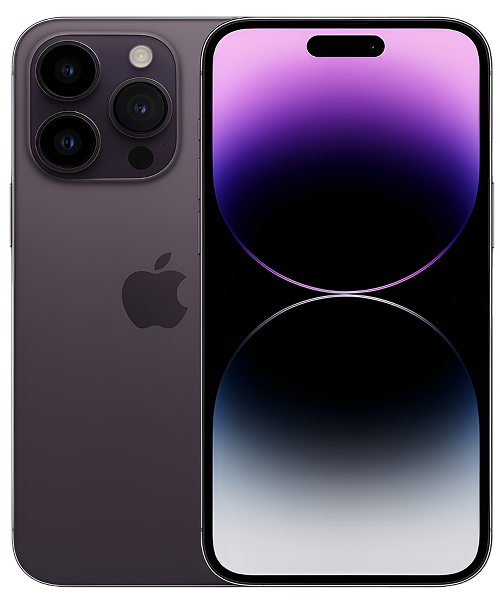
Released in the fall of 2022, the iPhone 14 Pro was a significant leap forward, aimed squarely at professionals and tech enthusiasts who demand peak performance. It was the device that introduced the world to the Dynamic Island, fundamentally changing the iOS interface. Under the hood, it's powered by the formidable A16 Bionic chip, the first from Apple built on a more efficient 4-nanometer process. Combined with its groundbreaking 48MP main camera and the always-on ProMotion display, it’s a complex and powerful machine where every component is precision-engineered.
The Universal Challenges of Modern Electronic Devices
Before we diagnose the specifics, we need to understand the fundamental principles. From an engineering perspective, every modern phone is a series of trade-offs.
- Screen & Display Fragility: That stunning ProMotion display is a laminated unit, bonding the OLED panel, the touch-sensing digitizer, and the Ceramic Shield glass. The technical reality: While strong, this unit is connected to the logic board by ultra-thin, flexible printed circuits (FPCs). A drop doesn't just risk cracking the glass; it can cause a microscopic tear in an FPC, severing the connection for touch or video and requiring a full display assembly replacement.
- Battery Degradation: Your phone's battery is a chemical system. The technical reality: Each charge and discharge cycle causes a tiny, irreversible degradation of the lithium-ion electrolyte and the cathode. Heat is a catalyst that accelerates this chemical decay. After hundreds of cycles, the battery's internal resistance increases, and it can no longer supply the stable voltage the A16 Bionic chip demands under load, leading to performance throttling or unexpected shutdowns.
- Port and Connection Wear: The USB-C/Lightning port is a high-traffic electromechanical component. The technical reality: The pins inside are rated for a certain number of insertions. More importantly, they are directly connected to the main power and data lines. Using a non-certified charger can send unstable voltage to the charging IC (often called the Tristar or Hydra chip), causing permanent damage that a simple port cleaning can't fix.
- Software Complexity: iOS is a complex operating system that can experience "kernel panics." The technical reality: This is a low-level system crash, often caused by a conflict between a hardware driver and a software instruction. It can cause random reboots that perfectly mimic a hardware failure, making a proper diagnostic essential.
Now, let's apply this technical lens to the most common iPhone 14 Pro issues.
An In-Depth Look at Common iPhone 14 Pro Problems
Here is a component-level breakdown of the issues we frequently diagnose and repair.
1. common iPhone 14 Pro problems: Battery Drain and Performance Throttling
- Symptoms: Your phone no longer reliably lasts the day, and you notice a distinct lag or stutter when opening apps or scrolling, especially when the battery is below 50%.
- Potential Causes: On the A16 Bionic, the six CPU cores are split between high-performance and high-efficiency. A software bug can prevent the phone from properly utilizing the efficiency cores, keeping it in a high-power state that drains the battery. The more common cause, after a year or more of use, is increased internal resistance in the battery, which prevents it from delivering the peak current required by the performance cores, forcing iOS to throttle the CPU speed.
- In-Depth Fixes to Try:
- Check for Rogue Processes: Go to Settings > Battery. If you see an app with unusually high background activity, you've found a likely software culprit.
- Verify Battery Health: Go to Settings > Battery > Battery Health & Charging. If the Maximum Capacity is below 85%, the battery's chemical age is the primary cause of your performance issues.
- DFU Restore: For persistent software issues, a Device Firmware Update (DFU) restore from a computer is the deepest possible software reset, which can rule out any corruption.
- A common misconception our technicians often address is that a battery is just "dead or alive." The truth is, it's a spectrum. We use specialized tools to measure a battery's internal resistance and voltage drop under load. A battery can show 90% health but fail a load test, confirming it's the root cause of performance throttling. If software fixes don't work, a professional iPhone 14 Pro repair to replace the battery is the only way to restore peak performance.
2. iPhone 14 Pro overheating
- Symptoms: The titanium frame becomes uncomfortably hot to the touch, especially near the power button. The screen dims, charging slows down, and the device can become extremely sluggish.
- Potential Causes: The iPhone 14 Pro uses a passive thermal system where the main logic board transfers heat to the frame. Intense, prolonged use of the GPU and performance cores (e.g., in 4K video editing or high-end gaming) can generate more heat than the system can dissipate. While usually caused by software, in rare cases, a small short circuit on one of the logic board's power rails can cause a specific chip to heat up uncontrollably.
- In-Depth Fixes to Try:
- Isolate the App: Note which specific app or task causes the overheating. Updating or reinstalling that app can often solve the problem.
- Remove the Case: A thick, insulating case can trap heat. Removing it during intensive tasks or charging can significantly improve thermal performance.
- One key detail from a component level is how we diagnose this professionally. We use thermal imaging cameras to see exactly which component on the logic board is generating the heat. If it’s the A16 Bionic chip, it’s a software issue. If it’s a tiny capacitor next to the Wi-Fi module, we know there's a hardware short that requires a micro-soldering repair.
3. iPhone 14 Pro camera not working
- Symptoms: The camera app is black, it freezes, or the advanced 3x telephoto lens fails to focus. You might hear a faint buzzing or clicking sound from the camera module.
- Potential Causes: The camera system is a marvel of miniature mechanics, including a Voice Coil Motor (VCM) for autofocus and a sensor-shift mechanism for Optical Image Stabilization (OIS). A drop, even one that doesn't crack the glass, can cause a mechanical failure in these components. A software crash can also prevent iOS from initializing the camera's firmware.
- In-Depth Fixes to Try:
- The Hard Reset: This is the first step for any camera issue, as it can resolve software initialization failures.
- Test All Lenses: Switch between the 0.5x, 1x, and 3x modes. If one lens works but another doesn't, it confirms the issue is isolated to a specific hardware module.
- A common misconception is that a broken camera is a simple swap. On the iPhone 14 Pro, the camera module is a complex assembly. More importantly, attempting a DIY iPhone 14 Pro repair on the screen or back glass can introduce a single speck of dust into the camera system, which will show up as a permanent black spot in every photo you take.
4. iPhone 14 Pro screen issues
- Symptoms: You’re experiencing "ghost touch" where the screen acts on its own, or there are areas that are completely unresponsive. You might also notice a green or purple line running down the display.
- Potential Causes: This is almost always a hardware failure. Ghost touch or dead spots are classic signs that the touch-sensing digitizer layer has been damaged from an impact or pressure. A vertical line on an OLED display is a definitive sign that one of the driver ICs bonded to the panel has failed.
- In-Depth Fixes to Try:
- Clean the Screen: Remove any case or screen protector to rule out external interference.
- Hard Reset: While unlikely to fix it, this can rule out a very rare, deep software crash that could cause these symptoms. If the issue persists after a reboot, it's a confirmed hardware fault.
- One key detail our experts have noted is the integrated nature of the display. Because the glass, digitizer, and OLED panel are a single, laminated unit, a failure in any one of these layers requires the entire display assembly to be replaced. There's no way to just replace the top glass or the digitizer on its own.
Our iPhone 14 Pro repair Process: What to Expect at The Fix
When you bring in a high-performance device, you deserve a high-performance, transparent repair process.
- The Free, No-Pressure Diagnosis: We start with a full diagnostic suite, testing everything from the battery's cycle count and internal resistance to the individual camera modules and Face ID sensors. This is always free.
- Clear Options and Upfront Pricing: We provide a detailed report on our findings and a clear, upfront quote for the component-level repair required. No guesswork, no surprises.
- The Expert Repair: Our technicians work in a professional, static-safe environment with the proper tools to safely handle the delicate components of your iPhone 14 Pro. We use high-quality parts to ensure a lasting solution.
- Post-Repair Testing: After the repair, we run your phone through a rigorous quality control check, testing all functions to ensure it's performing exactly as it should before it's returned to you.
A Proactive Guide to Keeping Your iPhone 14 Pro in Peak Condition
The best way to maintain the integrity of your device is through preventative care. A quality case with good shock absorption is essential to protect the delicate camera optics and the screen assembly. To preserve battery health, avoid letting the phone get hot, especially while charging. And finally, regular iOS updates are critical, as they contain updated firmware for the A16 Bionic's power management and thermal systems, which can prevent many common issues and help you avoid the need for a premature iPhone 14 Pro repair.
Conclusion
Your iPhone 14 Pro is a complex and powerful device, and its problems have equally complex technical causes. While some issues can be resolved with simple software troubleshooting, many require a deep understanding of the underlying hardware to diagnose and fix correctly.
If your troubleshooting has pointed to a hardware failure, or you simply want an expert analysis of what's going on inside your device, we're here to provide clarity. Contact The Fix today for a professional and transparent iPhone 14 Pro repair that addresses the root cause of the problem and restores your device to its peak performance.


Trusted repair solution for mobile phones, tablets, gaming consoles, and computer systems. We provide fast, reliable, and affordable repair services to get your devices back in perfect working condition.
The Fix is an independent repair service provider and is not affiliated with, sponsored by, or endorsed by Apple Inc., Samsung Electronics, Google LLC, or any other device manufacturer. We use high-quality compatible replacement parts unless explicitly stated. All trademarks are property of their respective owners.


© Copyright The Fix Solutions All rights reserved 2026.
Design by Deepcoder