






iPhone 14 Plus Repair Services
Get fast, reliable, and professional iPhone 14 Plus repair services at The Fix — your trusted destination for expert device care.
Common Repairs We Handle Daily


Is Your Data Safe? A Guide to iPhone 14 Plus repair After a Major Issue
It’s a feeling of pure panic. Your iPhone 14 Plus slips from your hand and hits the pavement with a sickening thud, and now the screen is black. Or maybe it took an unexpected dip in the pool and is completely unresponsive. It’s not just the device you’re worried about; it’s everything inside it. Your photos, your contacts, your messages, your memories. The first, terrifying question that flashes through your mind is: "Is everything gone forever?"
When you’re facing a worst-case scenario, you need clear, calm, and expert advice. As technicians who specialize in these critical situations, we know that your data is your number one priority. Let me walk you through what’s really happening inside your phone, what you can do, and how a professional iPhone 14 Plus repair is often focused on data recovery just as much as fixing the device itself.
Getting to Know Your iPhone 14 Plus
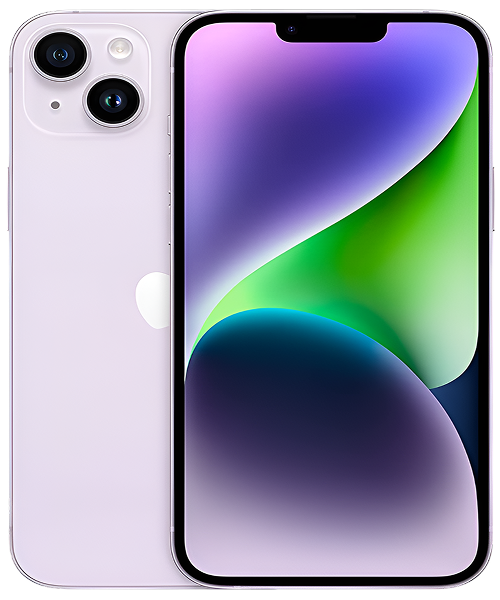
When you chose the iPhone 14 Plus, which was released in the fall of 2022, you picked a device known for its reliability and endurance. It was designed to be a dependable workhorse, praised for its large, beautiful screen and what was, at the time, some of the best battery life ever in an iPhone. Powered by the proven A15 Bionic chip, it's a solid and stable device, which makes it even more shocking and stressful when it suffers a major failure.
The Universal Challenges of Modern Electronic Devices
So, when disaster strikes, what’s happening on the inside? And more importantly, what does it mean for your data?
- The Screen is Your Gatekeeper: The Fear: "My screen is black, so I can't get to my data!" The Reality: Your screen is just a window. Even if it's shattered or completely black, the phone's "brain" (the logic board) and "memory" (the storage chip) are often still perfectly fine. The challenge isn't that the data is gone, but that the gate is locked.
- The Battery is the Heartbeat: The Fear: "My phone won't turn on, so it must have wiped everything." The Reality: Think of the battery like the heart. If it stops, the body is inert, but the brain and memories are still there, waiting for power. A dead battery or a faulty charging circuit is the most common reason a phone appears "dead."
- The Logic Board is the Brain: The Fear: "The phone is totally fried, it's a lost cause." The Reality: The logic board is complex, but your data lives on one specific component: the NAND flash storage chip. This chip is remarkably resilient. Even if other parts of the board are damaged, a skilled technician can often access this chip.
- Software is the Operating System: The Fear: "My phone is stuck on the Apple logo, I have to wipe it!" The Reality: A "boot loop" is a software crash. While Apple's default solution is a full restore (which erases your data), professional tools can often resolve these software conflicts without wiping your device.
Now let’s apply this reassuring, data-first approach to the most common worst-case scenarios for the iPhone 14 Plus.
An In-Depth Look at Common iPhone 14 Plus Problems
Here’s a breakdown of the scariest-looking issues and what they really mean for the safety of your data.
1. The Black Screen of Death (Display Failure)
- Symptoms: Your phone seems to be on—you might hear notifications or feel vibrations—but the screen is completely black and unresponsive. It's like you're locked out of your own device.
- Potential Causes: This is almost always a hardware issue. It could be that the OLED display itself has failed, or more commonly, that the internal cable connecting the screen to the logic board was damaged or dislodged during a drop.
- In-Depth Fixes to Try:
- Confirm It’s On: Flip the silent switch on the side of the phone. Do you feel a vibration? If yes, that's great news! It means the phone's logic board is working fine.
- Try a Hard Reset: Press and quickly release the volume up, then volume down, then press and hold the side button for about 30 seconds. In rare cases, a deep software crash can cause this, and a hard reset can fix it.
- A common misconception our technicians often address is that a black screen means the phone is dead. The truth is, your data is almost certainly safe and sound. The problem is one of access. A professional screen replacement is often all that's needed to unlock the gate to all your information. Don't panic and assume it's a lost cause; it's usually a very solvable problem.
2. The Phone is Completely Dead and Won't Turn On
- Symptoms: It’s a brick. You plug it in, and there’s no charging symbol. You hold the power button, and nothing happens. It feels like the end of the line.
- Potential Causes: The number one cause, in my experience, is a deeply discharged or failed battery. It could also be a faulty charging port or a failure in the charging circuit on the logic board. A critical logic board failure is possible, but less common.
- In-Depth Fixes to Try:
- The Charger Test: Leave the phone plugged into a known-good charger and wall outlet for at least one full hour. A deeply discharged battery needs time to accept a trickle charge before it shows any signs of life.
- Check the Port: Look for any lint or debris that could be blocking the connection.
- One key detail our experts have noted is the resilience of your data. Your photos, messages, and contacts are stored on a solid-state NAND chip that does not require constant power to hold its information. Even if the phone has been "dead" for weeks, the data is still physically there. A professional iPhone 14 Plus repair can often bring the device back to life simply by replacing the battery or repairing the charge circuit, giving you immediate access to everything you thought was lost.
3. The Dreaded Splash (Serious Liquid Damage)
- Symptoms: Your phone took a dive into the pool, the sink, or a puddle. It might have turned off immediately, or it might be acting erratically.
- Potential Causes: Water gets inside the phone and begins to corrode the delicate electronic components on the logic board, causing short circuits.
- In-Depth Fixes to Try:
- Power It Off Immediately. If it's still on, turn it off. Do not plug it in to charge, no matter what. This is the most important step.
- Do NOT Use Rice. This is a pervasive myth. Rice is completely ineffective at absorbing internal moisture and its starchy dust can cause more problems.
- A common misconception is that water damage means the data is instantly erased. The truth is, the data itself is safe on the NAND chip. The danger is the corrosion that destroys the pathways to the chip. The faster you can get the device to a technician who can professionally clean and dry the logic board, the higher the chance of saving those pathways and recovering your data. This is the most time-sensitive iPhone 14 Plus repair scenario.
4. Stuck on the Apple Logo (Boot Loop Failure)
- Symptoms: Your phone is stuck in a loop. It shows the Apple logo, flashes, and then shows the logo again, over and over. You can't get to your home screen.
- Potential Causes: This is typically caused by a corrupted software update or a storage issue. When the phone tries to start up, it hits a critical error in the operating system and is forced to restart. In some cases, it can also be a sign of a failing hardware component.
- In-Depth Fixes to Try: The only mainstream DIY fix is to connect the phone to a computer and attempt a software restore, but this will erase all of your data. Before you do this, it's best to seek a professional opinion.
- One key detail our experts have noted is that we have advanced tools that can often fix a boot loop without erasing your data. We can often resolve the software corruption directly or diagnose if a specific hardware component is the cause. Don't wipe your phone until you've explored these data-safe options first.
Our iPhone 14 Plus repair Process: A Focus on Your Data
When you bring a device to us in a crisis, we treat it like an emergency room visit. Our priority is to stabilize the patient and save what's most important.
- The Damage Assessment & Data Triage: Our first step is a free, no-pressure diagnosis to determine the extent of the damage and the likelihood of data recovery. We'll tell you honestly what we see.
- Clear Recovery Options & Pricing: We’ll explain the options, from a simple repair that restores full functionality to more advanced data recovery procedures if the device is severely damaged. You’ll get a clear, upfront quote for each path.
- The Expert Procedure: Our skilled technicians will use micro-soldering tools and data recovery equipment to perform the necessary repairs, always with the primary goal of protecting or retrieving your data.
- Post-Procedure Verification: We test the device to ensure it is stable and, most importantly, that you have access to the data you feared was lost.
A Proactive Guide to Keeping Your iPhone 14 Plus in Peak Condition
The absolute best way to protect your data from a worst-case scenario is to have a backup. It’s the ultimate safety net. Please, take a moment right now to go to Settings > [Your Name] > iCloud > iCloud Backup and make sure it's turned on. It’s the single most important thing you can do to prevent the panic of data loss. A good case and screen protector are also essential, as they prevent the physical damage that often leads to these catastrophic failures in the first place.
Conclusion
Seeing your iPhone 14 Plus unresponsive, wet, or stuck in a loop is a terrifying experience, but it’s crucial to remember that there is almost always hope. Your data is more resilient than you think, and a catastrophic-looking failure is often a solvable problem. Don't panic, don't try the rice trick, and don't wipe your device until you've spoken to an expert.
If you’re facing a worst-case scenario and are worried about your data, we’re here to help. Contact The Fix today for a calm, reassuring, and professional iPhone 14 Plus repair focused on saving what matters most to you.


Trusted repair solution for mobile phones, tablets, gaming consoles, and computer systems. We provide fast, reliable, and affordable repair services to get your devices back in perfect working condition.
The Fix is an independent repair service provider and is not affiliated with, sponsored by, or endorsed by Apple Inc., Samsung Electronics, Google LLC, or any other device manufacturer. We use high-quality compatible replacement parts unless explicitly stated. All trademarks are property of their respective owners.


© Copyright The Fix Solutions All rights reserved 2026.
Design by Deepcoder