






iPhone 13 Pro Repair Services
Get fast, reliable, and professional iPhone 13 Pro repair services at The Fix — your trusted destination for expert device care.
Common Repairs We Handle Daily


Keep Your iPhone 13 Pro Running Great: A Maintenance Guide for Longevity
Picture this: it's September 2021, and you just unboxed your brand-new iPhone 13 Pro. That feeling of unwrapping something genuinely premium—the weight of that stainless steel frame, the beauty of that ProMotion 120Hz display, those three cameras that took absolutely stunning photos. You invested in the Pro model specifically because you wanted the best, something that'd last for years.
Fast forward to 2025, and you're still using that same iPhone 13 Pro. It's been a great phone, but now you're noticing some changes. Maybe the battery doesn't last quite as long. Perhaps there's a small crack in the corner of the screen. Or maybe you're just wondering: is it worth keeping this device going, or is it time to upgrade?
Here's what you need to know: your iPhone 13 Pro is still an excellent device with years of useful life ahead. The A15 Bionic chip is still fast, the ProMotion display is still gorgeous, and that camera system is still better than most mid-range phones being sold today. With proper care and strategic iPhone 13 Pro repair when needed, there's absolutely no reason you can't keep using this device well into 2027 or beyond. Let's talk about how to make that happen—and why it's worth it.
Is This You? Quick iPhone 13 Pro Diagnostic Quiz
Before we dive into solutions, let's quickly identify what you're experiencing. Pick the scenario that best matches your situation:
Scenario A: "Everything works fine, I just want to keep it that way."
→ Jump to: Preventative Maintenance Guide
Scenario B: "Battery life isn't what it used to be, but everything else is great."
→ Jump to: Battery Health and Management
Scenario C: "I've got a crack or screen issue that's bothering me."
→ Jump to: Screen and Display Concerns
Scenario D: "My phone's acting weird—random issues, glitches, or slowdowns."
→ Jump to: Software and Performance Troubleshooting
Scenario E: "Something specific broke—camera, buttons, charging port, etc."
→ Jump to: Component-Specific Issues
Found your scenario? Let's dig in.
Let's Talk About Your iPhone 13 Pro for a Second
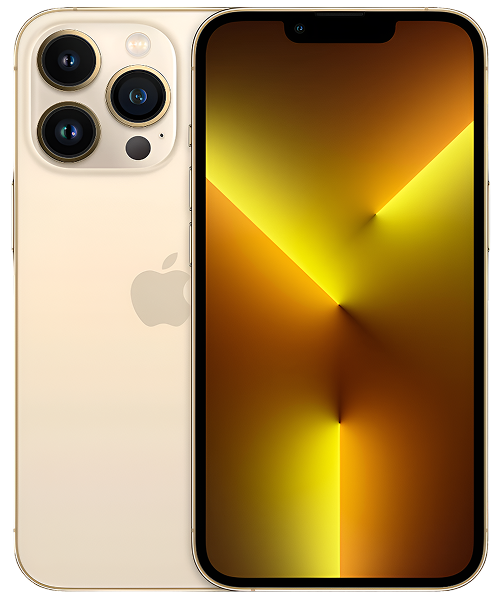
The iPhone 13 Pro launched in fall 2021, and it represented a pretty significant moment. This was the year Apple brought ProMotion (that silky-smooth 120Hz display) to iPhones for the first time. It got the A15 Bionic chip with an extra GPU core compared to the standard models. The camera system was legitimately pro-level, with improved low-light performance and that cinematic mode everyone loved. And the build quality? That surgical-grade stainless steel frame and textured matte glass back made it feel like a premium tool, not just a phone.
A lot of people chose the 13 Pro specifically because they wanted something that'd last. Not just the "good enough" phone, but the one with staying power. And here's the thing: that investment was smart. Three-plus years later, it's still incredibly capable. The A15 Bionic is the same chip that powers the iPhone 14 standard models—it's got plenty of processing power left. iOS 18 runs beautifully on it. That ProMotion display is still among the best smartphone screens you can get.
The question isn't whether your iPhone 13 Pro can keep going—it absolutely can. The question is: how do you maintain it properly so you get maximum life from your investment? That's what we're here for.
For Those Who Just Want to Keep Things Running: Preventative Maintenance Guide
If your iPhone 13 Pro is working great and you just want to keep it that way for years to come, this section's for you. These habits will extend your device's life and prevent most common problems.
Protect Your Investment Physically
Get serious about protection. Your iPhone 13 Pro's stainless steel frame and Ceramic Shield front are tough, but they're not indestructible. A quality case with raised edges around both the screen and camera array is cheap insurance. We're talking about protecting a device you paid premium money for—a case that costs a fraction of a screen replacement is a smart investment.
Consider the stainless steel factor. Unlike aluminum frames on standard iPhones, stainless steel shows micro-scratches and fingerprints more readily. If keeping it pristine matters to you, a case isn't optional—it's essential. The good news is stainless steel is more durable structurally, which means your phone can take impacts better than aluminum-framed devices.
Screen protectors are still worth it. Yes, Ceramic Shield is tough. But it's not scratch-proof—sand, keys, and other hard materials can still mark it up. A tempered glass protector costs very little and can be replaced when it gets scratched, keeping your actual screen perfect underneath.
Manage Battery Health Proactively
Understand what "battery health" actually means. That percentage in Settings > Battery > Battery Health & Charging shows maximum capacity compared to when the battery was new. Above 85%? Your battery's still in great shape. 80-85%? It's aging but still functional. Below 80%? You're going to notice meaningful differences in daily use, and replacement becomes worth considering.
Use Optimized Battery Charging. This feature (Settings > Battery > Battery Health & Charging) learns your charging routine and delays charging past 80% until you need it. Why? Because keeping lithium-ion batteries at 100% charge for extended periods accelerates chemical aging. Let iOS manage this for you—it genuinely helps.
Avoid temperature extremes. Heat is battery enemy number one. Don't leave your iPhone 13 Pro in hot cars, don't use it in direct sunlight for extended periods, and take off the case if your phone's getting warm during intensive use. Cold isn't great either—if you're in freezing weather, keep your phone in an inside pocket close to your body.
Partial charging is fine. You don't need to let your battery drain to zero before charging. In fact, partial top-ups throughout the day are actually gentler on battery chemistry than full discharge cycles. Charge whenever it's convenient—your battery will be fine.
Keep Software Current
Enable automatic updates. iOS updates aren't just about new features—they contain critical performance optimizations, security patches, and bug fixes specifically designed to keep older devices running smoothly. Your iPhone 13 Pro will continue getting updates for years, so take advantage of them.
Update apps regularly too. Developers optimize their apps for current iOS versions. Running outdated apps on current iOS can cause compatibility issues, crashes, and excessive battery drain. Let apps update automatically or make it a weekly habit to check for updates.
Clean up storage periodically. Full storage slows everything down. Go to Settings > General > iPhone Storage and review what's taking up space. Delete apps you don't use, clear out old message threads with lots of photos, and offload photos to iCloud or your computer. Keeping at least 10-15% of storage free helps your phone run smoothly.
Maintain Physical Cleanliness
Clean the Lightning port monthly. After three years of living in pockets, your port's got lint. Guaranteed. Power off your phone, use a wooden toothpick and a bright light, and gently remove any debris you see. This prevents 90% of charging problems before they start.
Wipe down your phone regularly. A slightly damp microfiber cloth removes oils, dirt, and grime. Don't use alcohol or harsh chemicals on the screen—they can damage the oleophobic coating. Just water on a microfiber cloth is perfect.
Pay attention to the speaker grilles and ports. Use a soft brush to gently clean speaker and microphone openings. Clear audio is important, and accumulated debris affects sound quality over time.
Pro Tip Callout:
The stainless steel frame on your iPhone 13 Pro can develop a patina over time—micro-scratches and minor oxidation that give it a "used" look. If this bothers you, there are metal polishes specifically designed for stainless steel that can restore the original luster. But here's the thing: many people actually like this worn look—it gives the phone character and shows it's been well-used. It's purely aesthetic, not functional, so whether you polish it or embrace the patina is entirely personal preference.
Battery Health and Management: The Most Common Concern
Let's address the elephant in the room: your iPhone 13 Pro's battery isn't brand new anymore, and you're probably noticing that.
What's Normal After Three Years
Expected capacity loss: If your battery health shows 85-90% maximum capacity after three years of daily use, that's completely normal. You've been through 700-1,000 charge cycles—the chemistry inside has naturally degraded. This isn't a defect or failure, it's just how lithium-ion batteries age.
Slightly reduced runtime is expected. When new, your iPhone 13 Pro probably lasted a full day with moderate-to-heavy use. Now, with 85% capacity, you might need a small top-up in the evening. That's proportional to the capacity loss—not an indication of other problems.
Performance shouldn't be affected yet. Apple's power management only kicks in when battery health drops significantly below 80% AND the battery can't deliver peak power. If your phone's still fast and responsive, your battery's still capable of delivering proper power—it just can't hold as much charge as it used to.
When to Consider Battery Replacement
The 80% threshold matters. Apple considers 80% capacity the point where most users will notice meaningful impact on daily use. Below this, you'll see more frequent low battery warnings, possible unexpected shutdowns under load, and potentially some performance throttling to prevent crashes.
Your usage patterns matter too. If you're a light user who's happy charging mid-day, 75% battery health might be perfectly fine for you. If you're a heavy user who needs full-day reliability, 80% health might already feel limiting. There's no universal "you must replace at X%" rule—it's about whether current performance meets your needs.
Battery replacement is like getting a new phone. Seriously. If the only issue with your iPhone 13 Pro is battery health, replacement transforms the device. You'll get back to that full-day-and-then-some battery life you remember from when it was new. Everything else—that fast processor, beautiful display, excellent cameras—was already fine.
Software Factors Affecting Battery Life
iOS bugs happen. Sometimes an iOS update introduces a battery drain bug. Before assuming hardware failure, check online forums to see if others are reporting similar issues after the same update. Apple usually fixes these quickly in subsequent updates.
Background app refresh can be a culprit. Settings > General > Background App Refresh shows which apps are allowed to refresh content in the background. You don't need to disable this entirely, but review the list. Do you really need that app you use once a month to constantly refresh? Probably not.
Location services are power-hungry. Settings > Privacy & Security > Location Services shows which apps have location access. "Always" permission for apps that don't need it (looking at you, random games) drains battery unnecessarily. Switch to "While Using" or "Never" where appropriate.
The 5G variable. Your iPhone 13 Pro supports 5G, which is great—when 5G coverage is solid. In marginal 5G areas, your modem works overtime constantly switching between 5G and LTE, draining battery fast. If you're in an area with spotty 5G, try Settings > Cellular > Cellular Data Options > Voice & Data and switch to LTE temporarily. See if battery life improves.
Screen and Display Concerns: Cracks, Scratches, and ProMotion Issues
Your iPhone 13 Pro's display is one of its best features—let's keep it that way.
Dealing With Cracks or Physical Damage
Small cracks don't stay small. Temperature changes cause materials to expand and contract slightly. A tiny crack in the corner can slowly spread across weeks or months. Additionally, cracks compromise the water resistance seal, potentially allowing moisture into the device.
Touch functionality might degrade. Even if a cracked screen still responds to touch now, the digitizer layer can fail progressively. What works today might develop dead zones next month. Address cracks sooner rather than later to avoid complications.
DIY repair isn't recommended for Pro models. The iPhone 13 Pro's display is more complex than standard models—it's got ProMotion (120Hz), higher brightness, and more sophisticated calibration. Screen replacement requires proper tools, quality parts that support ProMotion, and calibration to maintain True Tone and other features. This isn't a repair to cheap out on.
ProMotion Display Quirks
120Hz doesn't run all the time—that's by design. ProMotion adapts refresh rate from 10Hz to 120Hz based on content. Static content (reading an article) might run at 10-24Hz to save battery. Scrolling jumps to 120Hz for smoothness. If your display sometimes feels less smooth, it might just be operating at lower refresh rates appropriately.
Third-party apps might not support ProMotion. Not all apps are optimized for variable refresh rates. If an app feels less smooth than others, that's likely the app's limitation, not your display failing.
True Tone calibration matters. True Tone adjusts color temperature based on ambient lighting. If colors look off, go to Settings > Display & Brightness and toggle True Tone off and back on. Sometimes recalibration helps.
Scratches and Oleophobic Coating
Micro-scratches are inevitable over time. Ceramic Shield is highly scratch-resistant, but not scratch-proof. After three years, you'll probably have some fine scratches visible in certain lighting. This is cosmetic—it doesn't affect functionality.
The oleophobic coating wears off. That fingerprint-resistant coating on your screen degrades with use. After three years, your screen probably shows fingerprints more readily than it used to. This is normal wear. Screen protectors can restore that smooth, clean-feeling surface.
Toothpaste and other "scratch removal" methods don't work. Internet myths suggest using toothpaste, baking soda, or other abrasives to buff out scratches. Don't. These make things worse by wearing down the oleophobic coating and potentially creating more fine scratches. If scratches bother you, screen replacement is the only real solution.
Software and Performance Troubleshooting: When Your Phone Acts Weird
Your iPhone 13 Pro should still feel fast. If it doesn't, something's wrong—but it's usually fixable.
General Sluggishness or Lag
Check available storage first. Settings > General > iPhone Storage. If you're using over 90% of capacity, that's probably causing slowdowns. iOS needs breathing room for temporary files and cache. Free up at least 10-15% of total storage.
Background processes might be stuck. A simple restart often works wonders. If that doesn't help, try a force restart: press Volume Up, then Volume Down, then hold the Side button until you see the Apple logo.
Reduce motion and transparency effects. Settings > Accessibility > Motion has options to reduce animations. This can make an older device feel slightly snappier, though you lose some visual polish.
Reset all settings as a nuclear option. Settings > General > Transfer or Reset iPhone > Reset > Reset All Settings. This doesn't delete data, but returns all system settings to defaults. It often resolves weird performance issues caused by accumulated setting conflicts over years.
Random Crashes or Restarts
Check analytics logs. Settings > Privacy & Security > Analytics & Improvements > Analytics Data. Files starting with "panic-" indicate kernel crashes. Multiple recent ones suggest something's triggering system instability.
Update everything. Crashes are often caused by app incompatibilities with current iOS. Make sure both iOS and all apps are up to date.
Identify problematic apps. If crashes happen consistently when using a specific app, that app's the problem. Update it, or if it's still crashing, delete and reinstall it. If crashes persist, the app might just be poorly coded—consider alternatives.
Test in safe mode equivalent. While iOS doesn't have a true safe mode, you can approximate it: restart your phone and immediately after it boots, use it without opening any third-party apps. If it's stable without apps running, one of your apps is causing issues.
Face ID Problems
Clean the TrueDepth sensors. The notch area contains Face ID's sensors. They can get dirty—especially if you use screen protectors that overlap the sensors. Gently clean the notch area with a microfiber cloth.
Retrain Face ID. Settings > Face ID & Passcode > Reset Face ID, then set it up again. Sometimes recognition degrades over time as your appearance changes slightly, and retraining helps.
Check for physical damage. If Face ID worked fine then suddenly stopped after a drop or impact, the TrueDepth hardware might be damaged. This requires professional diagnostic and potential repair.
Attention Aware features cause confusion. Face ID won't unlock if you're not looking directly at the phone. This is a security feature, not a bug. If Face ID seems inconsistent, make sure you're looking at the screen when unlocking.
Component-Specific Issues: When Something Breaks
Let's address specific component failures and what they mean.
Camera System Problems
Autofocus issues are common after drops. The iPhone 13 Pro's camera system includes tiny motors that move lens elements for focusing and stabilization. These are delicate. Even drops that don't crack the external glass can damage internal mechanisms, causing focus problems or that weird camera shake/jitter.
All three cameras are separate modules. If one camera (say, the telephoto) isn't working but others are, that's an isolated module failure. It doesn't mean the entire camera system is failing—just that one module needs attention.
Software glitches happen too. Before assuming hardware failure, try: force-closing the Camera app, restarting the phone, and testing the camera in third-party apps like Instagram. If it works in other apps, it's likely a software issue in Apple's Camera app.
Lens flare is normal, not defective. The iPhone 13 Pro's cameras can show lens flare when shooting toward bright lights—that's physics, not a flaw. All cameras do this to some degree.
Charging Port Issues
Lint is almost always the culprit. After three years, there's definitely lint in there. Power off, inspect with a bright light, and clean carefully with a wooden toothpick. We can't stress this enough: most "broken" charging ports just need cleaning.
Lightning cables wear out. The thin wires inside fray with repeated bending. If cleaning doesn't help, try a different cable—ideally Apple's official Lightning cable—before assuming the port is damaged.
Water damage shows specific signs. If you've had liquid exposure and now charging is problematic, look for corrosion: green or white residue on the Lightning port's pins. This needs professional cleaning and potentially component replacement on the logic board.
Button Problems
The stainless steel frame is robust. The buttons on your iPhone 13 Pro (volume, power, mute switch) are pretty durable. If one's not working, it's usually debris or damage rather than normal wear.
Try cleaning around buttons. Dirt can accumulate under button edges. A soft brush or toothpick can sometimes clear this and restore functionality.
Haptic feedback might confuse you. iOS uses haptic feedback to simulate button presses in software. If you think a button's broken but you're still getting haptic vibration when you press it, the issue might be software-related rather than mechanical button failure.
Stereo Speaker Issues
Check for debris first. The speaker grilles can accumulate pocket lint too. Gently clean with a soft brush.
Test with different audio sources. Play music, watch a video, make a phone call. If one type of audio works but others don't, that's helpful diagnostic information.
Water damage affects speakers. If you've had liquid exposure, even minor, speaker components can corrode or the waterproofing membrane can get damaged, causing muffled or distorted audio.
Understanding the True Cost of Ownership
Let's talk about the bigger picture: why keeping your iPhone 13 Pro running makes financial and environmental sense.
The Financial Reality
Your initial investment was significant. You paid premium money for a premium device back in 2021. That investment included not just hardware, but also Apple's long-term software support, build quality designed for longevity, and features that wouldn't become obsolete quickly.
Targeted repairs maximize that investment. Even substantial repairs cost a fraction of what you'd pay for a current flagship device. Keeping your iPhone 13 Pro going means you're getting the full value from your original purchase rather than writing it off prematurely.
The upgrade treadmill is expensive. If you buy a new flagship every 2-3 years, you're spending significantly more over time than if you keep devices for 4-6 years with occasional repairs. The math is straightforward: repairs cost less than replacement.
The Environmental Impact
Manufacturing new phones has real environmental costs. Every new smartphone requires rare earth mineral mining, significant carbon emissions during production, and substantial water usage. By keeping your iPhone 13 Pro running longer, you're reducing demand for new device production.
E-waste is a growing problem. Functional phones thrown away because of fixable problems contribute to electronic waste that's difficult to recycle properly. Many components contain hazardous materials that need proper disposal.
Longevity is sustainability. The most environmentally-friendly device is the one you already own. Extending its useful life from 3 years to 5-6 years makes a meaningful difference in your personal environmental footprint.
The Practical Benefits
You keep everything familiar. No learning curve, no setup hassle, no data migration concerns. Your apps, settings, and muscle memory all stay exactly the same.
Your device is already broken in. You know exactly how your iPhone 13 Pro fits in your hand, in your pockets, in your life. You know its quirks. Switching to a new device means adjusting to new ergonomics, new button placements, new everything.
The 13 Pro's capabilities remain relevant. That A15 Bionic chip isn't suddenly slow. The cameras aren't suddenly bad. The ProMotion display doesn't stop being smooth. The hardware was excellent in 2021 and it's still excellent in 2025—it doesn't magically become obsolete because newer models exist.
What to Expect When You Bring Your iPhone 13 Pro In
If you've identified issues that need professional attention, here's what the process looks like.
Thorough diagnostic assessment. We test everything: battery health under load, screen touch response and color accuracy, all three cameras for focus and stabilization, Face ID functionality, charging system operation, speaker and microphone quality, and more. This comprehensive check is always free.
Honest assessment of repair value. We'll tell you what's wrong, what it'd take to fix it, and whether we think repair makes sense for a device of this age. Sometimes repairs are no-brainers. Sometimes they're borderline. We'll give you the information you need to make a smart decision.
Quality components and workmanship. If you choose to proceed, we use high-quality replacement parts that maintain your iPhone 13 Pro's capabilities. ProMotion displays that actually support 120Hz. Batteries with proper health reporting. Camera modules with functioning stabilization. We don't cheap out on Pro model repairs.
Comprehensive post-repair testing. We verify that the repair worked and that we didn't inadvertently affect anything else. You get your iPhone 13 Pro back fully functional and tested, not just "probably working."
Your iPhone 13 Pro Still Has Years Left
The iPhone 13 Pro was Apple's flagship just a few generations ago. It's not ancient history—it's a legitimately capable device that handles modern tasks beautifully. The A15 Bionic chip is still fast. The ProMotion display is still gorgeous. The camera system is still excellent. iOS 18 runs smoothly on it, and you'll keep getting updates for years.
If your iPhone 13 Pro is having issues, they're almost certainly fixable. Battery wearing out? Replacement gives you a fresh start. Screen cracked? Replacement restores that beautiful display. Charging port problematic? Usually cleaning solves it, but replacement when needed isn't complicated.
The key is thinking long-term. This device can easily serve you well into 2027 or beyond with proper care and occasional maintenance. That's 6+ years from its original release—genuinely impressive longevity for a device you use every single day.
If you're experiencing issues, dealing with normal wear and tear, or just want professional advice about keeping your iPhone 13 Pro running great, we're here to help. We work on these devices regularly, we understand what's worth fixing and what's not, and we're happy to give you honest guidance about the best path forward for your situation. Your iPhone 13 Pro is worth keeping—let's make sure it keeps running beautifully for years to come.


Trusted repair solution for mobile phones, tablets, gaming consoles, and computer systems. We provide fast, reliable, and affordable repair services to get your devices back in perfect working condition.
The Fix is an independent repair service provider and is not affiliated with, sponsored by, or endorsed by Apple Inc., Samsung Electronics, Google LLC, or any other device manufacturer. We use high-quality compatible replacement parts unless explicitly stated. All trademarks are property of their respective owners.


© Copyright The Fix Solutions All rights reserved 2026.
Design by Deepcoder