






iPhone 13 Mini Repair Services
Get fast, reliable, and professional iPhone 13 Mini repair services at The Fix — your trusted destination for expert device care.
Common Repairs We Handle Daily


iPhone 13 Mini Troubleshooting: A Step-by-Step Guide Before You Seek Repair
According to repair industry data, the iPhone 13 Mini has one of the highest rates of unnecessary service visits—people bringing in devices for issues that turn out to be software-related or easily fixed at home. Why? Because this compact powerhouse has some quirks that can seem like hardware failures but are actually normal behavior or simple fixes.
If you're reading this, your iPhone 13 Mini is probably acting up in some way. Maybe the battery's not lasting as long as you'd like (a super common complaint with the Mini). Or the screen's being weird, or it's getting hot, or charging is inconsistent. Before you assume you need professional iPhone 13 Mini repair, let's walk through a systematic troubleshooting process that might save you a trip—or help you understand exactly what's wrong so you can make a smart decision about what to do next.
Let's Talk About Your iPhone 13 Mini for a Second
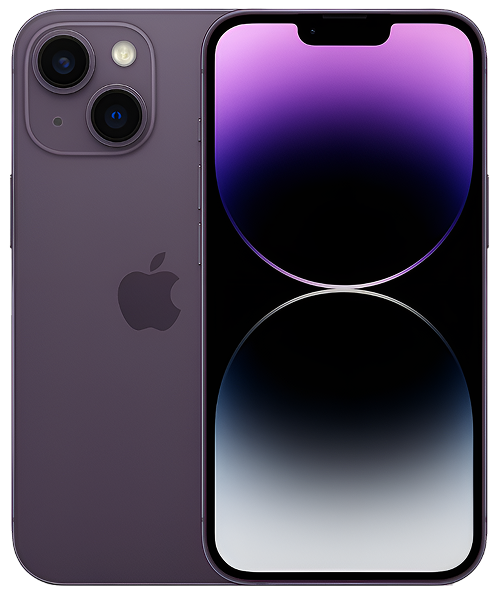
The iPhone 13 Mini launched in September 2021 as Apple's last truly compact flagship phone. With a 5.4-inch screen, it's genuinely pocket-friendly—something increasingly rare in today's world of ever-larger phones. It's got the same A15 Bionic chip as the larger iPhone 13, the same camera system, and the same feature set. The only real compromise? A smaller battery, which is just physics—you can't fit as much battery in a smaller body.
A lot of people chose the Mini specifically because they wanted a powerful phone that didn't feel like carrying a tablet. It's perfect for one-handed use, actually fits in normal pockets, and handles everything you throw at it. The trade-off has always been battery life—it's not bad, but it's not the two-day marathon runner that larger iPhones can be.
Now, in 2025, your iPhone 13 Mini is three-plus years old. It's still getting iOS updates, it's still fast, and it's still perfectly capable. But you might be noticing some issues that make you wonder if it's worth keeping or time to move on. Let's figure out what's actually wrong and what you can do about it.
Quick Problem Checklist: What Are You Dealing With?
Before we dive deep, let's quickly identify your issue and jump to the right solution:
Early Warning Signs (Weeks 1-4):
- Battery percentage jumping around erratically → Battery calibration issue
- Occasional random restarts → Software glitch or early battery problem
- Charging slower than usual → Port contamination or cable issue
Developing Problems (Weeks 4-12):
- Battery dies before end of day consistently → Battery degradation or app issue
- Phone getting warm more often → Background process or thermal management issue
- Charging intermittent or position-dependent → Port debris compaction
Critical Issues (Immediate attention needed):
- Phone won't turn on at all → Power system failure
- Screen not responding to touch → Digitizer failure or software crash
- Severe overheating with warnings → Urgent diagnostic needed
Found your situation? Let's troubleshoot systematically.
Early Warning Signs: Catching Problems Before They Get Worse
These are the subtle issues that, if addressed early, prevent bigger problems down the road.
Week 1-4: Battery Percentage Acting Weird
What you're seeing: Your iPhone 13 Mini shows 60%, then suddenly drops to 15%, then jumps back to 45% within minutes. Or it shuts down at 30% remaining. The percentage readings just don't make sense.
What's actually happening: This is almost always a battery calibration issue, not battery failure. Your battery has a tiny computer inside called the fuel gauge that estimates remaining charge based on voltage. Over time, this calibration can drift, causing inaccurate percentage readings even though the battery itself is still functional.
The myth to bust:
Myth: "Erratic battery percentages mean the battery is failing and needs immediate replacement."
Reality: Calibration drift is fixable without replacing anything. The battery might still be perfectly healthy—it just needs the fuel gauge recalibrated. This is especially common after iOS updates, which can sometimes reset battery monitoring parameters.
Your step-by-step fix:
- Let it fully drain. Use your iPhone 13 Mini normally until it completely shuts down on its own. Don't force-restart it or try to turn it back on.
- Charge to 100% without interruption. Plug it in and let it charge all the way to 100%. Don't use it during this charge if possible. Leave it charging for an extra hour after it hits 100%.
- Use normally for a week. The Battery Management System needs time to relearn your actual battery capacity. Don't do another full drain cycle during this week.
- Check battery health. After a week of normal use, go to Settings > Battery > Battery Health & Charging. If Maximum Capacity shows 85% or higher, your battery's actually fine—it just needed recalibration.
Warning Signs Checklist - When This Gets Serious:
- ✓ Phone shuts down repeatedly above 20% remaining
- ✓ Battery health shows below 80% maximum capacity
- ✓ Percentage drops dramatically during phone calls or camera use
- ✓ Calibration cycle doesn't improve behavior after a week
- ✓ Phone gets hot while charging or during light use
Week 1-4: Occasional Random Restarts
What you're seeing: Your iPhone 13 Mini restarts on its own every few days. No pattern to when it happens—just random, unexpected restarts.
What's actually happening: iOS logs these events in a hidden analytics file. Most random restarts are "kernel panics"—basically, the operating system encounters an error it can't handle and reboots to recover. This can be caused by software bugs, corrupted files, or app conflicts. It's less commonly a hardware issue unless there's physical damage or liquid exposure.
The myth to bust:
Myth: "Random restarts mean the logic board is failing—this is the beginning of total device failure."
Reality: Random restarts are usually software-related and fixable without replacing hardware. Even when it is hardware, it's typically an isolated component (battery, power management circuit) rather than catastrophic logic board failure.
Your step-by-step fix:
- Check the panic logs. Go to Settings > Privacy & Security > Analytics & Improvements > Analytics Data. Look for files starting with "panic-" followed by dates. If you see multiple recent ones, something's triggering crashes.
- Update everything. Make sure iOS is current and all apps are updated. Software bugs causing kernel panics often get fixed in updates.
- Remove recently installed apps. Think about what you installed in the week before restarts started. Uninstall those apps one by one and monitor for improvements.
- Reset all settings. Settings > General > Transfer or Reset iPhone > Reset > Reset All Settings. This returns system settings to defaults without deleting data, which often resolves conflicts causing crashes.
- Last resort: Clean restore. Back up your data, then erase the device and set it up as new (don't restore from backup initially). If restarts stop, something in your backup was corrupted.
Warning Signs Checklist - When This Gets Serious:
- ✓ Restarts happen multiple times per day
- ✓ Phone feels hot before restarting
- ✓ Restarts only happen during specific activities (charging, camera use, etc.)
- ✓ Clean software install doesn't resolve the issue
- ✓ Physical damage or liquid exposure in the phone's history
Week 1-4: Charging Slower Than Normal
What you're seeing: Your iPhone 13 Mini used to charge reasonably quickly, but now it takes forever to reach 100%. Or maybe it charges fine sometimes but slowly other times.
What's actually happening: Slow charging is almost always about the cable, adapter, or port—not the battery or charging circuitry. Lightning cables wear out (the thin wires inside break from repeated bending). Pocket lint accumulates in the Lightning port over years of use. Cheap chargers don't deliver advertised power. These are all simple, fixable issues.
The myth to bust:
Myth: "If charging is slow, the battery or charging circuit is damaged and needs professional repair."
Reality: At least 70% of slow-charging complaints are resolved by trying a different cable or cleaning the port. The charging circuit and battery are usually fine—it's the physical connection or power delivery that's the issue.
Your step-by-step fix:
- Try different cables and adapters. Test with at least two different Lightning cables (ideally Apple's official cables if you have them). Try different power adapters too. Lightning cables fail more often than people realize.
- Inspect the port. Power off your iPhone 13 Mini. Use a bright flashlight and look deep into the Lightning port. See any lint, dust, or debris? That's extremely common after three years.
- Clean very gently. Use a wooden toothpick (not metal!) and slowly, carefully remove visible debris. Be patient—compacted lint doesn't come out easily. Don't scrape or dig aggressively.
- Test charging speed properly. Plug into a 20W USB-C power adapter (Apple's or equivalent quality). Your iPhone 13 Mini should reach about 50% in roughly 30-35 minutes. If it does, your charging system is fine. If it's dramatically slower, there's a real issue.
- Check for "Liquid Detected" warnings. If you're getting these even though the phone's dry, there's likely corrosion in the port from old moisture exposure. This needs professional attention.
Warning Signs Checklist - When This Gets Serious:
- ✓ Phone won't charge at all with multiple known-good cables
- ✓ Charging only works if cable is held at specific angles
- ✓ "Liquid Detected" warnings appear repeatedly
- ✓ Port looks corroded (green/white residue on pins)
- ✓ Phone gets very hot during charging
Developing Problems: Issues That Need Attention Soon
These problems won't brick your phone immediately, but they're getting worse and need to be addressed.
Week 4-12: Battery Dies Before End of Day Consistently
What you're seeing: Your iPhone 13 Mini used to make it through a full day easily. Now you're scrambling for chargers by mid-afternoon every single day. The battery life has noticeably, consistently degraded.
What's actually happening: The iPhone 13 Mini has always had the shortest battery life in the iPhone 13 lineup—that's the compact phone trade-off. But after three years, chemical battery degradation is real. Combine natural aging with possibly inefficient iOS updates or power-hungry apps, and you've got legitimately poor battery life.
The myth to bust:
Myth: "The iPhone 13 Mini's battery is just too small—there's nothing you can do about poor battery life."
Reality: While the Mini does have a smaller battery, proper battery health should still get you through a full day of normal use. If you're consistently failing to reach dinnertime, either your battery's genuinely worn out (below 80% health) or there's a software issue draining power excessively. Both are addressable.
Your step-by-step fix:
- Check actual battery health. Settings > Battery > Battery Health & Charging. Look at Maximum Capacity. Above 85%? Your battery's actually still decent. Below 80%? Replacement makes sense. Between 80-85%? Borderline—depends on your usage needs.
- Identify power-draining apps. Settings > Battery shows usage by app over 10 days. If something unexpected is at the top (an app you rarely use consuming 30% of battery), that's your problem. Delete it or disable Background App Refresh for it.
- Check for signal issues. Poor cellular signal forces your modem to work much harder, draining battery fast. If you're frequently in low-signal areas, consider using Wi-Fi calling or enabling Low Power Mode when signal is weak.
- Manage screen brightness. The display is the biggest battery consumer. If you constantly use max brightness, you're killing battery life unnecessarily. Auto-brightness is your friend.
- Consider your usage realistically. Be honest: are you streaming video for hours, constantly on social media, playing games? The Mini's battery was never designed for truly heavy all-day use. Setting realistic expectations matters.
Tech Myth Debunked:
Myth: "Closing apps from the app switcher saves battery."
Reality: iOS manages background apps intelligently. Force-closing apps actually uses MORE battery because the app has to fully reload from scratch next time you open it, instead of resuming from its suspended state. The only time force-closing helps is if an app is genuinely stuck or misbehaving—but as a regular habit, it's counterproductive.
What we've learned from experience:
The iPhone 13 Mini's battery capacity is legitimately small compared to other iPhones. What feels like "normal use" on a larger iPhone can exhaust the Mini's battery quickly. Many Mini owners who complain about battery life are actually heavy users who'd be happier with a larger phone. But for light-to-moderate users, the Mini should still last a full day even after three years—if it doesn't, something's genuinely wrong (battery health, software issue, or both).
Week 4-12: Phone Getting Warm More Often
What you're seeing: Your iPhone 13 Mini gets noticeably warm during what seems like normal use—not just during demanding tasks like gaming or video recording, but even during basic stuff like browsing or messaging.
What's actually happening: Warmth during intensive use is normal—processors generate heat, and your phone's glass and metal body conduct that heat to the surface where it dissipates. But if your Mini's getting warm during light use, something's working too hard in the background. Usually, it's an app stuck in a loop, a software bug preventing the processor from scaling down to low-power modes, or the 5G modem working overtime in poor signal areas.
The myth to bust:
Myth: "If your phone gets warm, it's a hardware problem with the battery or processor that requires repair."
Reality: Occasional warmth is completely normal and by design. Even frequent warmth during demanding use is expected behavior. What indicates a problem is getting uncomfortably hot during light use, or getting so hot that iOS displays a temperature warning. And even then, it's usually software-fixable, not hardware failure.
Your step-by-step fix:
- Identify heat-generating apps. Settings > Battery shows which apps consume the most power (high power = high heat). If something unexpected tops the list, investigate further or delete it.
- Check for iOS updates. Thermal management bugs happen, especially right after major iOS updates. Apple usually fixes these quickly in subsequent updates.
- Disable 5G temporarily. Settings > Cellular > Cellular Data Options > Voice & Data. Try "LTE" instead of "5G" for a day. If warmth dramatically improves, your 5G modem was working overtime in your area's marginal 5G coverage.
- Remove case during intensive use. Cases trap heat. If you're gaming, recording video, or doing navigation, take the case off temporarily to improve heat dissipation.
- Reset all settings. Settings > General > Transfer or Reset iPhone > Reset > Reset All Settings. This often resolves software conflicts causing thermal issues without deleting data.
What we've learned from experience:
The iPhone 13 Mini's compact form means less surface area for heat dissipation compared to larger iPhones. It's naturally going to feel warmer during the same tasks because the heat's concentrated in a smaller space. This isn't a defect—it's physics. But chronic overheating (too hot to hold comfortably during light use) is abnormal and usually indicates a software issue that needs addressing to prevent accelerating battery degradation.
Week 4-12: Charging Intermittent or Position-Dependent
What you're seeing: Your iPhone 13 Mini charges fine if the Lightning cable is positioned just right, but loses connection if you move the cable slightly. Or charging works sometimes but not others, with no apparent pattern.
What's actually happening: After three years, the Lightning port has seen thousands of cable insertions. Combined with accumulated debris, this creates poor contact between cable and port pins. The cable might physically insert but not make proper electrical contact. Sometimes the port's internal plastic "tongue" (the part with the pins) gets slightly loose or bent, requiring cable pressure at specific angles to maintain connection.
The myth to bust:
Myth: "If the cable has to be at a certain angle to charge, the port is broken and needs replacement."
Reality: Debris is still the leading cause even when it's position-dependent. Compacted lint can block some pins while leaving others accessible, creating the "sweet spot" behavior. Thorough cleaning resolves this more often than port replacement. Only when cleaning doesn't work is hardware replacement needed.
Your step-by-step fix:
- Power off completely. This is important—you don't want to short anything while cleaning.
- Inspect thoroughly. Use the brightest flashlight you have and really look inside the port. Tilt the phone at different angles. Debris often hides along the sides.
- Clean in multiple sessions. Don't expect to get everything out in one go. Use a wooden toothpick and work slowly, gently. Take breaks. Come back and clean more. Compacted lint is stubborn.
- Test with multiple cables. Sometimes the issue is cable-specific. Worn cables with damaged connectors can create position-dependent charging even with a perfect port.
- Try wireless charging if available. If you have a Qi charger, test whether the phone charges fine wirelessly. If it does, that confirms the Lightning port is the problem, not the charging circuit or battery.
What we've learned from experience:
Many people give up on cleaning after 30 seconds of trying. But seriously compacted debris sometimes takes 10-15 minutes of patient, careful work to fully remove. We see "broken" ports all the time that just needed thorough cleaning. Don't rush to port replacement until you've really given cleaning a proper attempt—or had a professional try with proper tools.
Critical Issues: Problems That Need Immediate Professional Help
These aren't DIY-fixable. If you're experiencing these, it's diagnostic time.
Phone Won't Turn On At All
What you're seeing: Your iPhone 13 Mini is completely dead. No response to button presses, no charging indicator, no Apple logo, nothing.
What might be happening: True "won't turn on" scenarios have multiple possible causes: completely dead battery that needs time to charge before showing signs of life, charging circuit failure preventing power from reaching the battery, battery so degraded it can't hold any charge, or (rarely) logic board failure.
Your last-resort DIY attempts before seeking help:
- Charge for an hour minimum. Use a known-good cable and adapter. Don't keep checking—just leave it alone for a solid hour.
- Try a forced restart while connected to power. With the phone plugged in, do the restart sequence: Volume Up, Volume Down, hold Side button for 15+ seconds.
- Try a different charging method. If you've been using Lightning, try wireless charging if you have access to it (or vice versa). This isolates whether it's a port issue vs. power system issue.
If none of these work, professional diagnostic is needed. Don't keep trying—you won't magically fix this with more button presses. The issue is either a chargeable battery that needs professional tools to jump-start, a hardware component that needs replacement, or diagnostics to determine if repair is economically viable.
Screen Not Responding to Touch
What you're seeing: You can see the screen is on (maybe you see notifications or the lock screen), but touch doesn't work. Or only parts of the screen respond while other areas are dead zones.
What might be happening: The digitizer (touch-sensing layer) can fail independently of the display. Or the ribbon cable connecting the screen to the logic board can work loose or get damaged. Or—and this is common—there's a software crash where the display shows the last image but the system has actually frozen.
Your last-resort DIY attempts before seeking help:
- Force restart. You know the drill: Volume Up, Volume Down, hold Side button. If the system's frozen, this might bring it back.
- Clean the screen thoroughly. Sometimes excessive moisture or oil can interfere with capacitive touch. Clean with a slightly damp microfiber cloth and let it dry completely.
- Remove screen protector and case. Poorly-fitted accessories can cause touch issues. Test without them.
- Connect to a computer. Plug into a Mac or PC with iTunes/Finder. If the computer recognizes the phone, the logic board is functioning—the issue is isolated to the display. If it doesn't recognize it, you might have a deeper system issue.
If touch still doesn't work after these attempts, you need professional iPhone 13 Mini repair. This is almost always a hardware issue requiring screen replacement or cable repair—not something software updates will fix.
Severe Overheating With Temperature Warnings
What you're seeing: Your iPhone 13 Mini gets dangerously hot—hot enough that iOS displays a temperature warning and disables features or shuts down the device.
What might be happening: Severe overheating during light use indicates either a short circuit somewhere (drawing excessive current and generating heat) or catastrophic software failure causing maximum processor load continuously. Neither is safe to ignore.
Your last-resort DIY attempts before seeking help:
- Power off immediately and let cool. Don't use it until it's completely cool to the touch.
- Do a clean software restore. Back up your data, then completely erase and restore iOS from scratch. This eliminates all software variables.
- Use in Safe Mode environment. After restore, use the phone for a day without installing any third-party apps. If overheating stops, it was app-related. If it continues with only stock iOS, it's hardware.
If severe overheating continues even after clean software install, seek professional diagnostic immediately. Continuing to use a phone with hardware-induced overheating risks battery damage, logic board damage, or even safety issues. This isn't something to wait out or ignore.
What to Expect When You Bring Your iPhone 13 Mini In
If you've tried these troubleshooting steps and you're still having issues, professional help is the next logical step.
Comprehensive diagnostic assessment. We run systematic tests: battery load testing under controlled conditions, thermal imaging to identify heat sources, port inspection under magnification, software diagnostic scans, and full hardware functionality testing. This diagnostic is always free—no obligation to proceed with any repairs.
Clear explanation of findings. We'll tell you exactly what's wrong, why it happened, and what your options are. If it's something you could've fixed at home but didn't realize, we'll tell you that too (and show you how for next time).
Honest recommendation about repair value. For a three-year-old device like the iPhone 13 Mini, we'll be straight with you about whether repair makes economic sense. Sometimes it does, sometimes it doesn't—we'll give you the information you need to make a smart decision.
Quality service if you proceed. If you choose to go ahead with repairs, we use high-quality parts and take appropriate care. Your iPhone 13 Mini gets treated with respect—proper screw organization, ESD-safe handling, and thorough post-repair testing.
Your iPhone 13 Mini Still Has Life Left
The iPhone 13 Mini is Apple's last compact flagship, which makes it somewhat special. If you love the size and one-handed usability, there's no direct modern replacement—newer iPhones are all larger. That alone makes it worth maintaining if you can.
Most problems—battery degradation, charging issues, even screen damage—are fixable. The A15 Bionic chip is still fast, iOS updates are still coming, and the camera system is still very capable. If your only issues are normal wear (battery) or accidental damage (screen), repair makes sense.
The key is systematic troubleshooting before assuming you need professional help. Many iPhone 13 Mini issues have software solutions, simple cleaning fixes, or just need proper understanding of what's normal behavior for a compact phone. But when real hardware issues do crop up, they're usually addressable with targeted repairs rather than full device replacement.
If you've worked through this guide and you're still stuck, or if you've identified a hardware issue that needs professional attention, that's what we're here for. We work on iPhone 13 Mini devices regularly, we understand their specific quirks, and we're happy to help you figure out the best path forward for your situation.


Trusted repair solution for mobile phones, tablets, gaming consoles, and computer systems. We provide fast, reliable, and affordable repair services to get your devices back in perfect working condition.
The Fix is an independent repair service provider and is not affiliated with, sponsored by, or endorsed by Apple Inc., Samsung Electronics, Google LLC, or any other device manufacturer. We use high-quality compatible replacement parts unless explicitly stated. All trademarks are property of their respective owners.


© Copyright The Fix Solutions All rights reserved 2026.
Design by Deepcoder