






iPhone 13 Repair Services
Get fast, reliable, and professional iPhone 13 repair services at The Fix — your trusted destination for expert device care.
Common Repairs We Handle Daily


iPhone 13 Repair Myths Debunked: The Truth About Fixing Your Device
Why do so many iPhone 13 owners believe their phone is "too old to fix" or "not worth repairing"? You've probably heard all the myths: "After three years, the battery's shot and everything else will fail soon." "Repairs cost almost as much as a new phone." "Third-party repairs will brick your device." "Apple designs these to stop working after a few years."
But here's the truth: most of what you've heard about iPhone 13 repair is either outdated, exaggerated, or flat-out wrong. Your iPhone 13—released back in September 2021—is still a capable device that's absolutely worth maintaining and repairing. We're going to bust the most common myths, give you the real facts, and help you make smart decisions about keeping your iPhone 13 running strong.
Let's separate fact from fiction and figure out what's actually true about your device.
Let's Talk About Your iPhone 13 for a Second
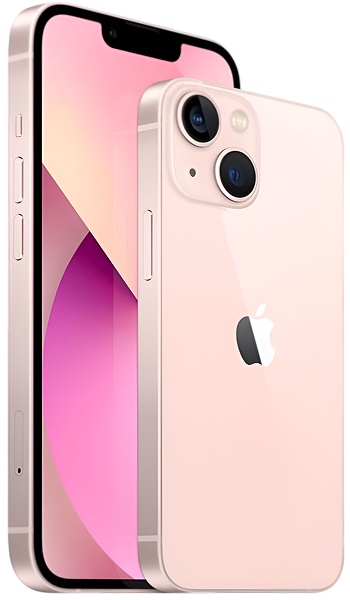
The iPhone 13 landed in fall 2021, and it was a solid step forward—bigger battery than the 12, better cameras with sensor-shift stabilization, that smaller notch everyone appreciated, and the A15 Bionic chip that's still plenty powerful today. It wasn't the flashiest release, but it nailed the fundamentals: reliability, battery life, and performance.
A lot of people picked the iPhone 13 because it hit the sweet spot—capable without being over-the-top expensive. It's got great cameras, solid battery life, and it handles iOS 18 without breaking a sweat. Now, in 2025, it's three-plus years old, and you're probably wondering if it's still worth investing in repairs or if it's time to move on.
Here's what matters: the A15 Bionic chip inside is genuinely fast (it's the same chip that powers the iPhone 14 standard models), Apple's still providing full iOS updates, and the hardware is built to last. If your iPhone 13 is having issues, it's almost certainly fixable—and usually worth fixing. Let's bust some myths and get to the truth.
Most Common iPhone 13 Problems (From Critical to "Annoying But Manageable")
Let's tackle the serious stuff first, then we'll get to the minor annoyances.
CRITICAL: My iPhone 13 Won't Turn On or Keep Shutting Down
What you're experiencing: Your iPhone 13 is either completely dead—won't power on, won't charge, shows no signs of life—or it's randomly shutting down, even when the battery shows plenty of charge remaining.
The myth vs. reality:
Myth: "If it won't turn on, the logic board is fried and it's basically e-waste."
Reality: Random shutdowns and power issues are almost always battery-related, not logic board failure. After three years of daily charging, your battery's internal resistance increases. It might show 60% charge, but it can't deliver the power needed when the processor demands it—so the phone just shuts down to protect itself. This looks catastrophic but it's usually fixable with battery replacement.
Complete "won't turn on" situations are often charging circuit issues or even just a completely drained battery that needs time on a charger. True logic board failure exists, but it's way less common than people think.
What to try first:
- Connect to power for 30 minutes. Use a known-good Lightning cable and power adapter. Don't keep checking it—just let it sit. A completely dead battery sometimes needs time before it'll show charging indicators.
- Force restart. Press Volume Up, then Volume Down, then hold the Side button for 10+ seconds. Keep holding even if nothing happens initially.
- Check battery health. If your phone does turn on, immediately go to Settings > Battery > Battery Health & Charging. If Maximum Capacity is below 80%, you've found your problem.
Tech Myth Debunked:
Myth: "Once your iPhone's battery health drops below 80%, you should just replace the whole phone."
Reality: Battery health below 80% means it's time for a battery replacement, not a device replacement. Your iPhone 13's A15 chip, cameras, display, and every other component are still perfectly functional. Replacing the battery gives you what feels like a brand new phone for a fraction of the cost of actually buying a new phone. We see iPhone 13 devices with 70% battery health that work perfectly fine in every other way—battery replacement brings them right back to 100% functionality.
What we've learned from experience:
The most common pattern we see: someone's iPhone 13 starts shutting down at 30-40% battery, they assume the entire phone is dying, and they start shopping for upgrades. Then we replace the battery, and suddenly they've got a phone that lasts all day again. It's not magic—it's just that batteries wear out while everything else stays functional.
HIGH PRIORITY: My Screen is Cracked or Not Responding
What you're experiencing: Your iPhone 13's screen has a crack (small or large), or there's no visible damage but certain areas won't respond to touch, or the whole display is acting weird—flickering, lines, dead zones.
The myth vs. reality:
Myth: "If I get my screen replaced somewhere other than Apple, Face ID will stop working and iOS will detect it and slow down my phone."
Reality: Let's clear this up once and for all. Screen replacement does NOT affect Face ID—the Face ID sensors are in the notch area and aren't touched during screen replacement. Your phone will NOT slow down or "detect" that you got it repaired elsewhere. This myth comes from confusion about battery replacements (where iOS does show a message if it can't verify the battery's health data) and mixing it up with screen repairs.
What IS true: if the repair is done poorly with low-quality parts, you might notice touch sensitivity differences or color accuracy issues. But a properly-done screen replacement with quality components works exactly like your original screen did.
What to try first (if there's no visible damage):
- Remove screen protector and case. Sometimes a poorly-fitted screen protector or pressure from a tight case can cause touch issues. Test without them.
- Clean the screen. Oils and moisture affect capacitive touch. Use a slightly damp microfiber cloth.
- Force restart. Volume Up, Volume Down, hold Side button until you see the Apple logo. Software glitches can cause temporary touch problems.
- Test specific areas. Open Notes and try drawing in all areas of the screen. This helps identify if it's localized dead zones (hardware) or general glitchiness (software).
Tech Myth Debunked:
Myth: "Cracked screens are just cosmetic—as long as the phone works, there's no rush to fix it."
Reality: Small cracks can and do spread, especially with temperature changes and the normal flexing your phone experiences in pockets. But more importantly, cracks compromise the water resistance seal around the display. Even minor moisture exposure through a cracked screen can cause internal corrosion that's way more expensive to fix than the screen itself. Small cracks caught early prevent bigger problems later.
What we've learned from experience:
We often see people delay screen repairs because "it still works fine, just looks bad." Then a few months later, that small corner crack has spread across the entire display, or moisture has gotten in and now there are charging issues or Face ID problems. Early repairs save money in the long run.
MODERATE PRIORITY: Battery Dies Way Too Fast
What you're experiencing: Your iPhone 13 used to last all day easily. Now you're hunting for chargers by early afternoon. The battery percentage seems to drop faster than it should, especially during light use.
The myth vs. reality:
Myth: "You should always drain your battery to 0% and charge to 100% to 'calibrate' it and improve battery life."
Reality: This is ancient advice from nickel-cadmium battery days. Your iPhone 13's lithium-ion battery doesn't have memory effect. Actually, deep discharges (letting it hit 0%) put MORE stress on the battery than keeping it topped up. Partial charging throughout the day is totally fine—better, even. The only time you should do a full 0-100% cycle is maybe once every few months to help the Battery Management System recalibrate its percentage readings. But as a daily habit? It's actually worse for battery longevity.
What to try first:
- Identify the battery drainers. Go to Settings > Battery and look at app usage over the last 10 days. If an app you barely use is consuming huge amounts of power, that's your problem—not hardware failure.
- Check battery health realistically. Settings > Battery > Battery Health & Charging shows Maximum Capacity. Here's the reality: 90-100% is excellent, 85-89% is good, 80-84% is acceptable, below 80% means replacement makes sense. Don't panic if you're at 87%—that's normal aging.
- Update iOS and apps. Power-draining bugs are real and they get fixed in updates. Keep your software current.
- Test in Low Power Mode. Enable it for a day and see if battery life dramatically improves. If it does, you've got a software issue, not hardware failure.
Tech Myth Debunked:
Myth: "Background App Refresh is killing your battery—turn it off for everything."
Reality: Background App Refresh is actually pretty efficient when it works as designed. iOS is smart about when and how often apps refresh. Completely disabling it can sometimes make things WORSE because apps then refresh inefficiently when you actually open them, using more power all at once. The better approach: disable it only for apps you don't care about getting updates from, and leave it on for apps you use frequently.
What we've learned from experience:
Battery anxiety is real, and it often makes people think their battery is worse than it actually is. We see devices with 85% battery health where owners swear it "only lasts three hours." Then we dig into their usage stats and find they're streaming video for four hours a day while constantly checking social media. That's not battery failure—that's heavy usage. Setting realistic expectations based on how you actually use your phone matters.
MODERATE PRIORITY: The Charging Port is Being Difficult
What you're experiencing: Your iPhone 13 won't charge reliably. You have to position the Lightning cable just right, or it charges really slowly, or sometimes it just won't charge at all. Maybe you're getting "Liquid Detected" warnings even though your phone's dry.
The myth vs. reality:
Myth: "Charging port problems mean you need a replacement port, which costs almost as much as a new phone."
Reality: About 60-70% of charging problems are simply compacted lint in the Lightning port. Three years of living in pockets means three years of accumulating pocket debris. This debris gets pushed deeper with every cable insertion until it completely blocks proper contact. A careful cleaning (often free at repair shops) solves it. The other 30% do need port replacement, but it's a moderate-cost repair, not "almost the price of a new phone."
What to try first:
- Inspect with good lighting. Power off your phone. Use a bright flashlight and look deep into the Lightning port. See lint, dust, or debris? That's probably your entire problem.
- Clean extremely gently. Use a wooden toothpick (never metal—you'll short something) and slowly, carefully remove visible debris. Be patient—compacted lint doesn't come out in one go.
- Test with different cables. Lightning cables wear out. The tiny contacts inside get damaged. Try multiple cables (ideally Apple's official cables) before concluding your port is broken.
- Check charging speed. Plug into a proper power adapter. The iPhone 13 should charge reasonably quickly with a 20W adapter. If it's charging but super slowly, that indicates contamination or connection problems, not total port failure.
Tech Myth Debunked:
Myth: "Using third-party Lightning cables damages your charging port."
Reality: Quality third-party cables that are MFi certified (Made for iPhone) are fine. What damages ports is poorly-made cables with incorrect tolerances—they fit too loosely or too tightly, causing physical wear. Also, yanking cables out at angles instead of pulling straight damages ports over time. The brand matters less than the quality and how you handle cable removal.
What we've learned from experience:
People often try cleaning their Lightning port with aggressive tools—paperclips, safety pins, toothpicks they've sharpened to a point. This causes WAY more damage than the original problem. We see bent pins, scratched contacts, and physically damaged ports from overly aggressive DIY cleaning. Gentle is the key word. If gentle cleaning doesn't work, it's professional help time, not "more aggressive cleaning" time.
LOW PRIORITY: Camera Won't Focus Properly
What you're experiencing: Your iPhone 13's camera refuses to focus, or it takes forever to lock focus, or photos come out consistently blurry even though you're holding still.
The myth vs. reality:
Myth: "If the camera glass isn't cracked, the camera hardware must be fine—it's probably just a software issue."
Reality: The most delicate camera components are INSIDE the module. The autofocus motor and optical image stabilization mechanism are tiny, precise mechanical parts that can be damaged by drops—even drops that leave the external glass completely unscathed. We regularly service iPhone 13 devices with perfect-looking camera glass but completely non-functional autofocus from internal component damage.
What to try first:
- Clean the lens properly. Fingerprints and smudges genuinely affect autofocus. Use a clean microfiber cloth and wipe gently.
- Test in third-party apps. Open Instagram, Snapchat, or another camera app. If focus works fine there but not in Apple's Camera app, it's software-related and will likely be fixed in an update.
- Force-close Camera app. Swipe up from the bottom and hold, then swipe up on Camera to fully close it. Reopen fresh.
- Check for case interference. Some thick cases or lens attachments can interfere with autofocus. Test without them.
Tech Myth Debunked:
Myth: "The iPhone 13's camera is old tech now—if it's having problems, you might as well upgrade to get better cameras anyway."
Reality: The iPhone 13's camera system—with sensor-shift OIS, Smart HDR 4, and Cinematic Mode—is still excellent by 2025 standards. It takes better photos than most mid-range phones released this year. If your only camera issue is a broken autofocus motor, replacing that module costs a fraction of upgrading and gives you back the full camera capability you had before.
What we've learned from experience:
A common pattern: someone drops their iPhone 13 onto carpet from waist height—seems totally harmless. Days or weeks later, they notice the camera won't focus properly. They don't connect the two events because there was no visible damage. But that impact was enough to knock the tiny autofocus motor out of alignment. Drops that seem minor can cause camera issues, even when everything else works fine.
LOW PRIORITY: Phone Gets Warm During Use
What you're experiencing: Your iPhone 13 gets noticeably warm—sometimes uncomfortably so—especially during charging, gaming, or using camera/video features.
The myth vs. reality:
Myth: "If my iPhone gets warm, it means the battery is about to fail or there's a serious hardware problem."
Reality: Warmth during intensive use is completely normal. The A15 Bionic chip is powerful, and power creates heat—that's basic physics. Your iPhone 13's glass back and aluminum frame actually act as heatsinks, conducting internal heat to the surface where it can dissipate. So you feeling warmth means the thermal management system is working as designed.
What's NOT normal: getting uncomfortably hot during light use (reading articles, texting), or getting so hot that iOS displays a temperature warning. That indicates a problem.
What to try first:
- Identify what's generating heat. Check Settings > Battery to see which apps are using the most power (high power usage = heat generation). Close or update problematic apps.
- Don't charge and use simultaneously for intensive tasks. Charging generates heat. Gaming generates heat. Doing both at once compounds the issue. If you need to game, do it unplugged. If you need to charge, leave the phone relatively idle.
- Remove case during charging. Cases trap heat. Giving your phone better airflow during charging helps it stay cooler.
- Reset all settings. Settings > General > Transfer or Reset iPhone > Reset > Reset All Settings can resolve software conflicts causing excessive heat without deleting your data.
Tech Myth Debunked:
Myth: "Putting your iPhone in the fridge or freezer when it overheats helps cool it down faster."
Reality: NEVER do this. Rapid temperature changes create condensation—moisture inside your phone—which can cause serious damage to internal components. It can also thermally shock components, potentially cracking solder joints. If your iPhone 13 is too hot, power it off and let it cool naturally in a room-temperature environment. Patience is better than refrigeration.
What we've learned from experience:
Heat and battery degradation are directly linked. Chronic overheating accelerates battery aging. If your iPhone 13 consistently runs hot (not just occasional warmth during demanding tasks, but frequently hot), addressing the heat issue now prevents battery problems later. Heat management isn't just about comfort—it's about device longevity.
The Biggest iPhone 13 Repair Myth of All
Let's address the elephant in the room—the big myth that keeps people from repairing their devices.
The Mega-Myth: "My iPhone 13 is three years old. If I spend money repairing it now, something else will just break in a few months and I'll have wasted my money. I should just buy a new phone instead."
The Reality: This assumes that device failures are like dominoes—once one thing goes, everything else follows quickly. But that's not how iPhones work. Your iPhone 13 has dozens of separate components, and most of them are incredibly durable. A worn-out battery doesn't mean your display is about to fail. A cracked screen doesn't mean your cameras are dying. Component failures are generally independent of each other.
Here's what actually happens: batteries wear out from chemical aging—that's normal after 2-3 years. Screens crack from drops—that's accidental damage, not aging. Charging ports accumulate debris—that's environmental, not wear-out. These are isolated, repairable issues, not cascading failures.
The A15 Bionic chip in your iPhone 13? Still fast. The cameras? Still excellent. The Face ID system? Still secure. The logic board? Still perfectly functional. iOS updates will keep coming for years. If the only issues you're dealing with are normal wear items (battery) or accidental damage (screen), repair makes total financial sense.
The math: Even if you need both battery and screen replacement—the two most common repairs—you're still spending far less than half what a new iPhone costs. And you keep everything—your data, your settings, your apps, your muscle memory with the device. There's no learning curve, no setup hassle, no adjustment period.
What to Expect When You Bring Your iPhone 13 In
Let's demystify the repair process so you know exactly what happens.
Free diagnostic—and we mean actually free. You bring in your iPhone 13 and tell us what's happening. We run a complete diagnostic to identify the exact issue—not just symptoms, but root causes. We test battery health, inspect ports under magnification, verify Face ID and cameras, check for liquid damage, and assess overall device condition. This is always free, and there's absolutely no obligation to proceed with repairs.
Honest assessment and clear options. Once we know what's wrong, we explain it in plain language. We'll tell you what needs fixing, what your options are, and honestly whether repair makes sense for your situation. If we think you'd be better off with a different approach, we'll say so. No pressure, no upselling, just straight talk.
Quality repair work. If you decide to go ahead, we use high-quality replacement components and proper tools. We take appropriate time—this isn't a rush job. Every screw gets organized by size and position, we use ESD-safe handling, and we treat your device carefully.
Post-repair verification. We don't just fix the problem and call it done. We verify that everything works: the new component functions correctly, yes, but also that we didn't inadvertently affect anything else. You get your iPhone 13 back fully functional and tested.
Your iPhone 13 is Still a Great Phone
Don't let myths and misconceptions convince you that your iPhone 13 isn't worth keeping. The truth is, it's still a capable, fast, reliable device with years of useful life ahead. Most problems are fixable, usually at reasonable cost, and repairs almost always make more financial sense than replacement.
Battery wearing out? That's normal, and replacement fixes it completely. Screen cracked? That's repairable and doesn't affect any other components. Charging port issues? Usually just needs cleaning. Camera problems? Typically an isolated module issue that doesn't indicate broader failure.
The A15 Bionic chip is still fast, iOS 18 runs great on it, Apple's still providing full updates, and the build quality is excellent. If your iPhone 13 is having issues, they're almost certainly fixable—and worth fixing.
If you're dealing with problems, don't let myths and misconceptions push you toward an unnecessary upgrade. We work on iPhone 13 devices every day, we've seen every issue and heard every myth, and we're happy to give you honest advice about what's actually worth doing with your device. Bring it by, and let's separate fact from fiction together.


Trusted repair solution for mobile phones, tablets, gaming consoles, and computer systems. We provide fast, reliable, and affordable repair services to get your devices back in perfect working condition.
The Fix is an independent repair service provider and is not affiliated with, sponsored by, or endorsed by Apple Inc., Samsung Electronics, Google LLC, or any other device manufacturer. We use high-quality compatible replacement parts unless explicitly stated. All trademarks are property of their respective owners.


© Copyright The Fix Solutions All rights reserved 2026.
Design by Deepcoder