






iPhone 12 Repair Services
Get fast, reliable, and professional iPhone 12 repair services at The Fix — your trusted destination for expert device care.
Common Repairs We Handle Daily


iPhone 12 Repair Myths vs. Reality: What's Actually True About Your Device
Why do so many iPhone 12 owners believe their four-year-old phone is "too old to fix" or that repairs will "just lead to more problems"? You've probably heard the myths: "iPhones slow down after a few years so Apple can sell new ones." "If you repair it anywhere but Apple, it'll never work right again." "The battery's shot, so everything else will fail soon too."
But here's the truth: most of what you've been told about iPhone 12 repair is either outdated information, misunderstanding, or just plain wrong. Your iPhone 12, released back in 2020, is still a capable device that's absolutely worth maintaining. The A14 Bionic chip is still fast, the cameras are still good, and with iOS 18 support, Apple's clearly not abandoning it anytime soon.
Let's bust the most common myths about iPhone 12 repair and give you the real facts so you can make smart decisions about your device. We'll separate what's genuinely true from what's just internet folklore, and help you understand when repair makes sense and when it doesn't.
Getting to Know Your iPhone 12 (And Why It's Still Relevant)
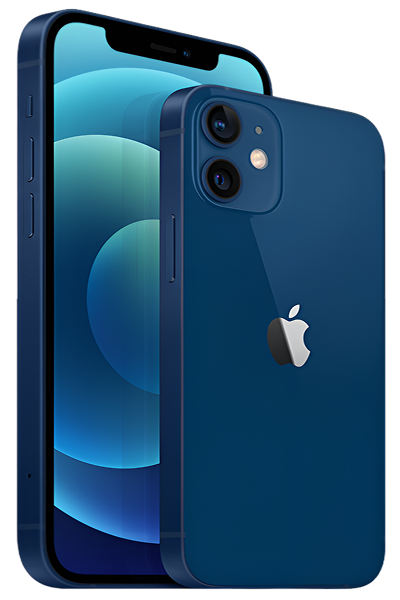
The iPhone 12 launched in October 2020, and it represented a pretty significant redesign—Apple returned to flat edges reminiscent of the iPhone 4/5 era, introduced MagSafe charging, and brought 5G to iPhones for the first time. It's got a 6.1-inch Super Retina XDR display, the A14 Bionic chip, and solid dual-camera system.
A lot of people chose the iPhone 12 as the sweet spot—capable performance without Pro pricing, good screen size, and that then-new 5G capability. It was the mainstream choice that didn't feel like settling. Now, four years later, it's in that interesting zone where it's definitely not new, but it's also definitely not obsolete.
Here's what matters today: the A14 chip is still plenty fast for everyday use. iOS 18 runs well on it. The cameras take good photos. If your iPhone 12 is having issues, they're almost certainly fixable problems with specific components, not the entire device reaching end-of-life. Let's figure out what's myth and what's reality about keeping it going.
Why Modern Phones Face These Universal Challenges
Before we tackle specific myths, let's understand something important: every smartphone, regardless of brand or age, faces certain inevitable issues. These aren't design flaws or planned obsolescence—they're just physics and chemistry.
Batteries chemically degrade over time. Your iPhone 12's lithium-ion battery has been through hundreds of charge cycles over four years. Each cycle causes microscopic chemical changes that reduce maximum capacity. This is normal aging, not a defect. After 800-1,000 cycles (roughly 3-4 years), capacity typically drops to 75-85% of original. That's expected, and it's why batteries are considered consumable components.
Glass can crack even with good protection. Your iPhone 12's Ceramic Shield front is tougher than previous iPhone screens, but it's still glass. And glass can break if it hits the ground at the wrong angle with enough force. The flat-edge design, while aesthetically pleasing, actually concentrates impact force on corners more than rounded edges did. That's not a flaw—it's just a trade-off in design.
Lightning ports accumulate debris over years. After four years of living in pockets and bags, your Lightning port has collected lint, dust, and microscopic debris. This gets compacted deeper with every cable insertion. Eventually, it prevents proper electrical contact, causing charging issues that seem like hardware failure but are actually just contamination.
Software gets more complex and sometimes bugs appear. iOS is sophisticated software that gets updated regularly. Sometimes updates introduce bugs. Sometimes app updates conflict with iOS. This can cause symptoms that look like hardware problems (crashes, slowdowns, battery drain) but are actually software issues. The good news? Software problems usually have software solutions.
Common iPhone 12 Problems and the Myths Around Them
Let's tackle the issues people actually face, and bust the myths that surround them.
1. Battery Dies Fast and Performance Feels Sluggish
What you're experiencing: Your iPhone 12 doesn't last nearly as long on a charge as it used to. You're reaching for a charger by mid-afternoon. Maybe you've also noticed the phone feels slower—apps take longer to launch, scrolling isn't as smooth, the camera app lags.
The myth to bust:
Myth: "Apple intentionally slows down older iPhones to force you to upgrade. If your phone's slow and the battery's dying, it's planned obsolescence."
Reality: Let's clear this up once and for all. Yes, Apple did throttle performance on iPhones with degraded batteries—but not to force upgrades. Here's what actually happened: batteries with high internal resistance can't deliver peak power on demand. When the processor tried to draw full power from a weak battery, the phone would unexpectedly shut down. Apple's solution was to throttle processor performance on phones with degraded batteries to prevent these shutdowns. They should've been transparent about it (and got in trouble for not being), but the intent wasn't planned obsolescence—it was preventing crashes.
The key detail? You can turn this off. Settings > Battery > Battery Health & Charging. If you see "Peak Performance Capability" with a message about performance management, your battery health has dropped enough that iOS is protecting you from unexpected shutdowns. You can disable this protection if you want full performance (at the risk of random shutdowns), or you can address the root cause: battery replacement.
What to try first:
Check battery health honestly. Settings > Battery > Battery Health & Charging shows Maximum Capacity. After four years, 75-85% is normal. Above 80%? Your battery's actually still decent. Below 75%? You're definitely going to notice performance throttling and reduced runtime.
Identify actual battery drainers. Settings > Battery shows usage by app. If an app you barely use is consuming huge percentages, that's your problem—not battery hardware failure. Delete problem apps or disable Background App Refresh for them.
Update everything. iOS updates fix performance bugs and optimize battery management. Make sure you're current.
Try a clean restart. Press Volume Up, then Volume Down, then hold the Side button until you see the Apple logo. This clears temporary issues.
Here's what we've learned from experience:
Battery health below 80% genuinely affects user experience on the iPhone 12. But here's what people don't realize: battery replacement literally transforms the device. We see iPhone 12 devices that owners swear are "dying" or "too slow to use." Then we replace the battery, and suddenly it's fast again, runs all day, and feels like new. It's not magic—it's just that the battery was the bottleneck affecting everything else.
2. Screen is Cracked or Touch Isn't Working Right
What you're experiencing: Your iPhone 12's screen has a crack, or maybe touch isn't responding properly in certain areas, or the display looks weird (lines, flickering, discoloration).
The myth to bust:
Myth: "If you get your screen replaced anywhere but Apple, iOS will detect it and disable features or slow down your phone."
Reality: Screen replacement does NOT cause iOS to disable features, slow performance, or "detect" that you got unauthorized service. This myth confuses screen repairs with Face ID repairs. Here's what's actually true:
- Screen replacement doesn't affect Face ID at all—those sensors are in the notch and aren't touched during screen repair
- iOS will show a message in Settings if it can't verify display authenticity, but this is purely informational—it doesn't affect function
- Your phone will NOT slow down or lose features from a screen replacement
- True Tone might not work if the replacement screen isn't properly calibrated, but that's a quality issue with the repair, not iOS intentionally disabling things
What IS true: low-quality screen replacements can have worse touch sensitivity, color accuracy, or brightness. But a properly-done screen repair with quality parts works exactly like the original.
What to try first (if there's no visible damage):
Remove screen protector and case. Poorly-fitted accessories can cause touch issues. Test without them.
Clean the screen thoroughly. Oils, moisture, and grime affect capacitive touch. Use a slightly damp microfiber cloth.
Force restart. Volume Up, Volume Down, hold Side button. Software glitches can cause temporary touch problems.
Check for moisture. If you've had any liquid exposure, even minor, moisture can cause erratic touch behavior. Let it dry completely in a low-humidity environment for 24-48 hours.
Tech Myth Debunked:
Myth: "Small cracks don't matter—as long as the phone works, there's no rush to fix it."
Reality: Small cracks spread. Temperature changes cause materials to expand and contract, and cracks propagate along those stress lines. What's a small corner crack today can be a spider-web across the entire screen in a few months. More importantly, cracks compromise the water resistance seal, potentially allowing moisture into the device. We've seen plenty of devices where "I'll fix it later" turned into "now there's water damage too." Early repair prevents bigger problems.
3. Charging is Slow or Inconsistent
What you're experiencing: Your iPhone 12 charges very slowly, or only charges if the Lightning cable is positioned just right, or doesn't charge at all sometimes. Maybe you're getting "Liquid Detected" warnings even though it's completely dry.
The myth to bust:
Myth: "Charging problems mean the battery or charging circuit is damaged—this is expensive, complicated repair."
Reality: At least 60-70% of charging complaints are caused by debris in the Lightning port. After four years, there's definitely lint in there. This gets compacted by cable insertions until it blocks proper pin contact. It's not hardware failure—it's just dirt. A careful cleaning (often free at repair shops) solves it. Even when it IS hardware failure, Lightning port replacement is a straightforward, moderate-investment repair—not the complex, expensive repair people imagine.
What to try first:
Inspect the port carefully. Power off completely. Use the brightest flashlight you have and really look inside the Lightning port. See lint, dust, debris? That's almost certainly your entire problem.
Clean extremely gently. Use a wooden toothpick (never metal!). Work slowly and patiently. Compacted lint doesn't come out easily—this might take 5-10 minutes of careful work.
Try different cables and adapters. Lightning cables fail more often than people realize. The thin wires inside fray with repeated bending. Test with multiple cables (ideally Apple's official cables) and different power adapters.
Check actual charging speed. With a proper 20W+ adapter, your iPhone 12 should reach roughly 50% in about 30 minutes. If it does, your charging system is fine—it was the cable, adapter, or debris.
Here's what we've learned from experience:
People often try "cleaning" their Lightning port with aggressive tools—paperclips, needles, safety pins. This causes MORE damage than the original problem. We see bent pins, scratched contacts, and physically damaged ports from overly aggressive DIY cleaning. The key word is gentle. Wooden toothpicks only. If gentle cleaning doesn't work, it's time for professional help, not more aggressive attempts.
4. 5G Connectivity Problems or Excessive Data Usage
What you're experiencing: Your iPhone 12's 5G connection is unreliable—it drops frequently, data speeds are inconsistent, or you're burning through your data plan way faster than you used to.
The myth to bust:
Myth: "5G is just better—you should always keep it enabled for the best experience."
Reality: 5G on the iPhone 12 is first-generation implementation, and it has quirks. In areas with strong 5G coverage, it's great. But in marginal 5G areas (which is still most places), your modem works overtime constantly switching between 5G and LTE. This drains battery fast, creates connectivity issues, and can actually give you a worse experience than just staying on LTE. Plus, many activities (messaging, browsing, even video streaming) work perfectly fine on LTE—5G's speed advantage only matters for large downloads.
What to try first:
Test with LTE only. Settings > Cellular > Cellular Data Options > Voice & Data. Switch from "5G On" or "5G Auto" to "LTE" for a few days. See if connectivity improves and battery life gets better. In many areas, you won't notice any practical difference except improved reliability.
Check data usage by app. Settings > Cellular shows which apps are consuming data. If something unexpected is using gigabytes, that's your problem. Disable cellular data for that app or delete it.
Turn off automatic downloads. Settings > App Store > Automatic Downloads. If "App Updates" or "App Downloads" are enabled, your phone's downloading updates on cellular, which eats data.
Use Wi-Fi whenever possible. Your iPhone 12 defaults to cellular for some tasks even when Wi-Fi is available. Settings > Cellular > scroll down to see which apps have cellular permission and disable the ones you don't need using data.
Tech Myth Debunked:
Myth: "5G radiation is dangerous and you should disable it for health reasons."
Reality: This is not supported by scientific evidence. The 5G frequencies iPhone 12 uses (Sub-6GHz) are actually lower energy than previous cellular technologies in many cases. Extensive research by health organizations worldwide has found no evidence of harm from normal cellular radiation exposure. If you want to disable 5G, do it for practical reasons (battery life, connectivity in marginal coverage areas), not health concerns that aren't scientifically supported.
5. Back Glass is Cracked or Camera Lenses Are Scratched
What you're experiencing: The back glass on your iPhone 12 is cracked (often around the camera bump), or the camera lenses themselves have scratches affecting photo quality.
The myth to bust:
Myth: "Back glass is purely cosmetic—it doesn't affect functionality, so you can just ignore it."
Reality: While back glass cracks don't affect the front display, they do compromise water resistance. The iPhone 12 is rated IP68, but cracks in the back glass break that seal. Even minor moisture exposure (humidity, rain, spills) can now reach internal components, potentially causing corrosion. Also, cracked back glass can shed small glass particles internally, which can scratch the camera lenses from behind or damage other components.
What to consider:
Back glass replacement is more involved than screen replacement. Unlike the screen, which is designed to be removable, the back glass is adhesively bonded to the frame. Replacement requires careful heating and removal, which takes time and expertise.
Cracked camera lenses directly affect photo quality. If the lens glass itself is scratched or cracked, you'll see haze, flare, or soft focus in photos. This is separate from the protective back glass—it's the actual optical element. Camera lens replacement is typically done by replacing the entire camera module.
A case can prevent further damage. If you've got a crack but aren't ready to repair it yet, a case can at least contain it and prevent it from spreading or shedding glass.
Here's what we've learned from experience:
The iPhone 12's camera bump design makes back glass particularly vulnerable. The cameras protrude, which means when you set the phone down on a table, it's resting on that glass around the camera bump. Any grit or hard particles on the surface can scratch or crack the glass. We see this pattern constantly: cracks radiating from the camera area because that's where the stress concentrates. A case with camera protection could've prevented it.
Understanding What's Normal Aging vs. What's a Real Problem
Not everything that happens to your four-year-old iPhone 12 is a problem requiring repair. Some things are just normal.
Normal aging: Battery capacity drops to 75-85% after 4 years, screen shows some micro-scratches in bright light, Lightning port requires more careful cable insertion, stainless steel frame shows light wear and fingerprints, speaker grilles accumulate some dust, iOS might feel slightly less snappy on the newest version compared to when the phone was new.
Actual problems: Battery health below 70% with unexpected shutdowns, screen cracks or significant dead zones, Lightning port won't charge with any cable after cleaning, cameras won't focus or produce blurry images consistently, Face ID stopped working entirely, severe overheating during light use with temperature warnings.
The key distinction: normal aging doesn't prevent the device from functioning as a phone. Actual problems do. If your iPhone 12 still makes calls, sends messages, runs apps, takes photos, and lasts at least most of a day on battery, it's aging normally—not failing. Strategic repairs when specific components need attention keep it running smoothly.
What to Expect When You Bring Your iPhone 12 In
If you've identified issues that need professional attention, here's what actually happens (dispelling more myths in the process).
Comprehensive diagnostic is genuinely free. We test everything: battery health under load, screen touch response and color accuracy, all cameras for focus and image quality, Face ID operation, charging system, speakers and microphones, buttons, and overall condition. This diagnostic is always free. "Free diagnostic" isn't a gimmick to get you in the door—it's standard practice.
We'll tell you if it's not worth fixing. Contrary to myth, repair shops don't automatically recommend repairs regardless of device condition. If your iPhone 12 has multiple expensive issues and limited remaining life, we'll tell you honestly. Sometimes repair doesn't make economic sense. We'd rather give you straight advice than make a quick buck on a repair that isn't in your best interest.
Quality varies, but it shouldn't. This is where some myths come from. There ARE shops that use cheap parts and rush jobs, leading to problems people then attribute to "any repair." But properly done iPhone 12 repair with quality components works exactly as it should. The challenge is knowing which shops take pride in their work and which ones cut corners.
Post-repair testing matters. We don't just replace a part and hand you your phone. We verify the repair worked, yes, but also that nothing else was inadvertently affected. Battery replacements get tested for proper health reporting and charging speed. Screens get tested for touch response across the entire surface and True Tone function. Cameras get tested for focus accuracy and image quality.
Your iPhone 12 Still Has Useful Life Left
The iPhone 12 is four years old, which sounds like a lot—but it's not actually that old for a device of its quality. The A14 Bionic chip is still capable. iOS 18 runs well on it, and Apple's not dropping support anytime soon. The cameras are still good. The build quality is still solid.
Most problems you're facing—battery degradation, screen cracks, charging port issues, 5G quirks—are either normal aging that's fixable with targeted repairs, or they're misunderstandings about what's actually wrong. The myths you've heard about repairs being pointless, phones being intentionally slowed down, or unauthorized repairs causing problems are either outdated, misunderstood, or just plain false.
If your iPhone 12 is having genuine issues—not just normal aging—they're almost certainly repairable. Battery replacement gives you back that all-day battery life. Screen replacement restores that beautiful display. Port cleaning or replacement fixes charging problems. These are targeted fixes that keep the device running smoothly, not bandaids on a dying phone.
The key is separating myth from reality. Don't let internet folklore or outdated information convince you that your iPhone 12 isn't worth maintaining. If you're dealing with specific problems, or if you just want honest professional assessment of whether repairs make sense for your situation, we're here to help. We work on iPhone 12 devices regularly, we understand what's fixable and what's not, and we're happy to give you straight answers about what makes sense for you. Your iPhone 12 isn't done yet—let's keep it running well.


Trusted repair solution for mobile phones, tablets, gaming consoles, and computer systems. We provide fast, reliable, and affordable repair services to get your devices back in perfect working condition.
The Fix is an independent repair service provider and is not affiliated with, sponsored by, or endorsed by Apple Inc., Samsung Electronics, Google LLC, or any other device manufacturer. We use high-quality compatible replacement parts unless explicitly stated. All trademarks are property of their respective owners.


© Copyright The Fix Solutions All rights reserved 2026.
Design by Deepcoder