






iPhone 11 Pro Repair Services
Get fast, reliable, and professional iPhone 11 Pro repair services at The Fix — your trusted destination for expert device care.
Common Repairs We Handle Daily


iPhone 11 Pro Repair: Extend Your Premium Device's Life Sustainably
Why do so many iPhone 11 Pro owners hesitate to invest in repairs for a five-year-old device? Is it really "too old" to fix, or are you letting myths about phone longevity influence your decision? You paid premium money for a premium device back in 2019—that stainless steel frame, the triple-camera system, the gorgeous Super Retina XDR display. These weren't just features—they were investments in quality and longevity.
Now it's 2025, and your iPhone 11 Pro is still your daily companion. Maybe the battery doesn't last quite as long. Perhaps there's some wear on that stainless steel frame. Or maybe you're wondering: is professional iPhone 11 Pro repair worth it at this point, or should I finally upgrade?
Here's what you need to know: your iPhone 11 Pro isn't just surviving—it's still a legitimately capable device. The A13 Bionic chip remains fast, those cameras still take beautiful photos, and iOS 18 support means Apple's still committed to it. With smart preventative care and strategic iPhone 11 Pro repair when components need attention, this device can serve you well into 2027 or beyond. That's not just financially smart—it's the environmentally responsible choice. Let's talk about how to make that happen.
Getting to Know Your iPhone 11 Pro
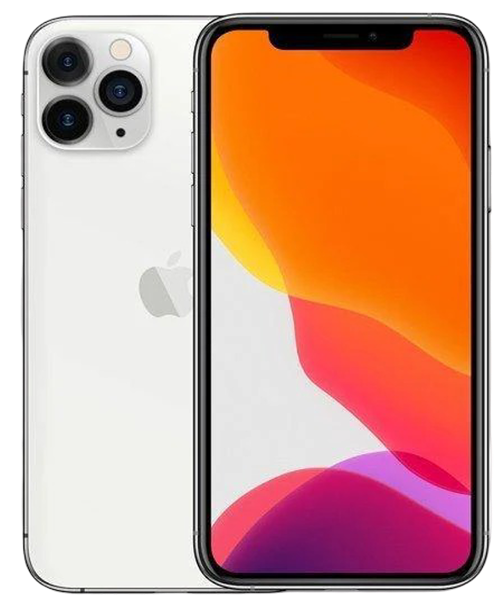
The iPhone 11 Pro launched in September 2019 as Apple's first "Pro" iPhone—the term that's now standard but was new then. Everything about it screamed premium: surgical-grade stainless steel frame, that stunning matte glass back in midnight green (or space gray, silver, gold), the triple-camera system that set new standards for mobile photography, and the Super Retina XDR display with excellent color accuracy and HDR.
You chose the Pro model for specific reasons. Maybe it was the telephoto camera for versatile photography. Maybe the premium materials and build quality. Maybe you just wanted the absolute best iPhone available in 2019. Whatever your motivation, you invested in quality—something built to last, not disposable tech designed for quick replacement.
Five years later, here's what hasn't changed: the A13 Bionic chip is still fast for everyday use. The triple-camera system with Night mode still produces excellent photos. iOS 18 runs reasonably well. The stainless steel frame, while it shows fingerprints and patina, remains structurally solid. When you address specific issues through iPhone 11 Pro repair—battery aging, accidental damage, normal wear—the device continues delivering that premium experience you paid for.
How to Keep Your iPhone 11 Pro Running Great (Prevention First)
The most cost-effective iPhone 11 Pro repair is the one you never need. Let's start with prevention.
Protect That Premium Build
The stainless steel frame deserves care. Yes, it's structurally stronger than aluminum. But it shows micro-scratches, fingerprints, and develops patina over time. A quality case isn't just protection—it's preservation of the premium aesthetics you paid extra for. Raised edges around the screen and camera bump prevent the damage that'd require expensive iPhone 11 Pro repair later.
Screen protectors remain essential. Your Super Retina XDR display is gorgeous, but the glass can still crack. After five years, you've probably accumulated micro-scratches even without major drops. A tempered glass protector costs very little compared to screen replacement through iPhone 11 Pro repair.
Mind the triple-camera array. Those three camera lenses protrude noticeably. When you set your phone down, it's resting on that glass. A case with substantial camera protection prevents the scratches and cracks we constantly see in iPhone 11 Pro repair diagnostics.
Manage Battery Health Proactively
Check current health status. Settings > Battery > Battery Health & Charging shows Maximum Capacity. After five years, 70-80% is normal. Below 70%? You're definitely experiencing reduced runtime and likely performance throttling. The good news? Battery replacement through iPhone 11 Pro repair essentially gives you a new phone experience.
Use Optimized Battery Charging. This feature (Settings > Battery > Battery Health & Charging) delays charging past 80% until you actually need it. Keeping batteries at 100% for extended periods accelerates aging. Let iOS manage this—it genuinely extends battery lifespan and delays the need for iPhone 11 Pro repair.
Avoid temperature extremes. Heat damages batteries faster than anything else. Don't leave your iPhone 11 Pro in hot cars, don't use it in direct sunlight for extended periods, and remove the case if it's getting warm during intensive use. Five years of careful thermal management makes a measurable difference in battery longevity.
Set realistic expectations. After five years, some capacity loss is inevitable. But there's a big difference between 75% capacity (still functional) and 65% (noticeably limiting). When capacity drops enough to affect your daily use, battery replacement through iPhone 11 Pro repair is the clear solution.
Keep Software Current and Optimized
Updates matter for older devices. iOS updates include critical optimizations specifically for older iPhones. Your iPhone 11 Pro will continue receiving updates—enable automatic updates to ensure you're running the latest version. This isn't just features—it's Apple actively working to keep your five-year-old device running smoothly.
Manage storage intelligently. Settings > General > iPhone Storage shows what's taking up space. Keep at least 10-15% free—full storage causes slowdowns. After five years, you've probably accumulated substantial photos, message threads, and app data. Regular cleanup prevents performance issues that might make you think you need a new phone when you just need storage management.
Monitor app behavior. Settings > Battery shows which apps consume power. After five years, you've probably got apps you no longer use still running in the background. Regular review and deletion of unused apps keeps your iPhone 11 Pro running efficiently and delays the need for performance-related upgrades.
Regular Physical Maintenance
Clean that stainless steel frame. It shows fingerprints readily. Weekly cleaning with a slightly damp microfiber cloth keeps it looking premium. For tougher grime in the seams, a soft toothbrush works. This is purely aesthetic, but maintaining that Pro appearance is part of what you paid for.
Inspect ports monthly. After five years, your Lightning port has collected substantial lint. Power off, use a bright light, and gently clean with a wooden toothpick. This prevents most charging issues before they require iPhone 11 Pro repair.
Check case condition. Cases degrade over five years. If yours is cracking, losing grip, or no longer fits snugly, replace it. A worn-out case doesn't protect properly, increasing your risk of damage requiring iPhone 11 Pro repair.
Common iPhone 11 Pro Problems After Five Years
Let's address the issues Pro owners face and the environmental context of repair versus replacement.
1. Battery Life Has Significantly Declined
What you're experiencing: Your iPhone 11 Pro used to last all day comfortably. Now you're hunting for chargers by mid-afternoon. The battery percentage drops quickly, and you might see performance slowdowns or unexpected shutdowns when battery is below 30%.
What's actually happening: After five years and 1,000-1,500 charge cycles, substantial battery degradation is expected. Check Settings > Battery > Battery Health & Charging. If Maximum Capacity shows 70-75%, that's normal aging. Below 70%? You're definitely experiencing reduced runtime and likely performance management (iOS throttling processor speed to prevent shutdowns from weak batteries).
The environmental perspective: Battery replacement through iPhone 11 Pro repair extends device life by 2-3 years while creating a fraction of the environmental impact of manufacturing a new phone. Every new smartphone generates approximately 85 kg of CO2 emissions, requires rare earth mining, and uses substantial water and energy. Battery replacement? Minimal impact while maximizing the value of resources already invested in your device.
What to try first:
Check battery health honestly. 75%+ is decent for five years. 65-74% is borderline—replacement makes sense if battery life bothers you. Below 65%? Replacement definitely recommended.
Identify power-draining apps. Settings > Battery shows usage by app. Something unexpected consuming huge percentages? That's your problem, not necessarily hardware failure requiring iPhone 11 Pro repair.
Update everything. iOS updates include battery management optimizations. Make sure you're current.
Did You Know?
The iPhone 11 Pro's battery capacity is 3,046 mAh—smaller than the Pro Max but larger than the standard 11. After five years of degradation, even at 70% health, that's still roughly 2,132 mAh of usable capacity. For comparison, that's more than the brand-new iPhone SE's full capacity. This means your "degraded" iPhone 11 Pro battery still has more absolute capacity than some current smaller iPhones at 100% health. Professional iPhone 11 Pro repair with battery replacement doesn't just restore runtime—it gives you back capacity that's still competitive with current devices.
What we've learned from experience:
Five-year-old batteries affect more than just runtime. We regularly see iPhone 11 Pro devices where owners think the entire phone is slow and outdated. Then we perform iPhone 11 Pro repair with battery replacement, and suddenly it's fast again. The A13 chip was never slow—it was being throttled to protect the weak battery. Camera launches faster, apps open quicker, everything feels more responsive. Battery replacement doesn't just restore runtime—it restores the premium experience.
2. Screen Cracks or Touch Issues
What you're experiencing: There's a crack on that beautiful Super Retina XDR display, or touch isn't responding properly in certain areas, or you're seeing display issues like flickering or lines.
What's actually happening: After five years, cumulative drop probability is high. Cracks are physical damage. Touch issues without visible damage typically indicate digitizer failure or loose display cables from impacts. Your Pro's display is higher quality than standard models—better color accuracy, higher brightness—which means maintaining that quality through proper iPhone 11 Pro repair matters.
The sustainability angle: Screen damage often pushes people toward upgrades when iPhone 11 Pro repair would be perfectly sufficient. The logic board, cameras, Face ID, frame—everything else is still excellent. Replacing one damaged component keeps the entire device functional. That's dramatically more sustainable than manufacturing a completely new device.
What to try first (if no visible damage):
Remove screen protector and case. Test without accessories. Poorly-fitted protectors or tight cases can cause pressure points.
Clean thoroughly. Use a slightly damp microfiber cloth. Oils affect capacitive touch.
Force restart. Press and release Volume Up, press and release Volume Down, hold Side button until Apple logo appears. This resolves temporary glitches.
What we've learned from experience:
The iPhone 11 Pro's Super Retina XDR display is noticeably better than standard iPhone 11 screens. When getting iPhone 11 Pro repair for screen replacement, quality matters—cheap screens don't match the color accuracy, brightness, or touch sensitivity. We see people who got cheap repairs elsewhere, then come to us because the replacement looks washed out or touch isn't as responsive. Quality components maintain the premium experience you paid for in iPhone 11 Pro repair.
3. Camera System Problems
What you're experiencing: One or more of your three cameras isn't working right. Autofocus won't lock, photos are blurry, or the telephoto or ultra-wide doesn't launch. Or you're seeing that camera shake or jitter.
What's actually happening: The iPhone 11 Pro's triple-camera system includes sophisticated stabilization and autofocus mechanisms—tiny motors moving lens elements with precision. After five years and likely multiple drops, these delicate systems can fail. External lens glass might look perfect, but internally, mechanisms are damaged.
Why it's worth fixing: Your iPhone 11 Pro's cameras—with Night mode, Deep Fusion, and Smart HDR—are still better than current budget and many mid-range phones. If photography matters to you, iPhone 11 Pro repair restoring camera functionality keeps an excellent tool rather than forcing upgrade.
What to try first:
Clean all three lenses thoroughly. Fingerprints genuinely affect quality and autofocus.
Test each camera individually. If only one fails, that's isolated module failure—not system-wide.
Try third-party apps. If cameras work in Instagram but not Apple's app, it's software—not hardware requiring iPhone 11 Pro repair.
What we've learned from experience:
After five years, most iPhone 11 Pro devices have been dropped multiple times. Even cushioned drops onto carpet can damage internal camera mechanisms. We often see devices where owners don't connect camera problems to drops months earlier. If cameras worked before a specific drop, that impact likely requires iPhone 11 Pro repair with module replacement.
4. Charging Port Inconsistencies
What you're experiencing: Charging is unreliable. Sometimes works, sometimes requires positioning the Lightning cable precisely, or won't charge at all. Maybe very slow even with good charger. Or "Liquid Detected" warnings when phone's dry.
What's actually happening: After five years, your Lightning port has substantial compacted debris. This prevents proper contact and seems like hardware failure but is often just contamination addressable without extensive iPhone 11 Pro repair parts replacement.
What to try first:
Inspect carefully. Power off. Use bright light and examine Lightning port. After five years, you'll definitely see compacted lint.
Clean extremely gently. Wooden toothpick only (never metal). Work patiently—five years of debris takes time.
Test multiple cables. After five years, you've gone through multiple cables. Try different ones before concluding port is damaged.
What we've learned from experience:
Five-year-old ports are typically packed with debris. We estimate 70-80% of "charging port broken" complaints on iPhone 11 Pro devices are resolved with professional cleaning—minimal iPhone 11 Pro repair cost. But aggressive DIY cleaning with metal tools damages ports and converts simple cleaning into genuine hardware damage requiring replacement.
5. Stainless Steel Frame Wear
What you're experiencing: Your premium stainless steel frame shows wear—micro-scratches, patina, fingerprints. It's cosmetic, but bothers you because you bought a Pro specifically for that premium feel.
The reality: Stainless steel develops patina of fine scratches that can be polished if it bothers you. But many Pro users like this worn look—it gives character, shows it's well-used. It's purely aesthetic without affecting function.
The sustainability perspective: Cosmetic wear pushes people toward upgrades when devices are perfectly functional. Your iPhone 11 Pro's frame might look worn, but it's structurally sound. Don't let cosmetic wear convince you that you need replacement when iPhone 11 Pro repair can address functional issues while the frame continues serving you.
What you can do:
Polish if desired. Stainless steel polishes work on phone frames. Gentle polishing restores much original luster.
Use case going forward. Prevents further wear while hiding existing patina.
Embrace the patina. Worn stainless steel on well-used Pro looks distinguished, not trashy.
What we've learned from experience:
Frame wear rarely needs iPhone 11 Pro repair—we're talking deep structural damage, not surface scratches. Most Pro owners worried about appearance are surprised how much better devices look after thorough cleaning. Oils in micro-scratches make them look worse. Cleaning reveals frames are better than thought.
What to Expect with iPhone 11 Pro Repair at The Fix
If you've decided iPhone 11 Pro repair makes sense, here's what happens.
Comprehensive free diagnostic. We test everything: battery health under load, all three cameras, screen functionality, Face ID, charging system, speakers, buttons, overall condition. For five-year-old devices, we're thorough because we want you making informed decisions about iPhone 11 Pro repair. Always free.
Honest assessment about value. We'll be straight: sometimes iPhone 11 Pro repair makes great sense, sometimes it's borderline, sometimes it honestly doesn't. We'll explain which category your device falls into and why. Honest advice over making a sale.
Quality components for Pro devices. When you proceed with iPhone 11 Pro repair, we use components appropriate for Pro models. Screens matching color accuracy. Batteries with accurate reporting. We don't cheap out just because the phone is older.
Thorough post-repair testing. We verify iPhone 11 Pro repair worked and nothing else affected. Fully functional and tested—not just "probably working."
Your iPhone 11 Pro Can Keep Going
The iPhone 11 Pro has served you well for five years—longer than many people keep phones. It's already proven itself as a solid investment. The question now is whether strategic iPhone 11 Pro repair can extend that investment further.
For many owners, the answer is yes. Battery replacement transforms the device. Screen replacement restores the premium display. One or two targeted fixes cost far less than replacement. And environmentally, keeping your iPhone 11 Pro running through repair is genuinely meaningful—manufacturing new phones creates substantial impact that repair avoids.
But let's be realistic: at five years, your iPhone 11 Pro is in its later life stage. It won't last forever. At some point, replacement makes more sense than continued repairs. The key is being honest about what you need and what the device can deliver.
If you're experiencing issues and wondering whether iPhone 11 Pro repair is worthwhile, bring it for free diagnostic. We'll tell you honestly what's wrong, what repairs entail, and whether we think it makes sense. Sometimes it clearly does. Sometimes it's borderline. Sometimes we'll honestly tell you investing in something newer is smarter.
Your iPhone 11 Pro was premium when new and can continue serving you well with strategic iPhone 11 Pro repair. Let's figure out together whether it's got more good years or whether it's earned retirement.


Trusted repair solution for mobile phones, tablets, gaming consoles, and computer systems. We provide fast, reliable, and affordable repair services to get your devices back in perfect working condition.
The Fix is an independent repair service provider and is not affiliated with, sponsored by, or endorsed by Apple Inc., Samsung Electronics, Google LLC, or any other device manufacturer. We use high-quality compatible replacement parts unless explicitly stated. All trademarks are property of their respective owners.


© Copyright The Fix Solutions All rights reserved 2026.
Design by Deepcoder