






iPhone 11 Repair Services
Get fast, reliable, and professional iPhone 11 repair services at The Fix — your trusted destination for expert device care.
Common Repairs We Handle Daily


iPhone 11 Repair: Keep Your Reliable Daily Driver Running Strong
Picture this: it's September 2019, and you're holding Apple's newest iPhone. The iPhone 11 might not be the "Pro" model, but it's got everything you actually need—great cameras, solid battery life, that reliable A13 Bionic chip, and it costs less than the fancy Pro models. You made a smart choice: capability without overpaying for features you didn't need.
Fast forward to 2025, and your iPhone 11 is still your daily companion. Maybe the battery's not lasting quite as long as it used to. Perhaps there's a crack you've been living with. Or maybe you're wondering: is professional iPhone 11 repair worth it for a five-year-old phone, or is it finally time to upgrade?
Here's the truth: your iPhone 11 isn't just "still working"—it's still genuinely capable. The A13 Bionic chip remains fast for everyday tasks, the cameras still take great photos, and iOS 18 support means Apple hasn't abandoned it. With smart maintenance and strategic iPhone 11 repair when needed, this device can easily serve you well into 2027 or beyond. That's five-plus years longer than most people keep their phones. Let's talk about how to make that happen while being smart about both your wallet and the environment.
Getting to Know Your iPhone 11
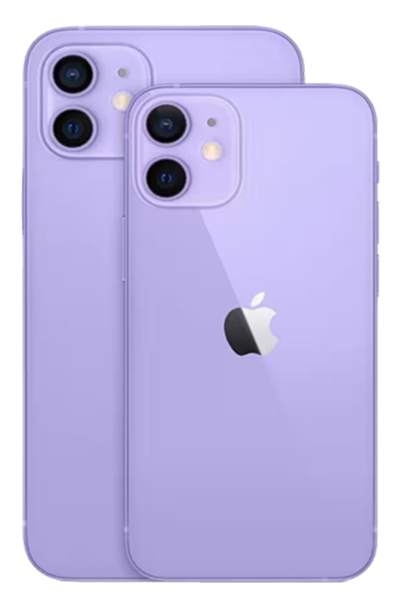
The iPhone 11 launched in September 2019 as Apple's mainstream flagship—the phone most people actually bought. It brought flagship features like the A13 Bionic chip, dual-camera system with Night mode, improved battery life over the XR, and that tougher glass (though not quite Ceramic Shield yet). It was available in those fun colors—purple, yellow, green, along with the standard black, white, and red.
You chose the iPhone 11 because it made sense. Maybe you wanted solid performance without Pro pricing. Maybe you liked the colors. Maybe you just needed a reliable phone that'd last. Whatever your reason, you made a practical choice that's proven itself—five years later, it's still going strong.
Here's what matters today: the A13 Bionic chip is still plenty fast. iOS 18 runs well on it. The cameras take good photos. The build quality has held up. If your iPhone 11 is having issues, they're almost certainly fixable problems with specific components through professional iPhone 11 repair, not the entire device reaching end-of-life. With proper care, there's no reason this phone can't keep serving you for years.
Why Modern Phones Face These Universal Challenges
Before we dive into specific problems, let's understand something important: every smartphone faces certain inevitable issues after five years of daily use.
Batteries are consumable components that chemically age. Your iPhone 11's lithium-ion battery has been through over 1,000 charge cycles by now. Each cycle causes microscopic chemical changes—electrolyte breakdown, electrode structural degradation, increased internal resistance. After five years, capacity typically drops to 70-80% of original, sometimes lower. This is normal aging, not defect. Battery replacement through iPhone 11 repair addresses this completely.
Glass screens can crack despite being durable. Your iPhone 11's front glass is tougher than older iPhones, but it's still glass. After five years, you've probably dropped it multiple times. Eventually, one of those drops hits at just the wrong angle and cracks appear. But here's the good news: screens are one of the most straightforward components to address through iPhone 11 repair.
Ports accumulate years of debris. After five years in pockets and bags, your Lightning port has collected substantial lint, dust, and microscopic particles. This gets compacted with every cable insertion until it prevents proper contact. What seems like hardware failure is often just contamination—frequently resolved without needing iPhone 11 repair parts replacement.
Software gets more demanding over time. iOS 18 is more sophisticated than iOS 13 that your phone shipped with. Sometimes older devices need optimization to run newer software smoothly. But Apple's actually done well here—your iPhone 11 still runs iOS 18 reasonably well, which speaks to the A13 chip's capability and Apple's commitment to supporting older devices.
Common iPhone 11 Problems (And What to Do About Them)
Let's walk through the issues iPhone 11 owners actually face after five years.
1. Battery Dies Much Faster Than It Used to
What you're experiencing: Your iPhone 11 used to last all day comfortably. Now you're reaching for chargers by mid-afternoon, or maybe even lunchtime if you're using it heavily. The battery percentage seems to drop faster than it should, and you might see "Low Power Mode" suggestions appearing earlier in the day.
What's actually happening: After five years and 1,000+ charge cycles, significant battery degradation is expected. Check Settings > Battery > Battery Health & Charging. If Maximum Capacity shows 75-80%, that's normal aging. Below 75%? You're definitely experiencing reduced runtime and possibly performance throttling (iOS limits processor speed when batteries can't deliver peak power).
Why iPhone 11 repair makes sense here: Battery replacement doesn't just restore runtime—it often makes the entire phone feel faster. That slowness you've been experiencing? It might be performance management protecting the weak battery, not the A13 chip actually slowing down. Professional iPhone 11 repair with battery replacement can make your phone feel new again.
What to try first:
Check battery health honestly. Settings > Battery > Battery Health & Charging shows Maximum Capacity. Above 75%? Your battery's actually not terrible for a five-year-old device—look for software issues. Below 70%? Replacement definitely makes sense.
Hunt down power-draining apps. Settings > Battery shows usage by app. If something you barely use is consuming huge percentages, that's your problem—not necessarily battery hardware failure. Delete problematic apps or disable Background App Refresh for them.
Update iOS and all apps. Updates often include power management optimizations. Make sure you're running the latest versions.
Manage connectivity smartly. Settings > Cellular > Cellular Data Options. The iPhone 11 doesn't have 5G, so you don't have that battery drain issue—but LTE in poor coverage areas still kills battery. If you're frequently in low-signal areas, enable Airplane Mode or use Wi-Fi calling.
What we've learned from experience:
We regularly see iPhone 11 devices that owners are convinced are "too old and slow to be worth fixing." Then we perform iPhone 11 repair with battery replacement, and suddenly it's fast again, runs all day, and the owner's shocked at the difference. After five years, battery degradation affects everything—not just runtime but overall performance. Addressing it through professional iPhone 11 repair transforms the device.
2. Screen Has Cracks or Isn't Responding Properly
What you're experiencing: There's a visible crack on the screen—maybe small, maybe significant. Or perhaps touch isn't responding properly in certain areas. Or you're seeing display issues like flickering, lines, or discoloration.
What's actually happening: After five years, the cumulative probability of screen damage is high—most phones experience at least one significant drop in that time. Cracks are physical damage. Touch issues without visible damage usually indicate digitizer problems (the touch-sensing layer failing) or loose display cables from impacts.
Why quality matters for iPhone 11 repair: Even though your iPhone 11 is five years old, it doesn't mean you should settle for low-quality screen replacement. Your eyes don't care how old the phone is—you're still looking at that screen every day. Quality screens with proper color accuracy and touch sensitivity make a huge difference in daily experience when getting iPhone 11 repair.
What to try first (if no visible damage):
Remove screen protector and case. Test touch without accessories. Some poorly-fitted protectors or tight cases cause pressure points affecting touch.
Clean thoroughly. Use a slightly damp microfiber cloth. Oils and moisture affect capacitive touch more than you'd think.
Force restart. Press and quickly release Volume Up, press and quickly release Volume Down, then hold Side button until you see the Apple logo. This resolves temporary software glitches.
What we've learned from experience:
Five-year-old phones often have accumulated minor damage—small edge cracks, areas with reduced touch sensitivity—that owners have learned to work around. But these issues typically get worse over time, not better. That small crack spreads. That dead zone grows. Early iPhone 11 repair for screen issues prevents them from becoming bigger problems later.
3. Camera Issues: Blurry Photos or Camera Won't Focus
What you're experiencing: Your iPhone 11's cameras aren't working right. Maybe autofocus won't lock properly. Maybe photos are consistently blurry even though you're holding still. Or maybe one of the two cameras (wide or ultra-wide) doesn't work at all.
What's actually happening: The iPhone 11's camera system includes optical image stabilization and autofocus mechanisms—tiny motors moving lens elements with precision. After five years and potentially multiple drops, these delicate systems can fail. The external camera lens glass might look perfect, but internally, something's damaged.
Why it's worth fixing through iPhone 11 repair: Your iPhone 11's cameras—especially with Night mode—are still quite capable. They take better photos than current budget phones. If cameras are important to you, professional iPhone 11 repair restoring camera functionality keeps a good photography tool in your hands rather than forcing an upgrade.
What to try first:
Clean both camera lenses thoroughly. Use a clean microfiber cloth. Fingerprints and smudges genuinely affect image quality and autofocus.
Test both cameras separately. Switch between wide and ultra-wide. If only one isn't working, that's isolated module failure—not system-wide issues.
Try third-party camera apps. If cameras work in Instagram or Snapchat but not Apple's Camera app, it's software-related—not hardware requiring iPhone 11 repair.
Force-close Camera app. Swipe up from bottom and hold, then swipe up on Camera to close it completely. Reopen fresh.
What we've learned from experience:
After five years, most iPhone 11 devices have been dropped multiple times. Even drops that seemed minor—onto carpet, into couch cushions—can damage internal camera mechanisms. We often see devices where owners don't connect camera problems to drops that happened months earlier. If your cameras worked fine before a specific drop, even a cushioned one, that impact likely requires iPhone 11 repair with camera module replacement.
4. Charging Port Problems: Inconsistent or Slow Charging
What you're experiencing: Charging is unreliable. Sometimes it works fine, sometimes you have to position the Lightning cable just right, or it won't charge at all. Maybe charging is very slow even with a decent charger. Or you're getting "Liquid Detected" warnings when the phone's dry.
What's actually happening: After five years, your Lightning port has accumulated substantial debris. Pocket lint gets compacted deeper with every cable insertion over hundreds or thousands of plug-in cycles. This prevents proper electrical contact and seems like hardware failure when it's often just contamination that can be addressed without extensive iPhone 11 repair.
What to try first:
Inspect carefully. Power off completely. Use a bright flashlight and really examine inside the Lightning port. After five years, you'll almost certainly see compacted lint.
Clean extremely gently. Use a wooden toothpick (never metal—you'll bend pins). Work slowly and patiently. Five years of compacted debris takes time to remove—don't rush it.
Test with multiple cables. Lightning cables wear out. After five years, you've probably been through multiple cables. Try different ones (ideally Apple's official cables) before concluding the port is damaged.
Check actual charging speed. With a proper 20W adapter, your iPhone 11 should still charge reasonably well. If it does once cleaned, your charging system was fine—it was just the debris.
What we've learned from experience:
Five-year-old Lightning ports are typically packed with debris. We estimate 70-75% of "charging port broken" complaints on iPhone 11 devices are resolved with thorough professional cleaning—no parts replacement, minimal iPhone 11 repair cost. But aggressive DIY cleaning with metal tools can damage ports and convert a simple cleaning into genuine hardware damage requiring replacement. If gentle wooden toothpick cleaning doesn't work, professional help prevents making it worse.
5. Back Glass Cracked or Camera Lenses Scratched
What you're experiencing: The back glass has cracks, particularly around the camera area. Or the camera lens glass itself has scratches affecting photo quality.
What's actually happening: The iPhone 11's dual-camera bump protrudes, which means when you set it down, it's resting on that glass. Over five years, that's thousands of times setting it on various surfaces. Any grit or hard particles scratch or crack the glass. The colorful back glass also shows damage more readily than darker colors.
Why it matters: Back glass cracks compromise water resistance. The iPhone 11 is rated IP68, but cracks break that seal. Moisture can now reach internal components, potentially causing corrosion that's far more expensive to address through iPhone 11 repair than the original crack. While not as urgent as screen cracks, back glass damage shouldn't be ignored indefinitely.
What to consider:
Back glass replacement is more involved than screen replacement. It's adhesively bonded to the frame and requires careful heating and removal, making iPhone 11 repair for back glass more time-intensive.
A case can contain damage temporarily. If you're not ready for repair yet, a case prevents cracks from spreading and keeps glass from shedding.
Camera lens scratches directly affect photos. If actual lens glass is scratched (not just surrounding back glass), you'll see haze or soft focus. This typically requires camera module replacement as part of iPhone 11 repair.
What we've learned from experience:
The iPhone 11's fun colors (purple, yellow, green) show back glass damage more noticeably than black or white. We see many colorful iPhone 11 devices where cracks are bothering owners more because they're so visible. But functionally, it's the water resistance compromise that matters most. If you've got back glass cracks and you're keeping the phone, consider iPhone 11 repair sooner rather than later to prevent moisture damage.
The Repair Value Proposition: Five Years In, Still Worth It?
Let's be honest about the economics and practicality of iPhone 11 repair at this point.
What You've Already Gotten
Five years of reliable service from a device is excellent. You've already maximized value from your original investment. The question now is: can you extend that even further through strategic iPhone 11 repair, or is it time to move on?
What Your iPhone 11 Can Still Do
The A13 Bionic chip handles everyday tasks well—messaging, browsing, social media, streaming, navigation. The cameras take good photos, especially with Night mode. iOS 18 runs on it (though not as smoothly as on newer devices). For most people's actual daily use, the iPhone 11 is still capable.
When iPhone 11 Repair Makes Sense
If battery is your only issue: Replacement costs far less than a new phone and gives you 2-3 more years of use. This is the clearest case for iPhone 11 repair.
If you've got a cracked screen but everything else works: Screen replacement restores full functionality. If the device is otherwise fine, this repair makes sense.
If you need one or two targeted repairs: Battery plus screen, or port replacement, or camera fix. These combined still cost considerably less than replacement.
When It Might Not Make Sense
If you need extensive repairs: Multiple major issues (battery, screen, back glass, cameras all failing) might cost enough that investing in a newer used device becomes comparable.
If performance is genuinely limiting you: If the A13 chip feels too slow for your needs (demanding apps, intensive gaming), iPhone 11 repair won't address that—you'd need newer hardware.
If you want newer features: Things like 5G, better cameras, MagSafe, ProMotion displays—iPhone 11 repair can't add features that weren't there originally.
The Environmental Angle
Here's where iPhone 11 repair becomes more compelling: keeping a five-year-old device running through repairs is genuinely meaningful environmentally. Manufacturing new phones creates substantial carbon emissions, requires rare earth mining, and generates e-waste. If targeted repairs can extend your iPhone 11's life to 6-7 years total, that's impressive longevity and significantly better for the planet than upgrading every 2-3 years.
What to Expect with iPhone 11 Repair at The Fix
If you've decided iPhone 11 repair makes sense for your situation, here's what the process looks like.
Comprehensive free diagnostic. We test everything: battery health, screen functionality, both cameras, Face ID, charging system, speakers, buttons, overall condition. For a five-year-old device, we're particularly thorough because we want to identify all issues upfront so you can make informed decisions about iPhone 11 repair. This diagnostic is always free.
Honest assessment about repair value. We'll be straight with you: for a five-year-old iPhone 11, sometimes repair makes great sense, sometimes it's borderline, and sometimes it honestly doesn't. We'll tell you which category your device falls into and explain why. We'd rather give honest advice than make a sale on iPhone 11 repair that isn't in your best interest.
Quality components when you proceed. If you choose to go ahead with iPhone 11 repair, we use quality parts appropriate for the device. Screens with proper color accuracy and touch sensitivity. Batteries with accurate health reporting. We don't use the absolute cheapest parts just because the phone is older.
Thorough testing after iPhone 11 repair. We verify repairs worked properly and that nothing else was affected. You get your device back fully functional and tested—not just "probably working."
Your iPhone 11 Has Earned Its Keep—Can It Keep Going?
The iPhone 11 has served you well for five years. That's already longer than many people keep their phones. The question isn't whether it's been a good investment—it clearly has. The question is whether strategic iPhone 11 repair can extend that investment even further.
For many iPhone 11 owners, the answer is yes. If battery is your main issue, replacement transforms the device. If you've got a cracked screen but everything else works, repair makes sense. If you need one or two targeted fixes, combined they're still far less than replacement cost.
But let's be realistic: at five years old, your iPhone 11 is in the later stage of its life. It won't last forever, and at some point, replacement will make more sense than continued repairs. The key is being honest about what you need and what the device can still deliver.
If you're experiencing issues and wondering whether iPhone 11 repair is worthwhile, bring it in for a free diagnostic. We'll tell you honestly what's wrong, what repairs would entail, and whether we think it makes sense for your situation. Sometimes it clearly does. Sometimes it's borderline and depends on your budget and needs. And sometimes we'll honestly tell you that investing in something newer is the smarter move.
Your iPhone 11 has been reliable—let's figure out together whether it's got more good years left in it with some strategic iPhone 11 repair, or whether it's earned a well-deserved retirement.


Trusted repair solution for mobile phones, tablets, gaming consoles, and computer systems. We provide fast, reliable, and affordable repair services to get your devices back in perfect working condition.
The Fix is an independent repair service provider and is not affiliated with, sponsored by, or endorsed by Apple Inc., Samsung Electronics, Google LLC, or any other device manufacturer. We use high-quality compatible replacement parts unless explicitly stated. All trademarks are property of their respective owners.


© Copyright The Fix Solutions All rights reserved 2026.
Design by Deepcoder