





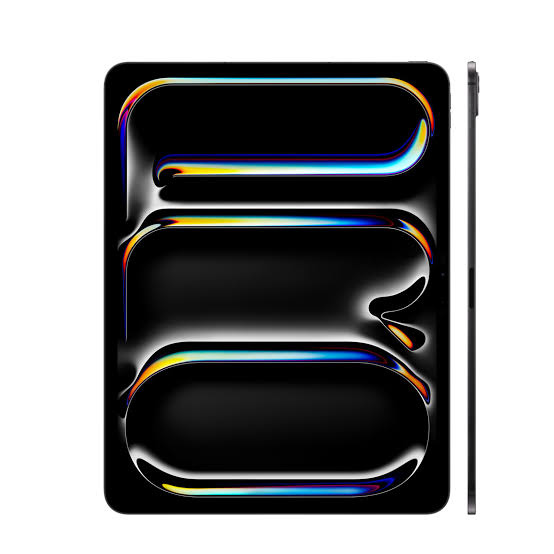
iPad Pro 13 (M4) Repair Services
At The Fix, we help with iPad Pro 13 (M4) screen damage, battery concerns, charging problems and camera faults. Visit your nearest location to discuss the issue and get a repair quote.
Common Repairs We Handle Daily


iPad Pro 13 (M4) Repair at The Fix
The 2024 iPad Pro 13-inch (M4) combines an Ultra Retina XDR Tandem OLED display with Apple's M4 chip in a body just 5.1 mm thick. Its large, fully laminated screen is central to drawing, reading, video calls and everyday work, so display damage or touch problems can quickly interrupt how you use the tablet.
At The Fix, we help with iPad repair needs including screen damage, battery problems and camera faults. If your tablet is not charging, the cause should be identified before deciding what repair is appropriate. The right repair depends on the symptoms and the cause of the problem. Explore the options below, then visit your nearest The Fix location to get a quote for your iPad Pro 13 (M4).
What Should You Do If Your iPad Pro 13 (M4) Screen Is Damaged?
A cracked screen, lines across the display, flickering, dark areas or unreliable touch response can make an iPad Pro difficult to use. The 13-inch model uses a 2752-by-2064-pixel Tandem OLED display with ProMotion, which supports adaptive refresh rates from 10 Hz to 120 Hz. Damage may affect the glass, image quality, touch input or more than one of these functions.
Not every display symptom has the same cause. If the image is distorted or touch input fails after a drop, avoid pressing hard on the screen or trying to separate its layers. For sharp glass fragments, handle the tablet carefully and keep it away from children. The Fix offers screen repair for iPad devices. Visit a nearby location to discuss the damage and get a quote for the repair your tablet needs.
When Does Your iPad Pro 13 (M4) Need a Battery Replacement?
A battery that drains much faster than it used to, causes unexpected shutdowns or struggles to hold enough charge may need attention. Apple lists a 38.99-watt-hour built-in rechargeable lithium-polymer battery for this model. Actual battery life varies with settings, applications, network conditions and how the tablet is used.
Rapid drain does not automatically mean the battery has failed. Background activity, software behavior and other power-related faults can also affect runtime. If the tablet becomes hot, its enclosure begins to separate, or the battery appears swollen, stop using and charging it. Do not press the screen or enclosure back into place. The Fix offers battery replacement services for iPad devices; contact your nearest location for a quote based on the problem.
Why Is Your iPad Pro 13 (M4) Not Charging Properly?
This iPad Pro charges through a USB-C connector that supports Thunderbolt 3 and USB 4. If charging starts and stops, the cable feels loose, or the tablet does not respond when connected, the cause could be the cable, power adapter, connector or another internal fault. A charging symptom alone does not prove that the port is damaged.
If the tablet or cable shows signs of liquid exposure, unusual heat or physical damage, disconnect it if safe to do so and do not continue charging it. Avoid inserting metal objects or tools into the connector. Charging symptoms can have several causes, so the connector should not be assumed to be defective based on symptoms alone. Visit a nearby The Fix location to discuss the issue and get a quote for the repair your tablet needs.
What Can You Do About iPad Pro 13 (M4) Camera Problems?
The iPad Pro 13 (M4) has a 12 MP rear wide camera with an ƒ/1.8 aperture, a LiDAR Scanner and a landscape-oriented front camera. If the camera shows a black image, cannot focus, or produces unexpectedly blurred photos, the cause may be software-related, lens obstruction or hardware damage.
Check whether the lens is visibly smudged and whether the issue occurs in more than one app. If the camera problem began after a drop or there is visible damage, avoid attempting to open the tablet. The Fix offers camera repair services for devices. A technician can help determine the next step, and you can request a quote for the repair indicated by the fault.
How Can The Fix Help With Your iPad Pro 13 (M4) Repair?
The Fix provides repair services for tablets, including iPad screen, battery, charging and camera concerns. Describing what happened, when the symptom began and whether the tablet suffered a drop or liquid exposure can help explain the issue when you visit. The specific repair and final quote depend on the fault identified.
Many common repairs can take about 30 minutes or less, although the time varies by repair and device condition. A more precise estimate can be provided after the problem is understood. Back up important information before service when the tablet is functioning safely enough to do so. A hardware repair should not be treated as a promise that data will always remain intact.
Frequently Asked Questions About iPad Pro 13 (M4) Repair
Can a cracked iPad Pro 13 (M4) screen be repaired?
Yes, The Fix offers iPad screen repair services. The appropriate repair depends on the type and extent of damage, including whether image quality or touch response is affected.
How can I tell whether my iPad Pro 13 (M4) battery needs replacement?
Shorter runtime, unexpected shutdowns and charging-related symptoms can indicate a battery problem, but they can have other causes too. A quote depends on the fault and the repair required.
Should I keep charging my iPad Pro 13 (M4) if it has liquid damage?
No, do not continue charging a tablet that may have liquid damage. Disconnect power if it is safe, avoid using heat to dry it, and seek professional help.
Need iPad Pro 13 (M4) repair? Visit your nearest The Fix location to discuss the issue and get a quote for the repair your tablet needs.


Trusted repair solution for mobile phones, tablets, gaming consoles, and computer systems. We provide fast, reliable, and affordable repair services to get your devices back in perfect working condition.
The Fix is an independent repair service provider and is not affiliated with, sponsored by, or endorsed by Apple Inc., Samsung Electronics, Google LLC, or any other device manufacturer. We use high-quality compatible replacement parts unless explicitly stated. All trademarks are property of their respective owners.


© Copyright The Fix Solutions All rights reserved 2026.