






Kindle Fire Repair Services
Get fast, reliable, and professional Kindle Fire repair services at The Fix — your trusted destination for expert device care.
Common Repairs We Handle Daily


Keep Your Kindle Fire Running: Smart Kindle Fire Repair Prevention
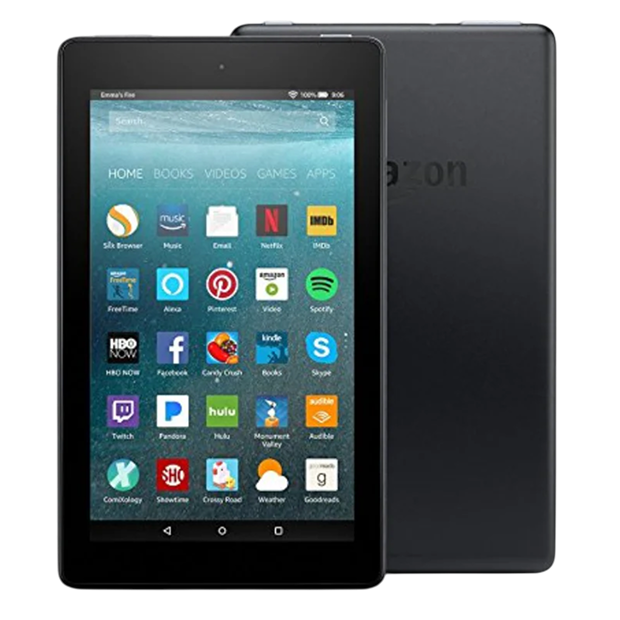
Amazon's Kindle Fire tablets have evolved through multiple generations since 2011, creating an affordable entry point into the Amazon ecosystem. These budget-friendly tablets range from the basic Fire 7 (7-inch display) to the Fire HD 10 (10.1-inch) and premium Fire Max 11. Specs vary across generations and models—MediaTek or Amazon-designed processors, 2GB to 4GB RAM, 32GB to 128GB storage, LCD displays with modest resolution. Fire OS (Amazon's Android fork) integrates tightly with Amazon services—Prime Video, Kindle books, Alexa, Amazon shopping. For families deeply invested in Amazon's ecosystem or anyone wanting an inexpensive tablet primarily for content consumption, Kindle Fire devices deliver exactly that at prices far below iPad or Samsung tablets.
Multiple generations and years later, these budget tablets develop predictable problems. Cracked LCD screens from drops, depleted batteries from years of use, worn charging ports, sluggish performance, and software that feels increasingly outdated. If you're dealing with a broken Kindle Fire—whether it's an older model or recent generation—and wondering whether Kindle Fire repair makes sense given these devices' low initial cost, let's work through what goes wrong and when repair investment is justified versus when replacement makes more sense.
Device Overview: Amazon's Budget Ecosystem
Amazon designed Kindle Fire tablets as affordable gateways to their services. These aren't high-performance devices competing with flagship tablets—they're content consumption machines optimized for Amazon's ecosystem at aggressive price points.
Display quality varies by model and generation. The basic Fire 7 uses a 1024x600 resolution LCD that's adequate for streaming but not impressive. Fire HD models offer better resolution (1920x1200 on HD 10) with improved color and brightness. The Fire Max 11 reaches 2000x1200 with better contrast.
Processors are budget-focused—MediaTek chips or Amazon's custom silicon optimized for Fire OS. Performance is adequate for streaming, browsing, and light gaming but struggles with demanding apps or heavy multitasking. This isn't failure—it's working within budget hardware constraints.
RAM ranges from 2GB on base models to 4GB on premium versions. Storage starts at 32GB with microSD expansion available. The modest internal storage works because Amazon pushes cloud storage for purchased content.
Battery capacities vary by screen size—roughly 3,000-4,000mAh for 7-inch models up to 7,000-8,000mAh for larger tablets. When new, you'd get 8-12 hours of video playback depending on configuration. After years of use, that declines significantly.
Fire OS runs on Android underneath but looks nothing like standard Android. Amazon's custom interface emphasizes their services. You can sideload apps, but the experience is optimized for Amazon's app store and services.
Connectivity is basic—Wi-Fi only on most models, though some premium versions offer LTE. USB-C on newer models, micro-USB on older ones. No premium features like stylus support or high-refresh displays.
Universal Challenges of Modern Electronics
Let's talk about why budget tablets age like any electronics. Your Kindle Fire's battery is like an electric toothbrush that doesn't hold a charge like it used to. When new, one charge lasted weeks. After years of daily use, you're recharging every few days. The cells that store electrical energy gradually degrade from repeated charge-discharge cycles. This isn't poor quality—it's fundamental battery chemistry affecting every rechargeable device.
After several years and hundreds of charge cycles, your Kindle Fire's battery capacity has dropped noticeably. You went from all-day battery to needing mid-day charging. This is normal lithium-ion behavior, not defect.
LCD displays age from operational hours. The LED backlight dims gradually over thousands of hours. The liquid crystal layer can develop stuck pixels. The digitizer coating shows microscopic wear from millions of taps. Budget displays age faster than premium ones because cost-cutting affects component quality.
Charging ports wear mechanically. Years of daily cable insertions degrade internal contacts. Whether it's micro-USB on older Fires or USB-C on newer ones, the spring contacts lose tension and the port housing can loosen.
Storage chips in budget devices use less robust NAND flash. Heavy use creates wear that manifests as slower performance or occasional data errors. This is more common in budget tablets than premium devices with better storage components.
Fire OS accumulates software cruft over time. Cached data, old files, and system updates create bloat. The modest processor and RAM struggle increasingly with this accumulation. Performance gradually declines even without hardware failure.
Physical wear from family use—especially if kids handle the devices—creates scratches, dings, and general deterioration. Budget plastic construction shows wear more obviously than premium metal builds.
Problems That Actually Show Up
Based on the devices we see: certain issues dominate Kindle Fire repairs, and they're remarkably consistent across generations.
Screen Damage
Cracked LCD screens are the most common Kindle Fire problem. These budget tablets often lack cases or screen protectors. Kids drop them. They get tossed in bags without protection. Eventually, something happens—a drop, pressure, impact—and the screen cracks.
The LCD displays on Kindle Fire tablets are basic technology. They cost less to replace than premium AMOLED screens, but replacement still represents significant expense relative to the device's low purchase price. This creates an economic dilemma.
Touch digitizer failures happen without visible cracks. The touch layer stops working in certain areas or fails completely. Sometimes the display looks fine but touch is completely unresponsive.
Dead pixels, backlight issues, or display discoloration affect aging devices. The budget components age faster than premium displays, and after years of use, quality deteriorates noticeably.
Battery Degradation
Your battery follows predictable decline. First year or two delivered decent runtime—maybe 8-10 hours of video streaming. By year three or four, you're charging mid-day. Year five or beyond, it barely holds any charge.
Budget batteries use less robust cells than premium devices. They degrade slightly faster under identical use patterns. This isn't dangerous—it's just the reality of cost optimization in budget hardware.
Some batteries develop serious problems. Random shutdowns, extreme heat during charging, or complete failure to hold charge indicate battery issues beyond normal degradation. Swollen batteries are dangerous and require immediate attention.
Charging Port Issues
Charging port problems appear gradually. Charging works only at certain cable angles. Connection becomes intermittent. The tablet doesn't recognize when you've plugged in power. Eventually, it won't charge at all.
Older Kindle Fires with micro-USB ports experience this more than newer USB-C models. Micro-USB is less robust mechanically. But even USB-C wears from hundreds of insertion cycles.
Debris accumulation in the port prevents proper connection. Years of use pack lint and dust into the charging port. Professional cleaning solves many "broken" charging ports.
Performance Slowdowns
Budget processors struggle with current software demands. Fire OS updates, app evolution, and accumulated system data tax the modest hardware. What ran adequately when new feels noticeably sluggish years later.
Storage affects performance dramatically. When your Kindle Fire is nearly full, performance tanks. The system struggles with temporary files and cache. Freeing space often restores better responsiveness.
Heavy app usage on budget RAM creates constant limitations. With only 2-3GB RAM, you can't run many apps simultaneously. Switching between apps causes reloading. This isn't new degradation—it's the limitation becoming more obvious.
Software Limitations
Fire OS updates eventually stop for older devices. Amazon doesn't support tablets forever. Once updates end, you're stuck with outdated software that may not receive security patches or support new app versions.
App compatibility becomes problematic. Newer apps require newer Fire OS versions your older device can't run. Existing apps stop updating for old OS versions. You're increasingly isolated from current software ecosystem.
Amazon's app store has limited selection compared to Google Play. Sideloading apps works but isn't straightforward for non-technical users. This limitation exists from day one but becomes more frustrating as devices age.
Behind-the-Scenes: How We Handle Budget Tablets
When a Kindle Fire comes in for repair, we approach it differently than premium tablets. The economics are completely different.
Cost-Benefit Assessment First
We start with honest conversation about repair value. Kindle Fire tablets cost $50-200 new depending on model and sales. Repair costs need consideration in that context.
Screen replacement might cost $60-100 depending on model. That's 60-100% of the device's purchase price for used/refurbished replacements. Battery replacement might cost $40-60. These percentages feel high even though absolute costs are modest.
We discuss whether repair makes sense or if replacement is smarter financially. Sometimes keeping a familiar device working justifies the cost. Other times, buying a current-generation Kindle Fire makes more sense than repairing an old one.
Parts Availability and Quality
Finding parts for Kindle Fire tablets varies by popularity and generation. Current models have reasonable parts availability. Older generations become challenging—parts are salvaged from broken units or questionable third-party alternatives.
Quality varies significantly. Budget replacement screens might save money but compromise display quality, touch response, or longevity. We're transparent about parts quality and let you make informed choices.
Batteries are particularly variable. Replacement batteries for budget devices often come from questionable sources. Capacity ratings may not match reality. Safety standards may not be rigorous. We source the best batteries available but acknowledge limitations.
Repair Execution
Screen replacement on most Kindle Fire models is relatively straightforward compared to premium tablets. They use basic LCD technology with simpler construction. Disassembly is less complex than Surface or iPad repairs.
Battery replacement requires opening the device, disconnecting the old battery, and installing the new one. It's doable but requires care to avoid damaging components or puncturing batteries.
Charging port repair depends on diagnosis. Cleaning solves many issues. Port replacement requires desoldering and soldering work that's technically feasible but might not be cost-effective given device value.
We work efficiently because labor time affects repair economics. Spending three hours on Kindle Fire repair doesn't make financial sense for anyone. We balance quality work with economic reality.
Testing and Limitations
After repair, we test functionality comprehensively. Display repairs get tested for touch response, image quality, proper brightness. Battery replacements get tested for charging behavior and runtime.
We set realistic expectations. A repaired budget tablet won't perform like a new flagship device. It'll work within its original design constraints—which are significant. The repair fixes the specific broken component but doesn't address fundamental hardware limitations.
Making the Smart Choice
Should you repair your Kindle Fire? Here's the honest framework:
For recent models (within 2-3 years) with single component failures, repair often makes sense. You're extending usable life at reasonable cost. The device continues serving its content consumption role adequately.
For older models (4+ years) or devices with multiple issues, replacement usually makes more sense. Combined repair costs approach or exceed buying a current-generation Kindle Fire with better specs, current software support, and fresh battery.
Consider who uses the device. If it's primarily for kids who'll likely damage the replacement too, repair might be smarter than buying something they'll break again. If adults use it carefully, upgrading delivers better experience.
Think about the Amazon ecosystem. If you're deeply invested—lots of purchased content, Prime membership, Alexa integration—keeping Kindle Fire devices makes sense. If you're not, other budget Android tablets might serve better.
Software support timeline matters. If your device still receives Fire OS updates, it has remaining useful life. If updates ended, you're on borrowed time with increasing security and compatibility issues.
For dedicated use cases—kid's tablet, kitchen recipe display, bedside streaming device—older Kindle Fires continue working fine despite age. Repair extends that utility at reasonable cost.
Environmental Consideration
Keeping functional devices running through repair reduces electronic waste. Budget tablets are particularly problematic for e-waste because they're easily disposable at low price points. Choosing repair over replacement is the sustainable choice when economically viable.
However, extremely old devices with no software support and failing hardware reach end-of-life where replacement becomes necessary regardless of environmental preferences. Balance sustainability with practical reality.
Your Next Step
Don't trust your Kindle Fire to just anyone. The Fix has the experience, tools, and expertise to handle tablet repairs correctly. We'll diagnose your device for free, explain your options honestly, and do the work right the first time.
Budget tablets deserve quality Kindle Fire repair just as much as premium devices. Your Kindle Fire might not be flagship hardware, but it's still useful for your specific needs. When it needs attention, bring it to technicians who understand budget devices and provide honest guidance about repair value. That's what The Fix delivers—expert assessment, quality work when it makes sense, and straightforward advice when replacement is smarter.


Trusted repair solution for mobile phones, tablets, gaming consoles, and computer systems. We provide fast, reliable, and affordable repair services to get your devices back in perfect working condition.
The Fix is an independent repair service provider and is not affiliated with, sponsored by, or endorsed by Apple Inc., Samsung Electronics, Google LLC, or any other device manufacturer. We use high-quality compatible replacement parts unless explicitly stated. All trademarks are property of their respective owners.


© Copyright The Fix Solutions All rights reserved 2026.
Design by Deepcoder